
Senior
November 4, 2024
Solved

"Could not step over: Cannot find bounds of current function", using VSCode

  • November 4, 2024
  • 1 reply
  • 2578 views

Hello @GMA 

it seems that there is surely a bug with STM32CubeMX and STM32G030C8T6, I have made the PCB and now try to write program for it. 

I just wrote a simple code to toggle a LED. but when I download the code to STM32G030 chip, the ST-link gdb had a strange problem, I used VS Code, the warning is like below:

dqsh06_0-1730697760397.png

the program cannot step over running, the ST-link gdb log is as:
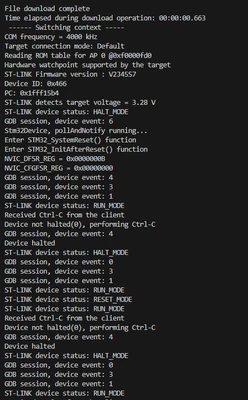
dqsh06_1-1730697964677.png

I attached the .ioc and main.c for you check.

please try to fix it.

Thanks!


Best answer by dqsh06

Hi @Nawres GHARBI

I have checked, it seems that I installed a yagarto gcc tool for proteus, but the gcc interference with the ST gcc, so the st-link gdb cannot work correctly. when I uninstalled the yagarto gcc, it works correctly. It is not an issue of  overflow a buffer, you can check the code which was generated by CubeMX.


Thanks.

1 reply

Nawres GHARBI
Technical Moderator
November 6, 2024

Hi @dqsh06 

This message appears in VSCode once you overflow a buffer and corrupt the stack.

Please check if your code is corrupting something. 

dqsh06AuthorBest answer
Senior
November 11, 2024

Hi @Nawres GHARBI

I have checked, it seems that I installed a yagarto gcc tool for proteus, but the gcc interference with the ST gcc, so the st-link gdb cannot work correctly. when I uninstalled the yagarto gcc, it works correctly. It is not an issue of  overflow a buffer, you can check the code which was generated by CubeMX.


Thanks.