TDJ
Senior III
March 26, 2026
Solved

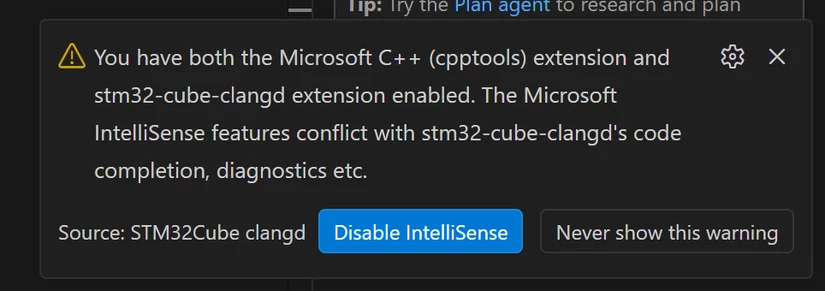
Disable Intellisense: You have both the Microsoft C++ ...

  • March 26, 2026
  • 4 replies
  • 400 views

Hi ST,

I understand that CubeIDE (clang-based) code-completion cannot coexist with Microsoft C++ IntelliSense. However, it seems that once IntelliSense is disabled (which is presented as the default option), it also stops working for other non-STM32 C++ projects permanently.

I wasn’t able to figure out how to re-enable it, disabling Cube IDE extension was not helpful. After about 30 minutes of trying, I ended up reinstalling VS Code- which probably isn’t the best or recommended solution.

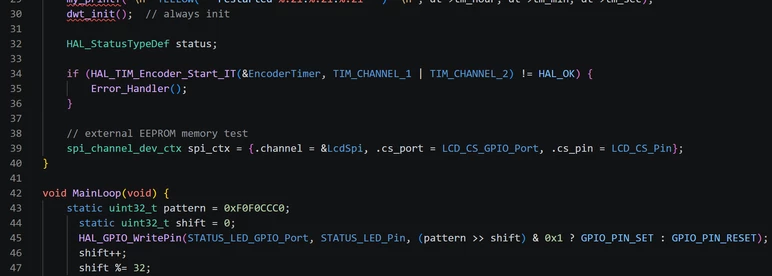
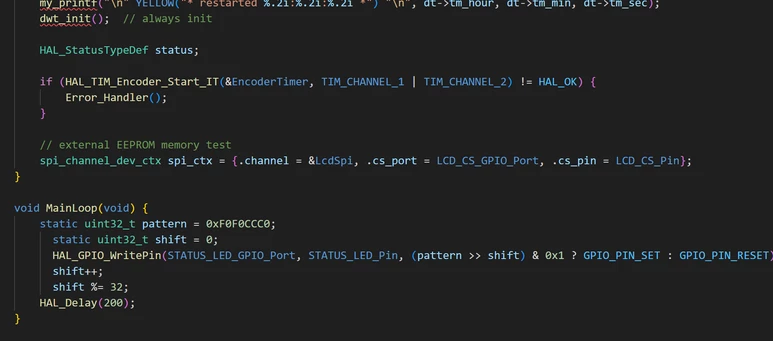
Moreover, it looks like Cube IDE extension modifies default use settings. Even after disabling Cube IDE extension code colors look much different than originally, and code formatting does not work.

What is the proper way to handle this situation? I really would like to use Cube IDE extension but only occasionally.
Please do not alter my default VS code settings for C/C++!

Thanks,

Thomas
Screen Shot 2026-03-26 at 11.06.23.898 PM.png

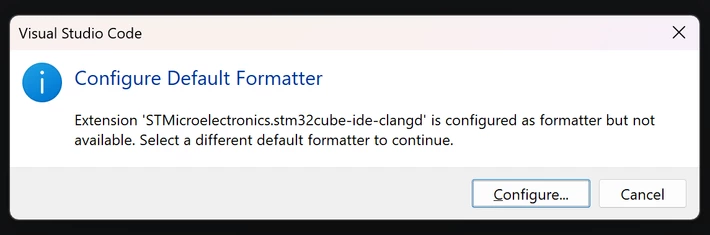
Here is the message I get trying to format other, non-cubeide project C code after disabling cube ide extension.
Screen Shot 2026-03-27 at 01.16.15.900 AM.png

Here is how code colors look

Screen Shot 2026-03-27 at 12.29.47.393 AM.png

.. and here is how it used to look

Screen Shot 2026-03-27 at 12.38.25.205 AM.png

Best answer by vincent_grenet

@TDJ 

STM32CubeIDE for Visual Studio Code promotes clangd as the default tool for code indexing. However, you are free to not install or to uninstall the extension that provides this functionality. No dependencies are enforced.

Currently, we also recommend including settings in the .vscode settings file to support the Microsoft C/C++ code indexing solution.

The rationale for promoting clangd first is that it is fully open source, while the Microsoft solution is not. Because clangd is open source, we can contribute bug fixes and improvements. Additionally, clangd enables support for Visual Studio Code alternatives such as Codium, Theia, and Antigravity, which the Microsoft C/C++ extensions do not allow.

Clangd linter usage is currently disabled by default in the contributing extension settings. Clangd is a multipurpose tool; our primary interest is code indexing. Valuable extensions are available on the marketplace to address formatting, linting, and other tasks. We prefer to allow freedom to the end user.

CMake and GCC versions are not restricted, but STM32CubeIDE for Visual Studio Code manages them through the STM32Cube bundle system.
Multiple CMake and GCC versions are currently supported, but not all possible versions it's true. If a specific version is missing, share the version and ST may assist.
You can contribute to your own local bundle, which the system considers. An STM32Cube bundle is a package for distributing any data or binary set. It is a zip file containing content and a mandatory CubeBundle.json file.
If you have already pulled content to your local disk, you can promote your own bundle. Once completed, your material is fully usable by STM32CubeIDE for Visual Studio Code, just like any ST's official bundle.

4 replies

Pavel A.
Super User
March 27, 2026

Please do not alter my default VS code settings for C/C++!

This is why VS Code has profiles. You can create a new profile for CubeIDE and install there only compatible extensions.


Cartu38 OpenDev
Graduate II
March 27, 2026

@TDJ 

Way to get back Microsoft C/C++ is Thanks settings


image.png
Such said @Pavel A. advice is best to me; let's rely on profiles ! https://code.visualstudio.com/docs/configure/profiles

TDJ
TDJAuthor
Senior III
March 28, 2026

Thank you @Pavel A.  and @Cartu38 OpenDev.

I still think it would be much better for CubeIDE not to mess with the default settings.

I have to say that I would highly appreciate VSCode extensions from ST, especially for debugging and deployment. However, I do not want to be forced to use CMake, particular version of GCC or Clang, clang code-completion and clang code linter.

I really tried to use CubeIDE, but unfortunately so far it gave me more headache than benefits. I am back to my default environment.

Thomas

vincent_grenetBest answer
ST Employee
March 29, 2026

@TDJ 

STM32CubeIDE for Visual Studio Code promotes clangd as the default tool for code indexing. However, you are free to not install or to uninstall the extension that provides this functionality. No dependencies are enforced.

Currently, we also recommend including settings in the .vscode settings file to support the Microsoft C/C++ code indexing solution.

The rationale for promoting clangd first is that it is fully open source, while the Microsoft solution is not. Because clangd is open source, we can contribute bug fixes and improvements. Additionally, clangd enables support for Visual Studio Code alternatives such as Codium, Theia, and Antigravity, which the Microsoft C/C++ extensions do not allow.

Clangd linter usage is currently disabled by default in the contributing extension settings. Clangd is a multipurpose tool; our primary interest is code indexing. Valuable extensions are available on the marketplace to address formatting, linting, and other tasks. We prefer to allow freedom to the end user.

CMake and GCC versions are not restricted, but STM32CubeIDE for Visual Studio Code manages them through the STM32Cube bundle system.
Multiple CMake and GCC versions are currently supported, but not all possible versions it's true. If a specific version is missing, share the version and ST may assist.
You can contribute to your own local bundle, which the system considers. An STM32Cube bundle is a package for distributing any data or binary set. It is a zip file containing content and a mandatory CubeBundle.json file.
If you have already pulled content to your local disk, you can promote your own bundle. Once completed, your material is fully usable by STM32CubeIDE for Visual Studio Code, just like any ST's official bundle.

To give better visibility on the answered topics, please click on Accept as Solution on the reply which solved your issue or answered your question.
TDJ
TDJAuthor
Senior III
April 8, 2026

@vincent_grenet

Thank you for the explanation. I will definitely give it another try. My first experience wasn’t entirely successful, as I realized STM32Cube extension was affecting my other C/C++ projects, and I had to quickly revert to the default options without having enough time to explore it properly. It may or may not be something worth considering.
It appears that “Debug Core” depends on both “Cube Core” and “CMake Support,” so it doesn’t seem possible to use only the STM32Cube debugging functionality on its own without CMake - I successfully use my own simple yet very effective cppbuild system.

mƎALLEm
Technical Moderator
April 24, 2026

Hello @TDJ ,

A kind reminder. If you've already solved your question or your original question has been answered please kindly close this post by marking as accepted solution the post that answered your question or at least guided you to the right direction.

Thank you.

"To give better visibility on the answered topics, please click on ""Accept as Solution"" on the reply which solved your issue or answered your question."