Explorer
August 28, 2025
Solved

how to real-time update "watch" windows data

  • August 28, 2025
  • 1 reply
  • 545 views

like keil "periodic window updata",now i can see the data by pausing

STM32Cube for Visual Studio Code V3.5.1

Best answer by Florent V

Hi ApeMan,

You can use the live watch feature in the STM32Cube for Visual Studio Code pre-release 3.5.1 by adding the following attribute in your debug configuration:

"liveWatch": {
 "enabled": true,
 "samplesPerSecond": "4"
},
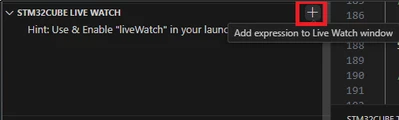

 
An STM32Cube Live Watch view is available in the debug activity bar. You can add an expression using the "+" button.
FlorentV_0-1756391144597.png
And then add your expression thanks to this field:
FlorentV_1-1756391168950.png

Regards,

/Flo

1 reply

Florent V
Florent VBest answer
ST Employee
August 28, 2025

Hi ApeMan,

You can use the live watch feature in the STM32Cube for Visual Studio Code pre-release 3.5.1 by adding the following attribute in your debug configuration:

"liveWatch": {
 "enabled": true,
 "samplesPerSecond": "4"
},
 
An STM32Cube Live Watch view is available in the debug activity bar. You can add an expression using the "+" button.
FlorentV_0-1756391144597.png
And then add your expression thanks to this field:
FlorentV_1-1756391168950.png

Regards,

/Flo

To give better visibility on the answered topics, please click on Accept as Solution on the reply which solved your issue or answered your question.