
Senior
February 8, 2026
Solved

How to Reopen the Initial CubeMX Popup in VS Code?

  • February 8, 2026
  • 2 replies
  • 240 views

Hi,

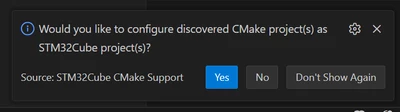
When opening a CubeMX-generated project in VS Code for the first time, a popup appears that—according to ST’s tutorial—you’re supposed to confirm by selecting “Yes”.
Ricko_0-1770571243876.png

Unfortunately, the popup disappeared after a few seconds before I could click it. I’ve tried reopening both VS Code and the project, but it hasn’t appeared again.

How can I bring this popup back, or trigger the same setup manually?

Thank you


Best answer by vincent_grenet

@Ricko 
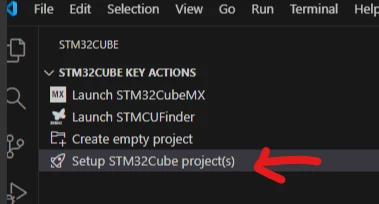
Please rely on following key action

vincent_grenet_0-1770722592559.png


2 replies

vincent_grenetBest answer
ST Employee
February 10, 2026

@Ricko 
Please rely on following key action

vincent_grenet_0-1770722592559.png


To give better visibility on the answered topics, please click on Accept as Solution on the reply which solved your issue or answered your question.
RickoAuthor
Senior
February 11, 2026

Thank you @vincent_grenet