
mmalo.1
Associate
March 21, 2023
Solved

How to show memory window while debugging in STM32 VSCode extension?

  • March 21, 2023
  • 2 replies
  • 8675 views

..

This topic has been closed for replies.
Best answer by robotdad

The memory view in VS Code comes from the Hex Editor extension.

Hex Editor - Visual Studio Marketplace

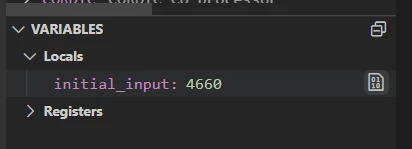
In the variables view there is a binary icon. Select that and it will open the hex viewer at that address.
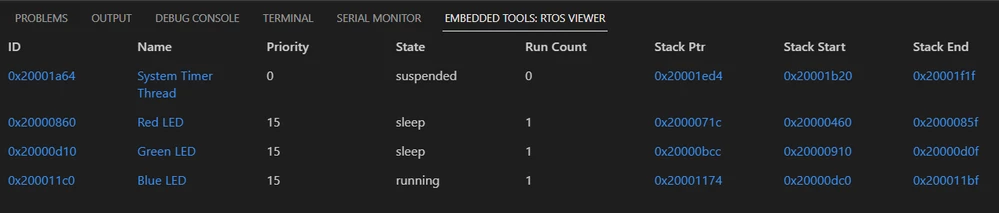
0693W00000aJbdRQAS.pngIf you are using an RTOS you can also select any of the memory addresses for the threads in that view.
0693W00000aJbdqQAC.png 

2 replies

robotdad
robotdadBest answer
Visitor II
March 23, 2023

The memory view in VS Code comes from the Hex Editor extension.

Hex Editor - Visual Studio Marketplace

In the variables view there is a binary icon. Select that and it will open the hex viewer at that address.

0693W00000aJbdRQAS.pngIf you are using an RTOS you can also select any of the memory addresses for the threads in that view.

0693W00000aJbdqQAC.png 

Jais
Visitor II
March 24, 2023

@robotdad​ It would be nice if the Hex Editor was a dependency of Embedded Tools ;)

mmalo.1
mmalo.1Author
Associate
March 24, 2023

Awesome, thanks!
