

Bea_12
Associate II
January 27, 2025
Solved

Main.h is not found

  • January 27, 2025
  • 4 replies
  • 3557 views

Hi,

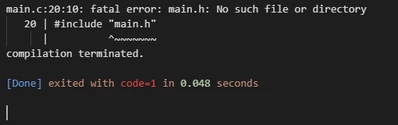
I generated the code in CubeMX and opened it in VSCode. However, I cannot run the code because VSCode cannot find main.h. I'm not sure why this is happening. I've generated the code twice, but the problem persists. The main.h file is located in the Core > Inc folder, and main.c is in the Core > Src folder. Does anyone know what might be causing this issue? Thanks!
Bea_12_0-1737980665497.png


4 replies

KnarfB
Super User
January 27, 2025

Did you import the project and open the folder? Here are instructions:

How to use VS Code with STM32 microcontrollers - STMicroelectronics Community

hth

KnarfB

Bea_12
Bea_12Author
Associate II
January 27, 2025

Yes, I followed the instructions, but I have the feeling that something might be off with the settings or something else. Is there something I might need to adjust?

Andrew Neil
Andrew NeilBest answer
Super User
January 27, 2025
A complex system that works is invariably found to have evolved from a simple system that worked.A complex system designed from scratch never works and cannot be patched up to make it work.
Karl Yamashita
Principal
January 28, 2025

upload your ioc file

If a reply has proven helpful, click on Accept as Solution so that it'll show at top of the post.CAN Jammer an open source CAN bus hacking toolCANableV3 Open Source
Bea_12
Bea_12Author
Associate II
January 28, 2025

It seems like I've resolved one of the issues by changing some settings in STM32CubeMX. However, the main.c and main.h files are still incorrect. No matter what I change, the files remain problematic. Additionally, I forgot to install STM32CubeCLT, but that hasn’t affected anything else so far. I do not know what i could change that my program works. Does anyone know please explain it to me. 

Andrew Neil
Super User
January 28, 2025

@Bea_12 wrote:

It seems like I've resolved one of the issues by changing some settings in STM32CubeMX.  


Excellent - what settings did you change?

Please 'Mark as solution' the post which resolved the issue:

https://community.st.com/t5/community-guidelines/help-others-to-solve-their-issues/ta-p/575256


@Bea_12 wrote:

No matter what I change, the files remain problematic. Additionally, I forgot to install STM32CubeCLT, but that hasn’t affected anything else so far. I do not know what i could change that my program works. Does anyone know please explain it to me. 


That's a new question - please start a new thread for that, then post a link here to that new thread.

In your new thread, you'll need to give more details for people to be able to help you - see: How to write your question to maximize your chances to find a solution

A complex system that works is invariably found to have evolved from a simple system that worked.A complex system designed from scratch never works and cannot be patched up to make it work.
Andrew Neil
Super User
February 12, 2025
A complex system that works is invariably found to have evolved from a simple system that worked.A complex system designed from scratch never works and cannot be patched up to make it work.