
ZWei.1
Associate
March 19, 2023
Solved

Project Error

  • March 19, 2023
  • 2 replies
  • 3128 views

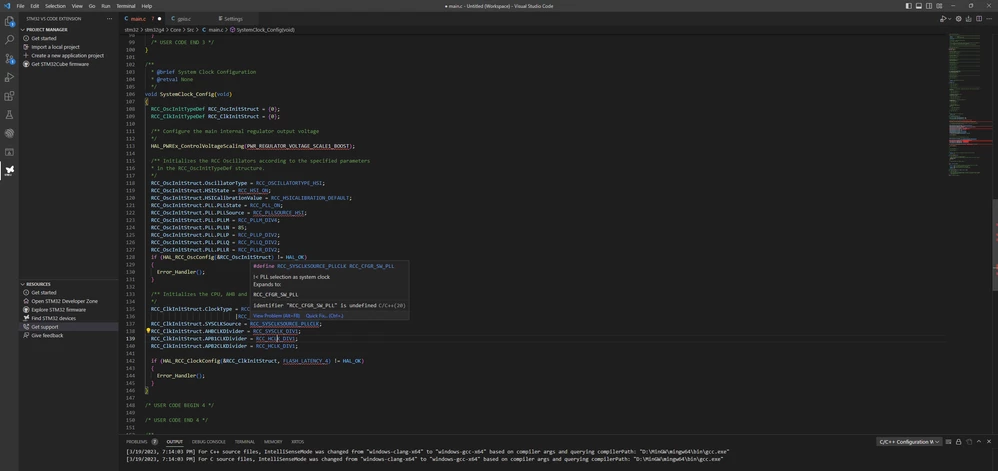
Hi, when I use VSCode STM32 extension, VSCode always show this error. Could you help me solve this problem?

Thanks for your help!
0693W00000aJHTRQA4.png

This topic has been closed for replies.
Best answer by robotdad

Looking at your first sreenshot it looks like you are configured to use the MinGW compilers. You need either the STM32IDE or STM32CLT (command line tools) installed in the default location so the extension can find the compilers from ST.

To confirm, did you use the import function in the extension to bring an existing project into VS Code? That generates necessary configuration files to support the build.

2 replies

Pavel A.
Super User
March 19, 2023

This is not an error. Does the program binary build? Can you run or debug it successfully?

ZWei.1
ZWei.1Author
Associate
March 20, 2023

Thanks for your reply. However, it shows as error.

0693W00000aJHdbQAG.png

Pavel A.
Super User
March 20, 2023

Not sure this is solves the problem but worth to try:

The filesystem path of your project contains weird characters - see the 2nd line from the bottom of the screenshot. Try to rename the directory.

robotdad
robotdadBest answer
Visitor II
March 23, 2023

Looking at your first sreenshot it looks like you are configured to use the MinGW compilers. You need either the STM32IDE or STM32CLT (command line tools) installed in the default location so the extension can find the compilers from ST.

To confirm, did you use the import function in the extension to bring an existing project into VS Code? That generates necessary configuration files to support the build.

ZWei.1
ZWei.1Author
Associate
April 6, 2023

I am so sorry for replying late. It is really helpful. I didn't install STM32CLT in the dafault location and didn't add it to system path.
