
Associate III
April 24, 2025
Solved

Run without debugging on VSCode

  • April 24, 2025
  • 14 replies
  • 9735 views

I have setup STM32 VSCode extension on my PC and it is amazing. The only problem that I have encountered is that it is not possible to run the code without debugging. I removed the "runToEntryPoint": "main" line in launch.json. But every time I launch the code it attaches a debugger. How can I simply run the code without debugging?


Thank you,

Damiano
Best answer by Sarra.S

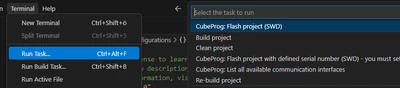
In the tasks.json file, there is a a "task" labeled STM32: CubeProg: Flash project (SWD) 

You can execute this task to perform a "flash and reset" altogether! 

There are 3 options to execute this: 

Option1: By "clicking": Terminal > Run Task... > CubeProg: Flash Project (SWD)
SarraS_0-1746551491069.png

Option2 via Run Task keyboard shortcut:

Option3: Pre-installed keyboard shortcut:

  • CTRL + P
  • Type: "Task CubePro..." <-- You will notice that the menu auto-suggests tasks matching your pattern.

Option3: Pre-installed keyboard shortcut: 

  • CTRL+ALT+F <-- This will immediately execute the same task

14 replies

Visitor II
December 24, 2025

Hi David, thousand thanks for the detailed description!


Visitor II
December 30, 2025

Hey! Thanks for this, I thought I was going crazy as I had some old proejcts generated using an older version with these tasks added automatically! 

The tasks you suggest are using the command to call the STM32_Programmer_CLI which should have been replaced in v 3.7.0 with the built in CLI tools installed through the bundles manager. Do you have an idea of how to recreate this functionality without installing the STM32CubeProgrammer? 

Associate II
February 26, 2026

Hey Jimbles.  I updated my post to use the bundled programmer utility so you don't have to install it separately.  The trick was to use "cube programmer" (where "programmer" is the first argument) instead of "STM32_Programmer_CLI".

Visitor II
January 21, 2026

Hi , i have created a Youtube video on how i solved programming without needing to go via debug.
https://youtu.be/0VvnFkwu2Y0


Brgds

PR TechTalk


Visitor II
February 26, 2026

Hi David,


Thats excellent thanks very much! I just tried that out and it works great. In coincidental timing I was going to add to this thread that I found a solution to at least generate the .bin files automatically, by adding the following to the bottom of the CMakeLists.txt :

# Create .bin from the ELF using the toolchain objcopy
add_custom_command(TARGET ${CMAKE_PROJECT_NAME} POST_BUILD
 COMMAND ${CMAKE_OBJCOPY} -O binary
 $<TARGET_FILE:${CMAKE_PROJECT_NAME}>
 ${CMAKE_CURRENT_BINARY_DIR}/${CMAKE_PROJECT_NAME}.bin
 BYPRODUCTS
 ${CMAKE_CURRENT_BINARY_DIR}/${CMAKE_PROJECT_NAME}.bin
 COMMENT "Generating .bin from ELF"
)

I was using this as a backup in case the usb/gdb connection wasnt working so I could at least update the firmware by dragging the .bin file into the external drive NODE_LG476RG. 

Your solution is a great help!