Associate II
December 4, 2025
Solved

Setup STM32Cube project(s) in gray color

  • December 4, 2025
  • 2 replies
  • 496 views

I installed STM32Cube for VS Code extension and then created an empty project.
But the "Setup STM32Cube project(s)" on the STM32CUBE KEY ACTIONS is still in gray color.

Is there something that I missed?

My environment is as follows.

- Windows 11

- VSCode: 1.106.3

- STM32Cube for VS Code:  3.6.4
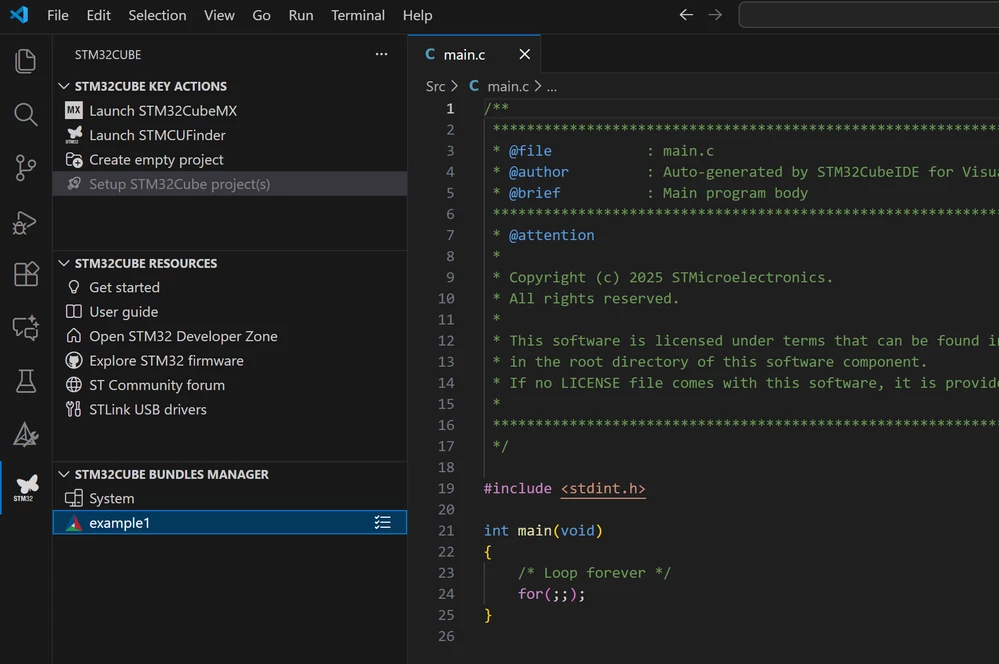
 

스크린샷 2025-12-04 105437.png

Best answer by Julien D

Hi @JaeLee, there is a known issue with this action enablement, did you clicked at some point on the Don't Show Again option of this notification ?

JulienD_0-1764832979191.png

If so it checks this setting for you which unexpectedly disable the action.

JulienD_1-1764833162560.png

It will be fixed by the upcoming version.

2 replies

Julien D
Julien DBest answer
ST Employee
December 4, 2025

Hi @JaeLee, there is a known issue with this action enablement, did you clicked at some point on the Don't Show Again option of this notification ?

JulienD_0-1764832979191.png

If so it checks this setting for you which unexpectedly disable the action.

JulienD_1-1764833162560.png

It will be fixed by the upcoming version.

To give better visibility on the answered topics, please click on Accept as Solution on the reply which solved your issue or answered your question.
JaeLeeAuthor
Associate II
December 8, 2025

When I restarted VSCode, this was resolved.