
Solved
STM32 Cube VS-Code stuck in activating extension
Hello,
I am trying to get the VS-Code extension to work on my Intel-Mac. I already have it running on my Windows machine no problem.
The problem is, that the extensions won't activate. I have created a new project using CubeMX and choose CMake as the toolchain. Then I installed the STM32 CLI tools, as well as cmake and the ARM compiler.
Then I am opening the project in VS-Code and CMake asks for a target. I choose Debug.
CMake extension output:
[proc] Executing command: /usr/local/bin/cmake --version
[proc] Executing command: /usr/local/bin/cmake -E capabilities
[kit] Successfully loaded 2 kits from /Users/jan/.local/share/CMakeTools/cmake-tools-kits.json
[presetController] Reading and validating the presets file "/Users/jan/Dev/fischer-technik-motor-controller/CMakePresets.json"
[presetController] Successfully validated /Users/jan/Dev/fischer-technik-motor-controller/CMakePresets.json against presets schema
[proc] Executing command: uname -s
[presetController] Expanding presets file /Users/jan/Dev/fischer-technik-motor-controller/CMakePresets.json
[presetController] Successfully expanded presets file /Users/jan/Dev/fischer-technik-motor-controller/CMakePresets.json
[main] Configuring project: fischer-technik-motor-controller
[proc] Executing command: /usr/local/bin/cmake -DCMAKE_BUILD_TYPE=Debug -DCMAKE_TOOLCHAIN_FILE=/Users/jan/Dev/fischer-technik-motor-controller/cmake/gcc-arm-none-eabi.cmake -S /Users/jan/Dev/fischer-technik-motor-controller -B /Users/jan/Dev/fischer-technik-motor-controller/build/Debug -G Ninja
[cmake] Build type: Debug
[cmake] -- Configuring done (0.0s)
[cmake] -- Generating done (0.0s)
[cmake] -- Build files have been written to: /Users/jan/Dev/fischer-technik-motor-controller/build/Debug
But the STM Extension is stuck in activation state I think:
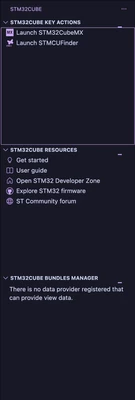
And I see this for a few seconds at the bottom of the window:

This is the output from the STM32Cube core extension:
2026-01-08 19:42:59.033 [Info] Adding STM32Cube CLI path to environment: /Users/jan/.vscode/extensions/stmicroelectronics.stm32cube-ide-core-1.1.0/resources/binaries/darwin/x86_64
2026-01-08 19:42:59.071 [Info] Configuring CMSIS_PACK_ROOT environment: /Users/jan/Library/Application Support/stm32cube/packs
2026-01-08 19:42:59.082 [Info] Configuring CUBE_BUNDLE_PATH environment: /Users/jan/Library/Application Support/stm32cube/bundles
2026-01-08 19:42:59.775 [Info] cube wrapper version: 0.8.3
2026-01-08 19:43:00.097 [Info] Online bundle cache built
Any help is greatly appreciated :)