JR2963
Senior II
January 11, 2026
Solved

STM32Cube extensions in Cursor editor?

  • January 11, 2026
  • 2 replies
  • 743 views

Hello,
I want to ask if it is possible to install STM32Cube extensions into Cursor.
I looked in the normal extension list but I could not find them.
Is this supported now or will it be supported in the future?

Thank you.

Best answer by Cartu38 OpenDev

@JR2963  see https://community.st.com/t5/stm32cubeide-for-visual-studio/publishing-stm32-extension-to-open-vsx-org-for-support-for/td-p/832071
Such said you can like I may have done have a try.
Let's get all STM32Cube VSCode extensions .vsix files then install them into Cursor.
The very same can apply to collection of VSCode like solutions like VSCodium, Antigravity, Theia, ....

What is nice is STM32Cube is not pulling any VSCOde marketplace restricted extension as dependency: proceeding is so fully legal.

All dependencies are available here:
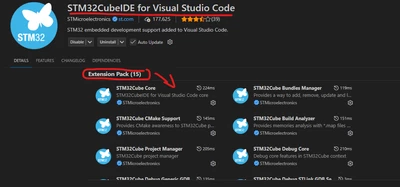
Cartu38OpenDev_1-1768199498744.png

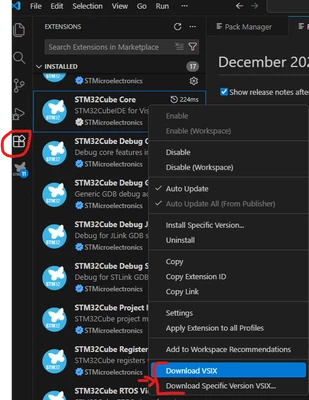
To download them:

Cartu38OpenDev_0-1768199246974.png

If you are taking time to exercise keep us posted about result !

 

2 replies

Cartu38 OpenDev
Cartu38 OpenDevBest answer
Graduate II
January 12, 2026

@JR2963  see https://community.st.com/t5/stm32cubeide-for-visual-studio/publishing-stm32-extension-to-open-vsx-org-for-support-for/td-p/832071
Such said you can like I may have done have a try.
Let's get all STM32Cube VSCode extensions .vsix files then install them into Cursor.
The very same can apply to collection of VSCode like solutions like VSCodium, Antigravity, Theia, ....

What is nice is STM32Cube is not pulling any VSCOde marketplace restricted extension as dependency: proceeding is so fully legal.

All dependencies are available here:

Cartu38OpenDev_1-1768199498744.png

To download them:

Cartu38OpenDev_0-1768199246974.png

If you are taking time to exercise keep us posted about result !

 

JR2963
JR2963Author
Senior II
January 13, 2026

And then install it like that:

JR2963_0-1768282914073.png


It works! Thnak you:)