Associate II
October 24, 2025
Solved

unable to find STM32H7 in Vs code project setup

  • October 24, 2025
  • 10 replies
  • 859 views

Hi I am trying to configure a project in Vs code.

1) Created/Generated a project using STM32CubeMX.

2) in vs code extensions added

3) by using open folder latest created project loaded

4) on pop-up Debug option selected

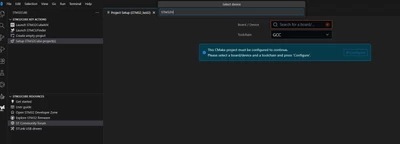
5) Then when it comes to device selection unable to find STM32H7 Series, eval board numbers in the list.

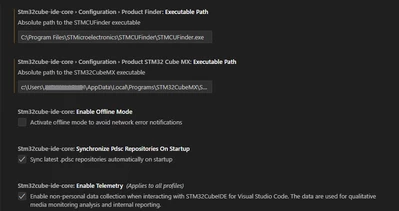
Note : STMCUFinder path, cubemx paths configured . please check below images
Jagan1_0-1761308203183.png

Jagan1_1-1761308338903.png


Best answer by Julien D

@Jagan1, do you confirm working behind a proxy?

If so, you have to set NODE_EXTRA_CA_CERTS environment variable (system wide) to reference your corporate CA bundle file.

10 replies

ST Employee
October 24, 2025

@Jagan1
Please let's skip this quick pick and focus on the red text field. Has any device completion appeared when you start typing STM32...?
If not, could you please try running the following command in the VSCode integrated terminal:

cube pack sync

Does the process complete successfully? If not, please share the trace.

To give better visibility on the answered topics, please click on Accept as Solution on the reply which solved your issue or answered your question.
Jagan1Author
Associate II
October 24, 2025

Hi @vincent_grenet , Other boards/devices showing only STM32H series missing.

Jagan1_0-1761310284518.png

unable to sync also .

Jagan1_1-1761310378164.png


Julien D
Julien DBest answer
ST Employee
October 24, 2025

@Jagan1, do you confirm working behind a proxy?

If so, you have to set NODE_EXTRA_CA_CERTS environment variable (system wide) to reference your corporate CA bundle file.

To give better visibility on the answered topics, please click on Accept as Solution on the reply which solved your issue or answered your question.
Jagan1Author
Associate II
October 24, 2025

i am not sure if i am using proxy.

is there any other solution.


Julien D
ST Employee
October 24, 2025

Better to confirm this before going one way or the other.

Could you paste the following line into your PowerShell terminal integrated in VSCode ?

It should print the certificate information you see from developer.st.com domain.

$cert = [System.Net.ServicePointManager]::ServerCertificateValidationCallback = {$true}
$tcp = New-Object Net.Sockets.TcpClient('developer.st.com', 443)
$ssl = New-Object Net.Security.SslStream($tcp.GetStream(), $false, ({$true}))
$ssl.AuthenticateAsClient('developer.st.com')
$ssl.RemoteCertificate | Format-List *

Then past the output here.

To give better visibility on the answered topics, please click on Accept as Solution on the reply which solved your issue or answered your question.
Jagan1Author
Associate II
October 24, 2025

Hi,

Highlighted ones masked.

if need i can share personally 

Handle : Number
Issuer : CN="zscaler.xxxxxx.com (t) ", OU=Security Operations, O=xxxxxx Technologies, S=Location, L=Location, C=US
Subject : OU=Zscaler Inc., O=Zscaler Inc., CN=www.st.com

Julien D
ST Employee
October 24, 2025

No this is already good enough to highlight the fact that your behind a proxy doing SSL inspection.

Then NODE_EXTRA_CA_CERTS is required to point to your Zscaler root CA certificates.

If you can navigate to https://developer.st.com/ without troubles it likely means that such certificates are already trusted into your Windows certificate manager.

JulienD_1-1761314026173.png capture picked from the internet

You could try export them (Zscaler*) in base-64 encoded X.509 format, and gather all exported files into a .crt file respecting this kind of format:

-----BEGIN CERTIFICATE-----
XXXXXXXXXXXXXXXXXXXXXXXXXXXXXXXXXXX
-----END CERTIFICATE-----
-----BEGIN CERTIFICATE-----
XXXXXXXXXXXXXXXXXXXXXXXXXXXXXXXXXXX
-----END CERTIFICATE-----
-----BEGIN CERTIFICATE-----
XXXXXXXXXXXXXXXXXXXXXXXXXXXXXXXXXXX
-----END CERTIFICATE-----

Then reference this file with NODE_EXTRA_CA_CERTS

To give better visibility on the answered topics, please click on Accept as Solution on the reply which solved your issue or answered your question.
Jagan1Author
Associate II
October 24, 2025

Jagan1_0-1761314706590.png


Julien D
ST Employee
October 24, 2025

Ok, it is denied but at least you have the lock meaning connection is secured, so you can proceed with the rest of my previous message.

To give better visibility on the answered topics, please click on Accept as Solution on the reply which solved your issue or answered your question.
Jagan1Author
Associate II
October 24, 2025

Hi, fallowed same steps, only one Zscaler is there in certmgr and exported, still same issue.

>> Restarted vs code


PS C:\Users\JNEKKALAPUDI\Documents\stm\test_gen\test5> setx NODE_EXTRA_CA_CERTS "C:\Users\JNEKKALAPUDI\Documents\stcertificate.cer"

SUCCESS: Specified value was saved.
PS C:\Users\JNEKKALAPUDI\Documents\stm\test_gen\test5> cube pack sync
Syncing metadata information C:/Users/JNEKKALAPUDI/AppData/Local/stm32cube/packs
Snapshot is already up to date
Syncing online metadata information C:/Users/JNEKKALAPUDI/AppData/Local/stm32cube/packs
Checking pidx https://developer.st.com/st-pack-server/api/v1/pidx/STMicroelectronics.pidx... (1/1)
Failed to download with request to https://developer.st.com/st-pack-server/api/v1/pidx/STMicroelectronics.pidx failed, reason: unable to get local issuer certificate, retrying...
Maximum number of retries reached: request to https://developer.st.com/st-pack-server/api/v1/pidx/STMicroelectronics.pidx failed, reason: unable to get local issuer certificate
Downloading https://developer.st.com/st-pack-server/api/v1/pidx/STMicroelectronics.pidx failed: FetchError: request to https://developer.st.com/st-pack-server/api/v1/pidx/STMicroelectronics.pidx failed, reason: unable to get local issuer certificate (1/75)
Syncing completed in 0.964s
PS C:\Users\JNEKKALAPUDI\Documents\stm\test_gen\test5>

Julien D
ST Employee
October 24, 2025

AFAIR there should be at least 2 certificates, the Zscaler Root CA and the Zscaler Intermediate Root CA, as shown in this screenshot (again picked on the Internet):

JulienD_0-1761316481333.png


To give better visibility on the answered topics, please click on Accept as Solution on the reply which solved your issue or answered your question.
Jagan1Author
Associate II
October 24, 2025

only one is there.


Jagan1_0-1761317078384.png


Julien D
ST Employee
October 24, 2025

only one is there.


 I wonder from where you get this screenshot. If from the Windows cert manager then I think it is expected since you only view the selected certificate. But if you get the certificate by clicking on the lock from a browser you may get more certificates in the chain.

To give better visibility on the answered topics, please click on Accept as Solution on the reply which solved your issue or answered your question.
Jagan1Author
Associate II
October 24, 2025

Hi,

From lock icon I didn't got any certificates.

Jagan1Author
Associate II
October 24, 2025

Hi,

these packs available looks like is this correct? 

Jagan1_0-1761317599169.png


Julien D
ST Employee
October 24, 2025

these packs available looks like is this correct? 


Packs are installed under %AppData%/Local/stm32cube/packs/STMicroelectronics/.

To give better visibility on the answered topics, please click on Accept as Solution on the reply which solved your issue or answered your question.