
Associate III
May 23, 2025
Solved

Unable to import project on visual studio code

  • May 23, 2025
  • 6 replies
  • 2685 views

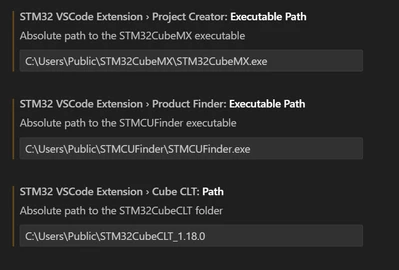
I installed the STM32Cube for Visual Studio Code extension, after which I downloaded STM32CubeMX, STMCUFinder and STM32CubeCLT_1.18.0 and linked them to the extension as seen below:
is45_0-1747976636332.png

I then opened STM32CubeMX, opened a project using the board NUCLEO-F746ZG, generated the code. The path of the project is: C:\Users\Public\VSCode_Projects\STM32\STM32_Testing

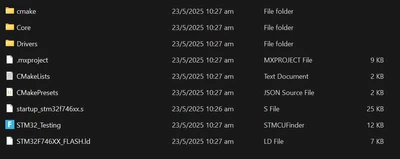
Here are the files in the folder:
is45_1-1747976743021.png

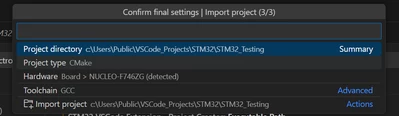
In VS code, I click on "Import CMake Project" and I click on Import project option in the screenshot below
is45_2-1747976830827.png

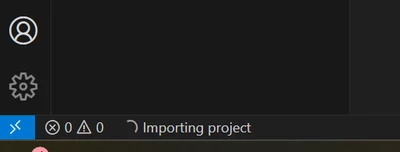
However, after that, the project does not open, and in the bottom bar VS code says "Importing project". The bar has been displaying that message for 2 hours now, yet a project hasn't opened. 
is45_3-1747976914787.png

May I know what I could be doing wrong? Thanks!


Best answer by Cartu38 OpenDev

https://www.youtube.com/watch?v=aWMni01XGeI sounds helpful too

6 replies

Cartu38 OpenDev
Graduate II
May 23, 2025

Have you got a chance to try brand new released solution (pre-released takes care you have to push right button to install it) ? 

See https://community.st.com/t5/stm32cube-for-visual-studio-code/new-stm32cube-for-visual-studio-code-extenstion-released-3-4-11/td-p/800040
Cartu38OpenDev_0-1747977882478.png

No more "Import" to be done ... just add STM32CubeMX generated projet to your VSCode workspace and at a time just answer "yes" to this notification kind which is happening following Cmake project discovery by CMake tools extension

Cartu38OpenDev_1-1747978200667.png


Sounds @AlanCui4080  has got some good first experience with see https://community.st.com/t5/stm32cube-for-visual-studio-code/why-this-extension-do-not-use-environment-variables/td-p/800975
Same here @3subzero3 https://community.st.com/t5/stm32cube-for-visual-studio-code/stm32-vs-code-extension-no-compiler-found-in-cache-file/td-p/584026/page/3


CSand
Associate III
May 28, 2025

Hi , I installed the new release and works fine , except I do not get the message 
"Would you like to configure discovered CMake projects as ST32MCube" projects?

I have STM32Cube for Visual Studio Code v 3.4.11 and is set on pre-release version

Can you help ?Screenshot 2025-05-28 185925.jpg

Cartu38 OpenDev
Graduate II
May 28, 2025

4'55" --> https://www.youtube.com/watch?v=aWMni01XGeI
Sounds notification text updated but you have to accept here. This is allowing to convert a CMake project to a STM32Cube project. Extensions are adding couple of metadata live.

Cartu38 OpenDev
Cartu38 OpenDevBest answer
Graduate II
May 23, 2025
is45Author
Associate III
May 23, 2025

Thanks for the help! The video was super helpful

Cartu38 OpenDev
Graduate II
May 28, 2025

and if you do not get this notification or if you may miss it at a point you can call process back Thanks:

Cartu38OpenDev_0-1748457343075.png


CSand
Associate III
May 29, 2025

@Cartu38 OpenDev  Thanks for hepling ...
I found out :
After I installed VS Code the projects were saved in a folder:
"C:\Users\MyUserName\VS\STM32\"

I found out that all these issues comming when I was looking to move the projects on my D:\ drive

I actually create new projects on new location but I still have the issue ( on the D:\ Drive location )

So if I create a project on D:\ drive I get bellow issues in VS Code:


1. I do not have the option "SetupSTM32Cube projects

2. Stm32Cube Bundles Manager seem to search something but never finds ( blue bar slides continuously ... )

Screenshot 2025-05-29 094633.jpg

Also in STM32Cube Deveices and Boards there's also a continuously search for hardware

Screenshot 2025-05-29 094722.jpg

So it seems the issue is related to project path  ...


Thanks


Cartu38 OpenDev
Graduate II
June 2, 2025

Any special character within your user name ? just in case ... mine has nothing "exotic" so ... who knows ... quite common pitfall for softwares

CSand
Associate III
June 2, 2025

Hi, I would still like to have my projects ( workspace ) on the location I use for all projects I am working ...
Could you please help why in other locations these VS Code projects are not working - as explained in previous message...


Thanks,

Julien D
ST Employee
June 2, 2025

Hello @CSand 

Does your D: drive be a network drive?

To give better visibility on the answered topics, please click on Accept as Solution on the reply which solved your issue or answered your question.
CSand
Associate III
June 2, 2025

Hi Julien, 
Drive D is not network drive.
Below the path to a project on D drive:
D:\APPWorkspace\VSCode\MonHub\

CSand_0-1748872602893.png


Cartu38 OpenDev
Graduate II
June 2, 2025

Works like a charm based on G:\ disk on my side while VSCode install is on my primary drive C:\
Windows 11

Cartu38OpenDev_0-1748867482998.png