

Rodo
Senior
October 10, 2025
Solved

Creating threads in threadx with cubeMX?

  • October 10, 2025
  • 1 reply
  • 263 views

Hi all,

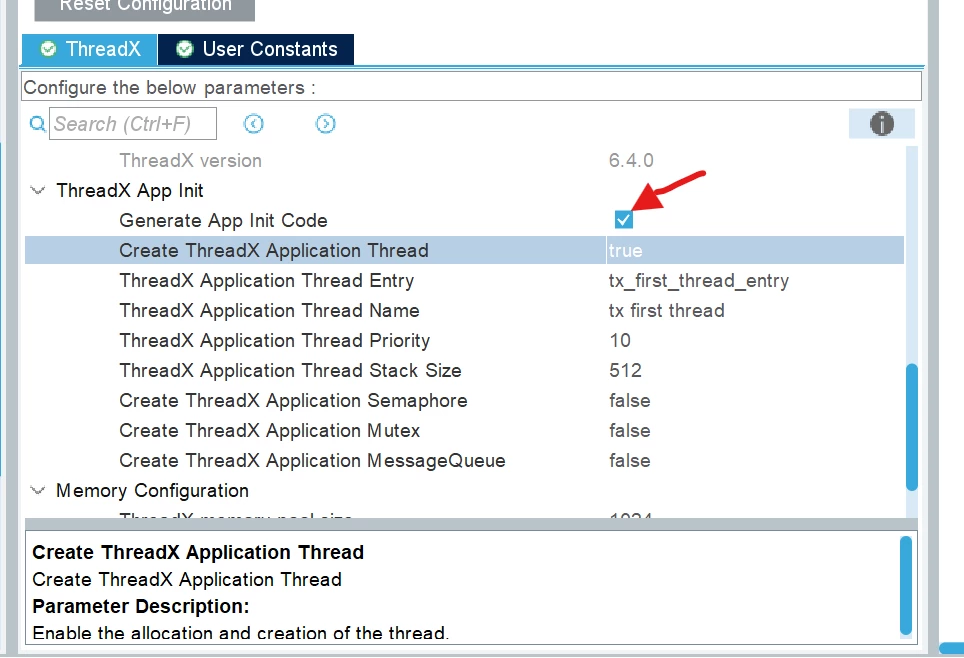
I'm using an stm32f746 and I switched to a stm32u5a9 mcu. I was learning about freeRTOS with the f746 and now it looks like I should be using threadX instead. Since I don't know much about RTOS, switching is not a big deal. But using cubeIDE build in cubeMX I could make multiple threads for freeRTOS before. Now it looks like I can make one in cubeMX by clicking the "generate app init code" and setting the "Create threadX application thread" to true. I know I can add more threads to the files manually. I'm wondering if I can make more than one in cubeMX ... like freeRTOS?


Thanks
 

threadx1.png

Best answer by Ghofrane GSOURI

Hello @Rodo 

Currently, CubeMX generates a single application thread by default. If you need additional threads, you must manually add them to your code after code generation. For reference, you can consult the Tx_Thread_Creation project located at:

C:\Users\XXXX\STM32Cube\Repository\STM32Cube_FW_U5_V1.8.0\Projects\NUCLEO-U5A5ZJ-Q\Applications\ThreadX\Tx_Thread_Creation

A change request has been submitted to the development team under internal ticket number 219287 to assess the feasibility of adding multi-thread configuration support for ThreadX directly within CubeMX

THX

Ghofrane

1 reply

Ghofrane GSOURI
Ghofrane GSOURIBest answer
Technical Moderator
October 10, 2025

Hello @Rodo 

Currently, CubeMX generates a single application thread by default. If you need additional threads, you must manually add them to your code after code generation. For reference, you can consult the Tx_Thread_Creation project located at:

C:\Users\XXXX\STM32Cube\Repository\STM32Cube_FW_U5_V1.8.0\Projects\NUCLEO-U5A5ZJ-Q\Applications\ThreadX\Tx_Thread_Creation

A change request has been submitted to the development team under internal ticket number 219287 to assess the feasibility of adding multi-thread configuration support for ThreadX directly within CubeMX

THX

Ghofrane

To give better visibility on the answered topics, please click on Accept as Solution on the reply which solved your issue or answered your question.