
Question
CubeMX does not validate CSI clock configuraiton on the STM32N6
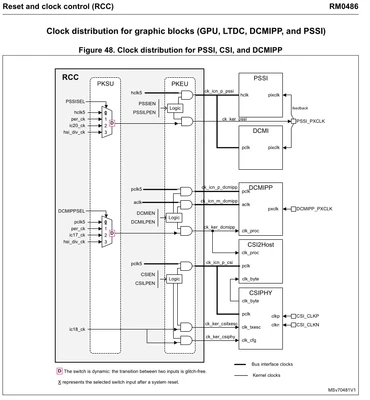
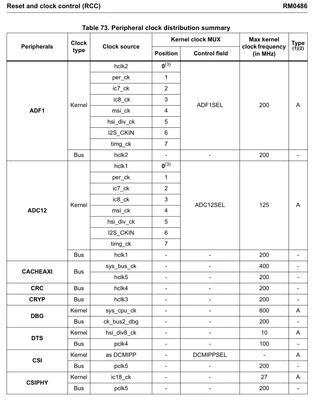
The STM32N6 reference manual shows that IC18 drives the CSI2Host and CSIPHY IP blocks at a maximum frequency of 200 MHz. CubeMX generates this clock configuration code but does not show the clock path in the clock configuration window. Additionally, it does not provide any error checking and will allow IC18 to be configured above 200 MHz.
Clock tree diagram:
Maximum clock rate spec:
CubeMX generated code in HAL_DCMIPP_MspInit:
PeriphClkInitStruct.PeriphClockSelection = RCC_PERIPHCLK_DCMIPP|RCC_PERIPHCLK_CSI;
PeriphClkInitStruct.DcmippClockSelection = RCC_DCMIPPCLKSOURCE_IC17;
PeriphClkInitStruct.ICSelection[RCC_IC17].ClockSelection = RCC_ICCLKSOURCE_PLL4;
PeriphClkInitStruct.ICSelection[RCC_IC17].ClockDivider = 1;
PeriphClkInitStruct.ICSelection[RCC_IC18].ClockSelection = RCC_ICCLKSOURCE_PLL4;
PeriphClkInitStruct.ICSelection[RCC_IC18].ClockDivider = 2;