
Associate II
March 1, 2026
Solved

CubeMX doesn't generate .project and .cproject files with non-default firmware location

  • March 1, 2026
  • 8 replies
  • 784 views

CubeMX does not generate .project and .cproject files for cubeIDE, when in CubeMX project it is selected to not use default firmware location, and path set to folder with STM32Cube FW from github.


To reproduce:

1 Open CubeMX

2 Select File->New Project 

3 Select chip,  in my case stm32g491ceu6

4 Open Project manager tab, enter name and location for the project, toolchain - stcubeide

5 Uncheck "Use Default Firmware Location", Click Browse and navigate to a folder with github repository with cude FW package

6 Go to "Code Generator" sub tab, select radio button "Add nevessary library files as reference in the toolchainproject configuration file"

7 Click generate

8 Observe folder content in the file explorer - .cproject and .project are missing.


CubeMX version 6.16.1
Best answer by Andrew Neil

@trs wrote:

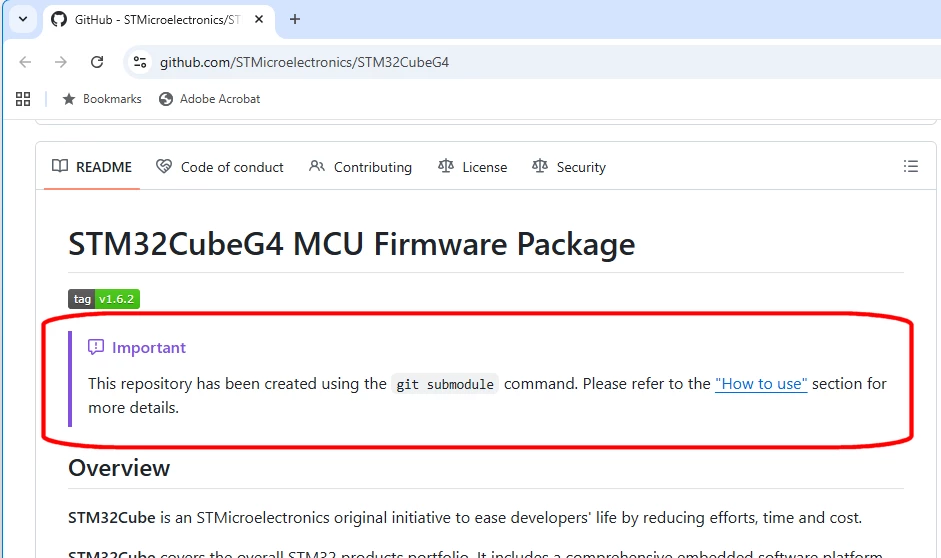
a github repo (https://github.com/STMicroelectronics/STM32CubeG4) cloned on my machine,


ST's GitHub repos rely on submodules - so you have to follow the instructions to clone correctly:

Image1.png

Did you do that?

8 replies

TDK
Super User
March 1, 2026

Just tried this and both .project and .cproject showed up as expected. Maybe you missed a dialog box, or maybe you have some other project setting which is incorrect, or maybe you have "dot" files hidden.

Screenshot 2026-03-01 162608.png

It is easier to debug STM32CubeMX issues when you attach the IOC file that produces the incorrect behavior.

"If you feel a post has answered your question, please click ""Accept as Solution""."
trsAuthor
Associate II
March 2, 2026

Thank you for support. Attaching my STM32CubeMX project with the IOC file.


Screenshot 2026-03-01 205814.png

These are all files that I get after pressing Generate button.

TDK
Super User
March 2, 2026

I do not see an attached IOC file.

"If you feel a post has answered your question, please click ""Accept as Solution""."
TDK
Super User
March 2, 2026

> ProjectManager.CustomerFirmwarePackage=..\\..\\libs\\STM32CubeG4

Maybe a relative path is supported in the "Firmware Relative Path" box.

I can't test out your IOC exactly because our library paths are not the same. With a non-default absolute path, everything works for me.

"If you feel a post has answered your question, please click ""Accept as Solution""."
Pavel A.
Super User
March 2, 2026

Cannot reproduce this problem. Tested with relative path:

ProjectManager.CustomerFirmwarePackage=..\\CUBELIBS\\STM32Cube_FW_C0_V1.1.0

Though in the CubeMX GUI the path is displayed as absolute (and it does not let user edit in place), in the ioc file it is relative.


Screenshot 2026-03-02 215027.png

trsAuthor
Associate II
March 2, 2026

If you open IOC file I shared before, can you get to generate STM32CubeIDE project?

As soon as I check the box "Use Default Firmware Location" the project generates normally. Then if I uncheck the checkbox, click Browse and navigate to a github repo (https://github.com/STMicroelectronics/STM32CubeG4) cloned on my machine, all files in the project's Drivers folder are gone, and there is no path in .project file to any source file anymore, including main.c.

The GUI says Relative path, which is I suppose automatically resolved into a relative path, as there is no way to paste any text into the text box. The only way to set the path is to click Browse button. Is it not the case on your side?

The path it resolved, after I navigated to the repo through Browse button click - is correct:

ProjectManager.CustomerFirmwarePackage=..\\..\\libs\\STM32CubeG4

Here is my folder structure, where STM32CubeG4 is a submodule in main Git repo:

Screenshot 2026-03-02 173346.png


Andrew Neil
Andrew NeilBest answer
Super User
March 3, 2026

@trs wrote:

a github repo (https://github.com/STMicroelectronics/STM32CubeG4) cloned on my machine,


ST's GitHub repos rely on submodules - so you have to follow the instructions to clone correctly:

Image1.png

Did you do that?

A complex system that works is invariably found to have evolved from a simple system that worked.A complex system designed from scratch never works and cannot be patched up to make it work.
trsAuthor
Associate II
March 4, 2026

Good point Andrew, I did not clone the repo as a one with submodules. I see now that STM32G4xx_HAL_Driver is a submodule. And now I did that, and code generation worked, partially.

When in Code generation subtab, I had selected "Copy only necessary library files" it copied files from my "libs" folder. I tested that by adding some text in comments and after project generation I saw that file copied into my project was updated with that change.

When in Code generation subtab, I had selected "Add necessary library files as reference in the toolchain project configuration file" then .project file for the CubeIDE is not generated correctly still. Files are all gone and not copied - which is expected, but .project file does not have file references to files from "libs" folder.

Thank you for support, again very good point you brought up!


TDK
Super User
March 2, 2026

> a github repo (https://github.com/STMicroelectronics/STM32CubeG4) cloned on my machine

Maybe this is the issue. What if you use the standard way of installing the package? (Help -> Manage embedded...)

You can't just mix and match any repo version with any CubeMX version.

"If you feel a post has answered your question, please click ""Accept as Solution""."
trsAuthor
Associate II
March 3, 2026

You are probably correct. I don't want to try installing firmware package as the STM32CubeMX already installed it's own package and I know that is working.

So the issue is that github repo != installed package. Which is unfortunate, as it would blend very nicely with having a github repository within your project repository, where FW package is a submodule in it. This is attractive because:

A) it is easy to get updates - no installation is required;

B) modifications to the FW library are easy to keep track of because I would create a separate branch, and would always see what I changed in the library and why;

C) integration of my changes and updates is a breather as I would merge/rebase my branch of the FW library.

Anyway, thank you for the help! Hopefully this will be possible in near future.

trsAuthor
Associate II
March 3, 2026

jamessmite,

"When you uncheck “Use Default Firmware Location,” the IDE references the libraries as external links instead of copying them," - This is not correct, there is another thing for this function. The options you are referring to are the ones here in the screenshot:

Screenshot 2026-03-02 194802.png

“Use Default Firmware Location” will allow you to get the library from another CubeMX FW installation. But this, unfortunately does not work with github repository of the library.

Pavel A.
Super User
March 3, 2026

The GUI says Relative path, which is I suppose automatically resolved into a relative path, as there is no way to paste any text into the text box. The only way to set the path is to click Browse button

Yes. Even if the path in the .ioc file is absolute, you can edit it manually to relative form and CubeMX will preserve it.

@trs  Do you have two Cube libraries: one in your git repo and another (the 'default' one)  installed by the CubeMX or CubeIDE? If so, is the non-default library in your repo broken in some way?


trsAuthor
Associate II
March 4, 2026

Yes I have library that CubeMX downloaded in c:\Users\username\STM32Cube\Repository\STM32Cube_FW_G4_V1.6.2\ and one I cloned. I compared them, and difference was only in line endings.

As Andrew mentioned - I did not clone github repo with submodules parameter and as a result my repo was screwed up. 

Pavel A.
Super User
March 4, 2026

Then I'm out of ideas. I use basically the same setup: customized Cube package in non-default directory, which is also a git repo. Works well with several versions of CubeMX and CubeIDE.

trsAuthor
Associate II
March 5, 2026

So I kept looking into this issue, now I have 2 projects with identical IOC file and one generates good CubeIDE project, the other one does not. 

There are some differences in .mxproject file.. Will keep investigating..

Attaching the projects..