KMew
Senior III
January 4, 2023
Solved

CubeMX Generated Code: Build Option Greyed Out

  • January 4, 2023
  • 1 reply
  • 2780 views

Hello,

I am using the NUCLEO-F401RE with the NUCLEO-IDB05A2 bluetooth low energy expansion board. I am trying to run the sample demo code that is part of the X-CUBE-BLE1 software package (SensorDemoBLE).

I followed the instructions in this video below:

https://www.youtube.com/watch?v=jGljm6nxW9s

When I follow this video, I am unable to build the project because the build option is greyed out.

Additionally, when I try to import the project from the File System or Archive, it shows the Bluetooth_SensorDemo\STM32CubeIDE Exlipse Project is not opened. If I select it and hit finish, it does not do anything.

Does anyone know what causes this?

STM32CubeIDE Version: 1.11.0

STM32CubeMX Version: 6.6.1
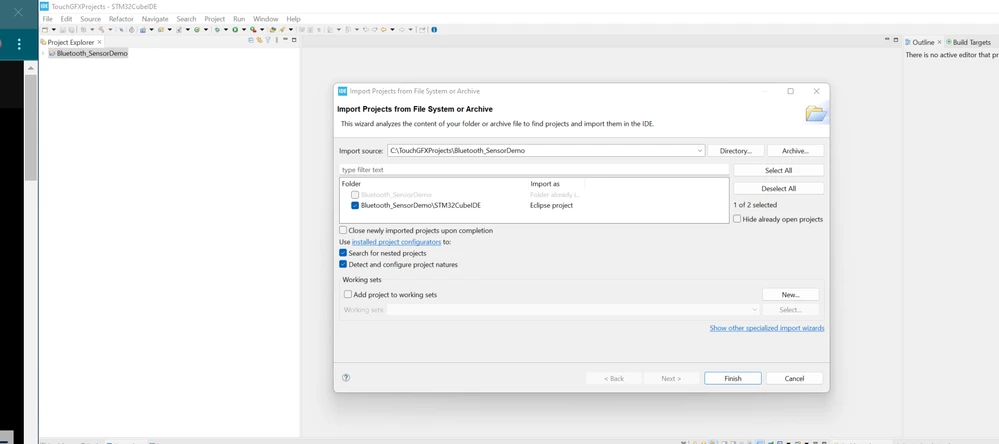
0693W00000Y7P7WQAV.png

This topic has been closed for replies.
Best answer by KMew

I found the solution.

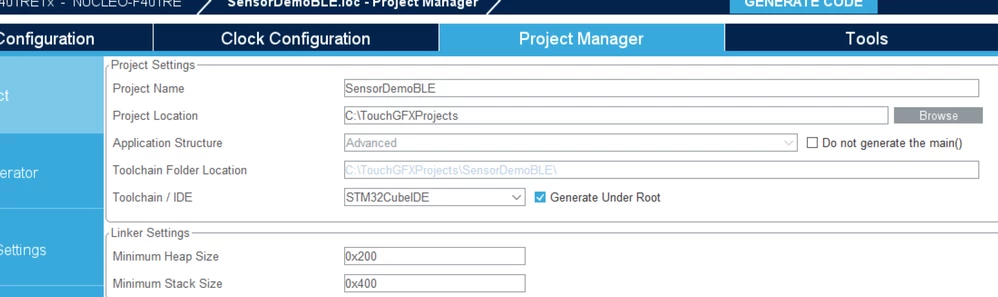
I recreated the project, but when selecting the Toolchain/IDE when the project is first generated, you have to select the "Generate Under Root" option.

I did that and I could compile/run it.

I consider this resolved, but does anyone understand why that would matter?

0693W00000Y7PPfQAN.png

1 reply

KMew
KMewAuthorBest answer
Senior III
January 4, 2023

I found the solution.

I recreated the project, but when selecting the Toolchain/IDE when the project is first generated, you have to select the "Generate Under Root" option.

I did that and I could compile/run it.

I consider this resolved, but does anyone understand why that would matter?

0693W00000Y7PPfQAN.png

Technical Moderator
January 10, 2023

Hi @KMew​, 

You should check this checkbox in order to generate the toolchain project files in STM32CubeMX user project root folder. This option allows to benefit from the Eclipse features such as copy of the project into the Eclipse workspace when importing a project or use of source control systems (GIT, SVN,...) from the Eclipse workspace.

To give better visibility on the answered topics, please click on Accept as Solution on the reply which solved your issue or answered your question.Best regards,FBL