Associate
October 4, 2023
Solved

CubeMX generated code doesn't work when mixing use HAL and LL

  • October 4, 2023
  • 1 reply
  • 1883 views

My project running on STM32G071 uses LL drivers for ADC and USART. The configuration code is generated by STM32CubeMX.  It works fine. However after adding I2C HAL module which connects to a sensor to the project, the I2C function HAL_I2C_IsDeviceReady() always returns HAL_ERROR. 

To investigate it, I created a simple project. It only has I2C. If selecting HAL driver for RCC and GPIO in the CubeMX, the returns from HAL_I2C_IsDeviceReady()  and HAL_I2C_Mem_Read() are correct. 
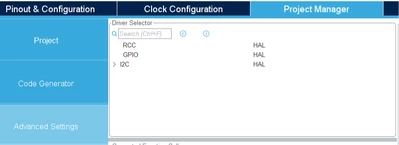
why_q_0-1696428687162.png

but it selects LL drivers for RCC and GPIO, and I2C stays as HAL, the return from HAL_I2C_IsDeviceReady()  is HAL_ERROR.
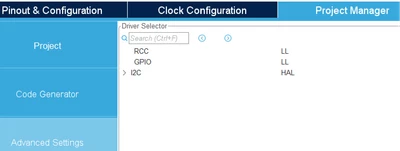
why_q_1-1696429012212.png

Any idea what is wrong? Is it possible to mix use HAL and LL like this?

Many thanks!
 

This topic has been closed for replies.
Best answer by Foued_KH

Hello @why_q , 

Yes you can mix HAL and LL : 
I couldn't reproduce your issue!

Foued_KH_0-1696586313956.pngFoued_KH_1-1696586328721.png

Foued

1 reply

Foued_KH
Foued_KHBest answer
ST Employee
October 6, 2023

Hello @why_q , 

Yes you can mix HAL and LL : 
I couldn't reproduce your issue!

Foued_KH_0-1696586313956.pngFoued_KH_1-1696586328721.png

Foued

To give better visibility on the answered topics, please click on Accept as Solution on the reply which solved your issue or answered your question.
why_qAuthor
Associate
November 6, 2023

Hi Foued,

Thank you for your reply and sorry to hear that you couldn't repeat the issue.

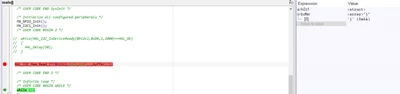
My project was created by Keil uVision, ran CubeMX from there.  The below is the code.  If selecting  LL for RCC and GPIO, the return from HAL_I2C_IsDeviceReady() is HAL_ERROR

why_q_0-1699284615594.png


Foued_KH
ST Employee
November 6, 2023

Could you take an oscilloscope and check the SDA & SCL behavior.
If you have NACK, you should set the correct address.

Foued

To give better visibility on the answered topics, please click on Accept as Solution on the reply which solved your issue or answered your question.