

MechatronikMonkey
Associate II
February 18, 2025
Question

CubeMX virtual com port for NUCLEO-H533RE does not generate correct code

  • February 18, 2025
  • 3 replies
  • 1129 views

I enabled this option to activate the virtual COM port for debug reasons:
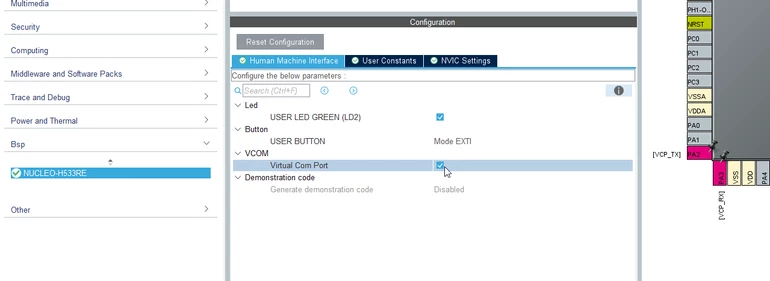
MechatronikMonkey_0-1739908865321.png


It is a CMake Project to be opened in VS-Code

Enabling the Virtual Com Port in CubeMX results in this error in VS Code:
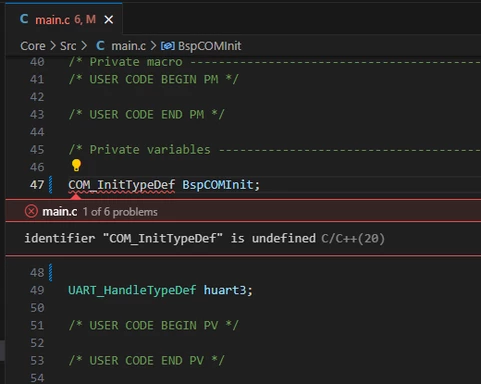
MechatronikMonkey_1-1739909024203.png

Crawling in the files, I found that the stm32h5xx_nucleo_conf.h the USE_BSP_COM_FEATURE is not enabled.
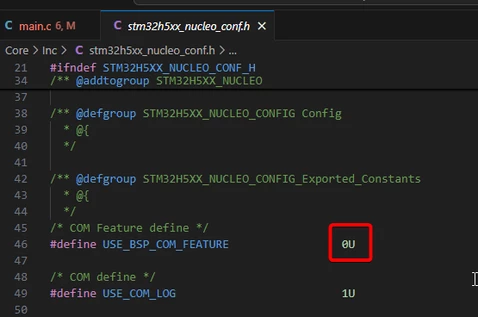
MechatronikMonkey_2-1739909117987.png

Enabling this manually will result in many more errors:
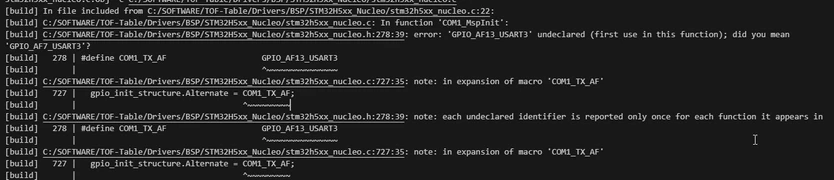
MechatronikMonkey_3-1739909333150.png

Generating the code again will reset the USE_BSP_COM_FEATURE to 0.

Did I forget or overlook something?

3 replies

MechatronikMonkey
Associate II
February 18, 2025

Yes, it is another bug!!!!!!!!!!!!!!!!!

First you need to remove the lock from this pins (right click) ans set manually to USART2 RX/TX as USART3 is not avail on this pins:

MechatronikMonkey_1-1739911155382.png


Next you need to set this in the stm32h5xx_nucleo.h

MechatronikMonkey_0-1739911012164.png

to THIS:

MechatronikMonkey_3-1739911408732.png


and than set this to 1 in the stm32h5xx_nucleo_conf.h

MechatronikMonkey_2-1739911342698.png


Now it compiles, but if you re-generate the code with CubeMX your changes will be reverted... nice work STM

Karl Yamashita
Principal
February 19, 2025

What version CubeMX are you using?

I'm using 6.13.0 and it seems to be setting the #define correctly.


I also don't see line 47  #define USE_NUCLEO_H533RE in you screenshot?


KarlYamashita_1-1739923352167.png


With that define, it would correctly select UART2 for the COM port.

KarlYamashita_2-1739923592327.png


If a reply has proven helpful, click on Accept as Solution so that it'll show at top of the post.CAN Jammer an open source CAN bus hacking toolCANableV3 Open Source
MechatronikMonkey
Associate II
February 19, 2025

We are using also the 6.13.0

I can confirm, that the problem only occurs on first creation of a project after installing the CubeMX.

I set up the toolchain and CubeMX at my client's site and created a project. The necessary packages were downloaded when the project was first created. Immediately afterwards, we continued with the project creation without closing the software. The result was a corrupted project.

Today, I recreated the project and suddenly a new dialog appeared that I didn’t see yesterday. It seems there are issues with fresh installations or packages.

MechatronikMonkey
Associate II
February 19, 2025

No, this error is not caused by a fresh installation. Although there seems to be an issue here as well. After installing the packages, it is not possible to initialize a project.

The error occurs as soon as the X-CUBE-TOF1 is added. Once this is done, the project is corrupted, and it is no longer possible to compile the project without manual adjustments.

Setup your project like this and you will see, that the project no longer compiles...

MechatronikMonkey_0-1739991866616.png


Karl Yamashita
Principal
February 19, 2025

Yes, you are correct. There seems to be a bug.

When I added the X-CUBE-TOF1 to the project and generated the code...

  1. The define is zero instead of 1 #define USE_BSP_COM_FEATURE                 0U
  2. The #define USE_NUCLEO_H533RE is missing.
If a reply has proven helpful, click on Accept as Solution so that it'll show at top of the post.CAN Jammer an open source CAN bus hacking toolCANableV3 Open Source