Associate II
March 8, 2024
Solved

Effect of CubeMX DEBUG Settings

  • March 8, 2024
  • 2 replies
  • 1816 views

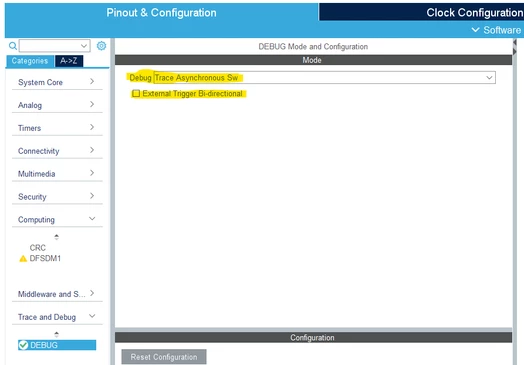
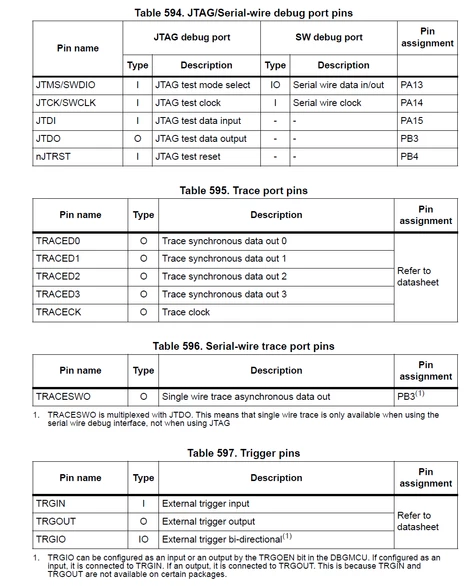
Other than reserving pins for the hardware-implemented debug interface (Fig. 1), what are the effects of the highlighted settings of the "Trace and Debug" category of CubeMX (Fig. 2)?
 

dmocom_2-1709880966211.png

Fig 1: Debug infrastructure (RM0433)


dmocom_1-1709880891568.png

Fig 2: CubeMX Trace and Debug


Changing those settings has no effect in regard of code generation.


How would one utilize i.e. External Trigger Bi-directional? I would have expected the system to halt (essentially triggering a breakpoint) on a signal change of the reserved TRGIO pin when activating this setting - but nothing happens. The same is true for the other direction, triggering a breakpoint does not change the value on the TRGIO pin.


The same goes for the setting Trace Synchro SW (x bits). SWDIO and SWCLK can be used to communicate with a debugger, but TraceD0 seems to do nothing?


I could not find an answer in the datasheet as referenced by Table 595 in RM0433.


This topic has been closed for replies.
Best answer by Pavel A.

How would one activate the External Trigger Bi-directional for example? Or the synchronous tracing? 

One instructs the debugger (or other software) to connect to the target in desired mode. For example to use ITM trace, you check the box in the debugger dialog and select SWD mode (not JTAG). The debugger then configures the debug module of the target MCU.


2 replies

Pavel A.
Super User
March 9, 2024

Selection of debug mode in CubeMX/IDE does not have other effects besides of reserving the pins (which is already valuable).

Activation of the debug mode is what matters. This occurs when the debugger connects to STM32 or the program  running on STM32 pokes the DBG module and related things (cross-trigger interface, ETM, ITM, trace...)

dmocomAuthor
Associate II
March 11, 2024

@Pavel A.Thank you.

How would one activate the External Trigger Bi-directional for example? Or the synchronous tracing? Is this the responsibility of the debugger hardware/tool?

SWD is straight forward since it is the default(?) debug interface and used by the ST-Link debugger.

Pavel A.
Pavel A.Best answer
Super User
March 11, 2024

How would one activate the External Trigger Bi-directional for example? Or the synchronous tracing? 

One instructs the debugger (or other software) to connect to the target in desired mode. For example to use ITM trace, you check the box in the debugger dialog and select SWD mode (not JTAG). The debugger then configures the debug module of the target MCU.