
Associate
July 10, 2025
Solved

Error with CMake in New Version 6.15.0

  • July 10, 2025
  • 4 replies
  • 2306 views

Today, while using the CubeMX product, I upgraded to version 6.15.0 (previously 6.14.1). After upgrade, the CMake step when generating project code failed. Even when generating an empty project, CMake still did not succeed. I also tried previously working projects that had been successfully flashed before, but they also failed during the CMake step.
The following error message was displayed: 

CMake Error at D:/Program Files/JetBrains/CLion/bin/cmake/win/x64/share/cmake-3.31/Modules/CMakeTestCCompiler.cmake:67 (message):
 The C compiler

 "C:/Program Files/GNU-Arm-Toolchain-eabi/bin/arm-none-eabi-gcc.exe"

 is not able to compile a simple test program.

 It fails with the following output:

 Change Dir: 'D:/project/keysking/P10_Clock/clock/cmake-build-debug/CMakeFiles/CMakeScratch/TryCompile-q0iun1'
 
 Run Build Command(s): "D:/Program Files/JetBrains/CLion/bin/ninja/win/x64/ninja.exe" -v cmTC_47519
 [1/2] C:\PROGRA~1\GNU-AR~1\bin\AR19DD~1.EXE -std=gnu11 -fdiagnostics-color=always -o CMakeFiles/cmTC_47519.dir/testCCompiler.c.obj -c D:/project/keysking/P10_Clock/clock/cmake-build-debug/CMakeFiles/CMakeScratch/TryCompile-q0iun1/testCCompiler.c
 [2/2] C:\WINDOWS\system32\cmd.exe /C "cd . && C:\PROGRA~1\GNU-AR~1\bin\AR19DD~1.EXE CMakeFiles/cmTC_47519.dir/testCCompiler.c.obj -o cmTC_47519.exe -Wl,--out-implib,libcmTC_47519.dll.a -Wl,--major-image-version,0,--minor-image-version,0 -lkernel32 -luser32 -lgdi32 -lwinspool -lshell32 -lole32 -loleaut32 -luuid -lcomdlg32 -ladvapi32 && cd ."
 FAILED: cmTC_47519.exe 
 C:\WINDOWS\system32\cmd.exe /C "cd . && C:\PROGRA~1\GNU-AR~1\bin\AR19DD~1.EXE CMakeFiles/cmTC_47519.dir/testCCompiler.c.obj -o cmTC_47519.exe -Wl,--out-implib,libcmTC_47519.dll.a -Wl,--major-image-version,0,--minor-image-version,0 -lkernel32 -luser32 -lgdi32 -lwinspool -lshell32 -lole32 -loleaut32 -luuid -lcomdlg32 -ladvapi32 && cd ."
 C:/PROGRA~1/GNU-AR~1/bin/../lib/gcc/arm-none-eabi/14.3.1/../../../../arm-none-eabi/bin/ld.exe: unrecognized option '--major-image-version'
 C:/PROGRA~1/GNU-AR~1/bin/../lib/gcc/arm-none-eabi/14.3.1/../../../../arm-none-eabi/bin/ld.exe: use the --help option for usage information
 collect2.exe: error: ld returned 1 exit status
 ninja: build stopped: subcommand failed.

 CMake will not be able to correctly generate this project.
Call Stack (most recent call first):
 CMakeLists.txt:28 (project)


File .ioc as follows.
Best answer by Ghofrane GSOURI

Hello @Mocozzz 

The root cause of the issue is related to how the toolchain file was specified in previous MX versions. Previously, the toolchain file was defined in two locations: CMakePresets.cmake and CMakeLists.txt.

Starting with version 6.15, the specification in CMakeLists.txt has been removed, and it is now retained only in CMakePresets.cmake. This change was made to eliminate redundancy and to simplify switching between GCC and starm-clang .

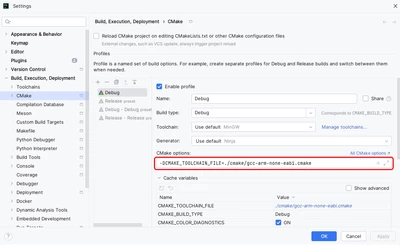
To be able to build the 6.15 projects with Clion we need to specify the toolchain file in the Clion project:

- Go to menu File -> Settings -> Build, Execution, Deployment -> CMake

- In “CMake options” field , we need to add the toolchain file variable for GCC :

     -DCMAKE_TOOLCHAIN_FILE=./cmake/gcc-arm-none-eabi.cmake

GhofraneGSOURI_0-1752767876590.png


Note: To use starm-clng instead of gcc, we need to add : -DCMAKE_TOOLCHAIN_FILE=./cmake/starm-clang.cmake


THX

Ghofrane


4 replies

KnarfB
Super User
July 10, 2025

The lines

 [1/2] C:\PROGRA~1\GNU-AR~1\bin\AR19DD~1.EXE -std=gnu11 -fdiagnostics-color=always -o CMakeFiles/cmTC_47519.dir/testCCompiler.c.obj -c D:/project/keysking/P10_Clock/clock/cmake-build-debug/CMakeFiles/CMakeScratch/TryCompile-q0iun1/testCCompiler.c
 [2/2] C:\WINDOWS\system32\cmd.exe /C "cd . && C:\PROGRA~1\GNU-AR~1\bin\AR19DD~1.EXE CMakeFiles/cmTC_47519.dir/testCCompiler.c.obj -o cmTC_47519.exe -Wl,--out-implib,libcmTC_47519.dll.a -Wl,--major-image-version,0,--minor-image-version,0 -lkernel32 -luser32 -lgdi32 -lwinspool -lshell32 -lole32 -loleaut32 -luuid -lcomdlg32 -ladvapi32 && cd ."
 FAILED: cmTC_47519.exe

show that your CMake setup tries to compile a Windows executable using the arm-none-eabi toolchain which cannot work. In short, your installation is broken. Try to clean-up and re-start from scratch. Maybe by using the tools from STM32CubeCLT - Toolset for third-party integrated development environment (IDE) providers, allowing the use of STMicroelectronics proprietary tools within their own IDE frameworks - STMicroelectronics.

hth

KnarfB


MocozzzAuthor
Associate
July 10, 2025

Thanks, I'll clean it and try again!

MocozzzAuthor
Associate
July 10, 2025

Now I have no choice but to come back to CubeMX version 6.14.1, which is currently the only solution. I hope ST engineers can fix the issue "CubeMX 6.15.0 fails to load using CMake" as soon as possible. I look forward to experiencing the new features at the earliest opportunity.

Ghofrane GSOURI
Technical Moderator
July 14, 2025

Hello @Mocozzz 

After using your IOC , generate and build the code I found no compilation errors 

GhofraneGSOURI_0-1752486275916.png

GhofraneGSOURI_1-1752486325134.png

Could you please share your entire project, not just the IOC? This will help me investigate the issue further

THX

Ghofrane 

To give better visibility on the answered topics, please click on Accept as Solution on the reply which solved your issue or answered your question.
MocozzzAuthor
Associate
July 14, 2025

Hello, @Ghofrane GSOURI 


I've rolled back to version 6.14.1 for now. I also have a file here that was previously wrong with the new version but didn't roll back. I share the entire project file with you. In addition, I am using clion for compilation, is it because I use the software that I will have the above error?

Ghofrane GSOURI
Technical Moderator
July 10, 2025

Hello @Mocozzz 

I'm currently investigating this .

I will get back to you as soon as possible.

THX

Ghofrane 

To give better visibility on the answered topics, please click on Accept as Solution on the reply which solved your issue or answered your question.
glitch
Explorer
October 3, 2025

What you need to do is just simply select the preset cmake profile (the gray ones) and click `enable profile`, then apply it.

That's all, and you will find your project working right.

Look through the documentation of clion for more information.

https://www.jetbrains.com/help/clion/cmake-presets.html 

Happy hacking!