
Associate II
January 20, 2026
Solved

How to configure Downsize of DCMIPP pipe1 with STM32CubeMX

  • January 20, 2026
  • 2 replies
  • 246 views

I'm using STM32N6570-DK board and developing an image processing application.
When I tried to use STM32CubeMX to generate the project, I was able to set DCMIPP Pipe1 just like the attached screen capture.
I would like to downsize the source image data to 800x480, but I could not find the option field in the DCMIPP Configuration view in STM32CubeMX.
Is there something that I missed?

My STM32CubeMX is Version 6.16.1 for Windows 11.
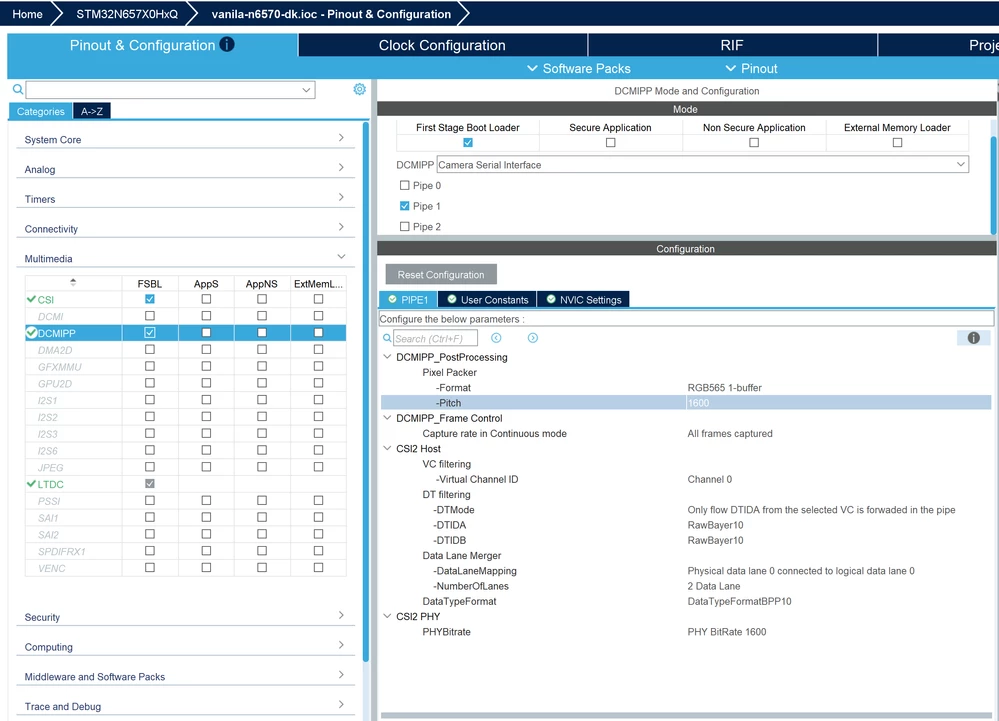
스크린샷 2026-01-20 103147.png


Best answer by Mikk Leini

 @JaeLee check the example code:

https://github.com/STMicroelectronics/STM32CubeN6/blob/1fc803683e03b0ce78e64523441d31acd0db2829/Projects/STM32N6570-DK/Applications/DCMIPP/DCMIPP_ContinuousMode/FSBL/Src/main.c#L333

Basically you have to write DCMIPP initialization/configuration code yourself.

To understand the math behind ratio and division numbers, check N6 reference manual chapters:

39.14.71 DCMIPP Pipex downsize configuration register (DCMIPP_PxDSCR)

39.14.72 DCMIPP Pipex downsize ratio register (DCMIPP_PxDSRTIOR)

2 replies

Technical Moderator
January 20, 2026

Hello @JaeLee 


Let me thank you for posting.

I am currently checking this behavior and I will get back to you ASAP.


Thanks

Mahmoud

To give better visibility on the answered topics, please click on Accept as Solution on the reply which solved your issue or answered your question.
Technical Moderator
January 22, 2026

Hello @JaeLee ,


On STM32N657 devices, the DCMIPP peripheral does not support image scaling (downsize or upsize). DCMIPP is limited to image capture, pixel format conversion, but it does not include a hardware resizer.

For this reason, STM32CubeMX does not provide any configuration fields to set an output resolution such as 800×480 in the DCMIPP configuration view.


Thanks.

Mahmoud

To give better visibility on the answered topics, please click on Accept as Solution on the reply which solved your issue or answered your question.
Mikk Leini
Mikk LeiniBest answer
Senior
January 22, 2026

 @JaeLee check the example code:

https://github.com/STMicroelectronics/STM32CubeN6/blob/1fc803683e03b0ce78e64523441d31acd0db2829/Projects/STM32N6570-DK/Applications/DCMIPP/DCMIPP_ContinuousMode/FSBL/Src/main.c#L333

Basically you have to write DCMIPP initialization/configuration code yourself.

To understand the math behind ratio and division numbers, check N6 reference manual chapters:

39.14.71 DCMIPP Pipex downsize configuration register (DCMIPP_PxDSCR)

39.14.72 DCMIPP Pipex downsize ratio register (DCMIPP_PxDSRTIOR)