Associate
March 14, 2024
Solved

How to configure STM32G474’s ADC Analog Watchdog2、3's channel by CubeMX?

  • March 14, 2024
  • 1 reply
  • 1777 views

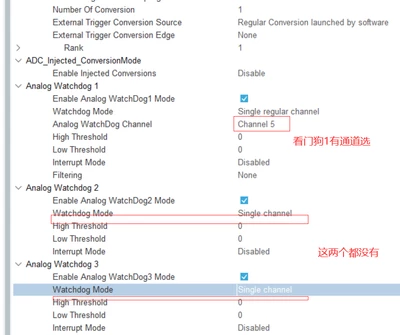
I configured the watchdog of ADC using stm32cubemx and found that only watchdog 1 can display channel configuration options. Watchdogs 2 and 3 do not have this option.  When generating code, even though 2 and 3 watchdogs are enabled, the code for these two will not be generated. Do anyone know what the reason is? Thanks so much. (I have read two topics about this problem in the community, but they don't tell me why and how to solve.)
zwhao_0-1710426618663.png


This topic has been closed for replies.
Best answer by Imen.D

Hello @zwhao and welcome to the Community :)

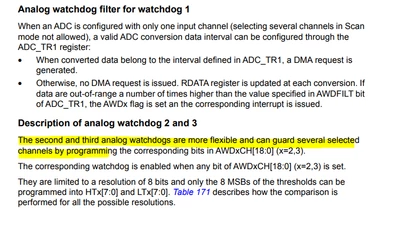
As described in the RM0440 (section 21.4.28): The second and third analog watchdogs are more flexible and can guard several selected channels. However, One Analog Watchdog can monitor one selected channel or all enabled channels (Analog Watchdog 1).

ImenD_0-1710488431166.png

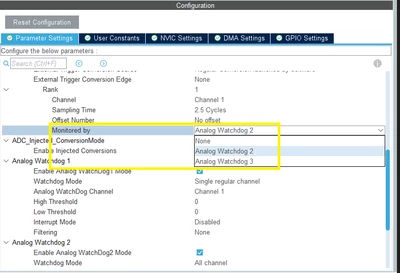
To select a watchdog (2 or 3) to monitor a channel (Eg. enable Analog watchdog 2 to monitor channel 1), you should activate channel 1 and enable Analog Watchdog2 Mode. For that, make sure to enable "ADC_Regular_ConversionMode" and select the channel from "Rank" list. Then, using "Monitored by" option, you can choose the watchdog to monitor this channel.

ImenD_1-1710488614751.png

Hope this answer your question.

1 reply

Imen.DBest answer
Technical Moderator
March 15, 2024

Hello @zwhao and welcome to the Community :)

As described in the RM0440 (section 21.4.28): The second and third analog watchdogs are more flexible and can guard several selected channels. However, One Analog Watchdog can monitor one selected channel or all enabled channels (Analog Watchdog 1).

ImenD_0-1710488431166.png

To select a watchdog (2 or 3) to monitor a channel (Eg. enable Analog watchdog 2 to monitor channel 1), you should activate channel 1 and enable Analog Watchdog2 Mode. For that, make sure to enable "ADC_Regular_ConversionMode" and select the channel from "Rank" list. Then, using "Monitored by" option, you can choose the watchdog to monitor this channel.

ImenD_1-1710488614751.png

Hope this answer your question.

"When your question is answered, please close this topic by clicking ""Accept as Solution"".ThanksImen"
zwhaoAuthor
Associate
March 15, 2024

I have found a way to set it up according to the way you provided. Thank you very much, it has been of great help to me!!!