
Associate II
November 28, 2025
Solved

How to set Hi-Z mode in PH1 (OSC_OUT) when using HSE BYPASS mode in STM32F446RE?

  • November 28, 2025
  • 5 replies
  • 425 views

Hi there, im using Nucleo-F446RE , ST HAL and CubeMX, and im learning to configure the clock

I use HSE Bypass mode (MCO from the st-link in the nucleo), everything perfect here

In the RM i found out that, when using HSE BYPASS mode, PH1 (OSC_OU) should be left in HI-Z state
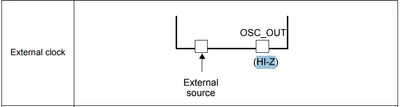
Cblue_X_0-1764310642345.png

What does HI-Z means in STM32 MCUs? does it mean configuring the pin as digital input? or it means configuring the pin as analog input?
Or it depends?


When selecting HSE BYPASS MODE the chip image in the .ioc file gets set like this:
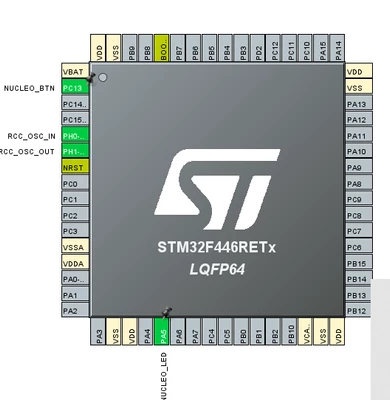
Cblue_X_1-1764310883497.png

But if i try to  set PH1 (OSC_OUT) as GPIO a conflict is generated, so, how can i set the state of PH1 as HI-Z?


Also, why does PH1 gets reserved and configured in the chip as OSC_OUT? is this to avoid configuring it as another thing?


And finally, what it seems very weird to me, why the clock por GPIOH is enabled when CubeMX generates the code if i cant use PH1 as a normal GPIO? (im not using any other PHx PIN)
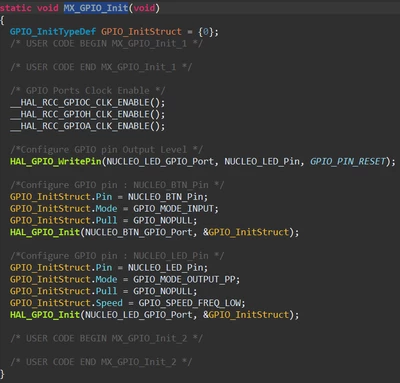
Cblue_X_2-1764311277059.png


Thanks in advance and sorry for the english, not a native speaker!


Best answer by mƎALLEm

Hello,

For STM32F4, if you configure HSE in Bypass mode, OSC_OUT could be used as GPIO pin (In/Out). 

The documentation needs to be updated as well as the the CubeMx should keep OSC_OUT unconfigured. So the user can configure it as a GPIO pin if he wants.

Please refer also to this discussion.

I will raise that issue internally for fix (internal tickets 220390 and 222721).

5 replies

mƎALLEm
mƎALLEmBest answer
Technical Moderator
November 28, 2025

Hello,

For STM32F4, if you configure HSE in Bypass mode, OSC_OUT could be used as GPIO pin (In/Out). 

The documentation needs to be updated as well as the the CubeMx should keep OSC_OUT unconfigured. So the user can configure it as a GPIO pin if he wants.

Please refer also to this discussion.

I will raise that issue internally for fix (internal tickets 220390 and 222721).

"To give better visibility on the answered topics, please click on ""Accept as Solution"" on the reply which solved your issue or answered your question."
Cblue_XAuthor
Associate II
November 29, 2025

Thank you for answer!

Just one last thing sir, so this means that enabling GPIOH clock is not necessary at all when using HSE Bypass mode right?

I ask this because GPIOH gets its clock enabled automatically by CubeMX when you choose HSE Bypass mode

Again, thanks for your time, i really appreciate it 

AScha.3
Super User
November 29, 2025

HSE is on GPIOH ;

and on arm (or any cpu of this kind) the port to use has to get a clock - otherwise its just not working.

So be glad, Cube setting this for you - port would not work otherwise.

"If you feel a post has answered your question, please click ""Accept as Solution""."
Andrew Neil
Super User
November 29, 2025

@Cblue_X wrote:

In the RM i found out that, when using HSE BYPASS mode, PH1 (OSC_OU) should be left in HI-Z state


Indeed it does - here is the full context:

AndrewNeil_0-1764409703530.png

https://www.st.com/resource/en/reference_manual/rm0390-stm32f446xx-advanced-armbased-32bit-mcus-stmicroelectronics.pdf#page=120


@mƎALLEm Indeed, this wording is misleading: it suggests that this is something that the user has to actively do - which, as you say, is not the case.

A complex system that works is invariably found to have evolved from a simple system that worked.A complex system designed from scratch never works and cannot be patched up to make it work.
Cblue_XAuthor
Associate II
November 29, 2025

Thanks to everybody for your answers!

But @AScha.3 what seems weird to me is that the enabling of GPIOH clock gets done (by automatically generated CubeMX code) after clock gets configured

AScha.3
Super User
November 30, 2025

>seems weird to me is that the enabling of GPIOH clock gets done (by automatically generated CubeMX code) after clock gets configured

I think this is just the "standard automatic" : if a pin on port xx is used, port xx clock is enabled.

And this is basically a good idea ....dont ask me, how many hours i was fiddling around with my first arm cpu, F103, 

until i found out: enabling power to port is needed, but to get any reaction from the port (= its working), the clock for this port also has to be enabled. That time no nice Cube or integrated IDE, just bare metal writing...ugly for beginner. (13 y ago...)

+

I tried: set HSE bypass; the bypass setting is used in clock tree:

AScha3_0-1764492814254.png

And what we dont know: the internal connection of the oscillator -> maybe it can only switch it to the port, in+out, or not at all. So no use of the osc-out pin possible.

from rm:

AScha3_3-1764493867550.png

"should" is a bit ambiguous, like: better dont touch it, leave it unconnected; to avoid "side effects" - if it works at all.

If you want to know 100% , try it with a real F446: set it to HSE bypass, then set port pin PH1 in program to other function, input with pullup , or output lo. Then see what its doing in the respective case...

or buy/select a cpu, that can switch ph1 off, if you insist on this feature.

Thats different on other series: see rm of cpu :

for H743 the text in hse description is :

AScha3_1-1764493600927.png

So osc-out is not connected to the pin, free to use, Cube shows it also:

AScha3_2-1764493752619.png

So different , depends on series, which kind of HSE is built in.

+

>What does HI-Z means 

Just leave it , connect nothing. (sometimes labeled "nc" , not connect or connected on other chips)

info from @mƎALLEm 

I've got a confirmation from the team: yes for STM32F446 you can use OSC_OUT and OSC32_OUT as GPIOs when HSE or LSE are in bypass mode.

The documentation will be updated accordingly (Internal ticket number 220390).

<

"If you feel a post has answered your question, please click ""Accept as Solution""."
mƎALLEm
Technical Moderator
December 1, 2025

To All,

The details of the ticket numbers mentioned above:

220390 to fix the documentation.

222721 to fix CubeMx accordingly.

"To give better visibility on the answered topics, please click on ""Accept as Solution"" on the reply which solved your issue or answered your question."
Cblue_XAuthor
Associate II
December 4, 2025

Ok, got it, thanks to all!