

reedomneck
Associate III
May 14, 2025
Solved

HSI16 and sysclock configuration using Cube

  • May 14, 2025
  • 2 replies
  • 470 views


Hello,


I'm new to ST platform and I would like to understand about clock configuration.

I'm using NUCLEOU545REQ board for my development and want to know how to enable HSI16 clock and configure system clock to 24Mhz using stm32cube

GUI.
Best answer by TDK

Create a new project, use the Board Selector to select your board.

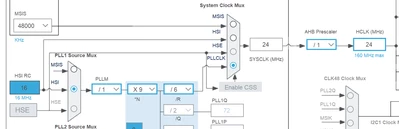
Go to the Clock Configuration tab, select HSI for the PLL source, and PLLCLK for the SYSCLK source. Type "24" in the HCLK box and press enter.

TDK_0-1747223272850.png


2 replies

TDK
TDKBest answer
Super User
May 14, 2025

Create a new project, use the Board Selector to select your board.

Go to the Clock Configuration tab, select HSI for the PLL source, and PLLCLK for the SYSCLK source. Type "24" in the HCLK box and press enter.

TDK_0-1747223272850.png


"If you feel a post has answered your question, please click ""Accept as Solution""."
reedomneck
Associate III
May 14, 2025

@TDK Thank you for your help. So once I enter 24 in HCLK other fields are getting updated which are in dropdown box.

Could you please share if there is any doc/resource available if I want to do manually configuration I mean in register level how do I calculate values for PLL - M,PLL - N,PLL- R ,PLL - Q   

TDK
Super User
May 14, 2025

The register level details of how the chip operates are found in the Reference Manual.

STM32U5 series Arm<Sup>®</Sup>-based 32-bit MCUs - Reference manual


"If you feel a post has answered your question, please click ""Accept as Solution""."