

FPHIL.1
Associate
January 27, 2023
Question

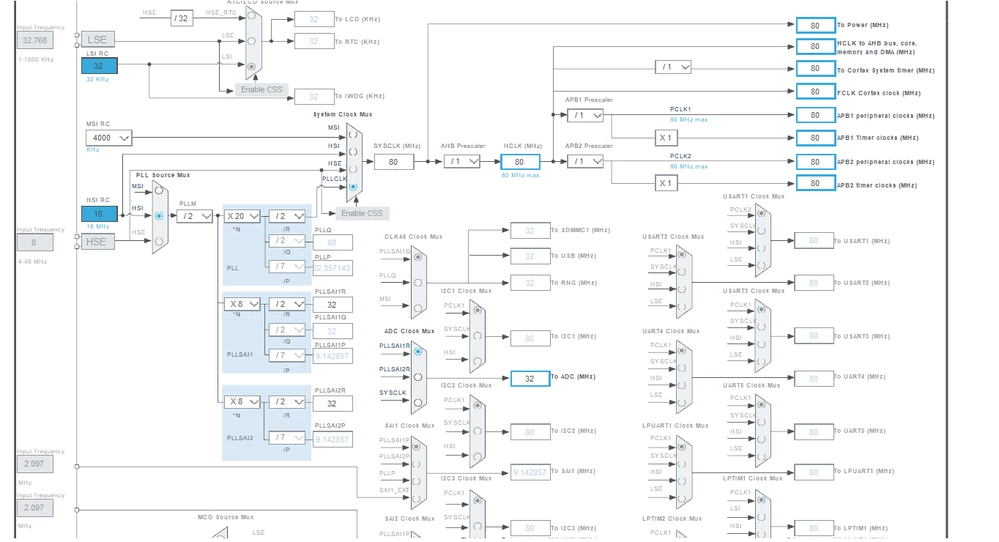
I'm a STMCube Newbie. I'm under the impression when I set up the clocks in STM32CubeIDE, it should generate all the clock configurations. Right now I'm not getting the RCC_PeriphCLKInitTypeDef PeriphClkInit = {0}; Should it be there. See clock config
  • January 27, 2023
  • 1 reply
  • 1454 views

0693W00000Y9NDWQA3.png

This topic has been closed for replies.

1 reply

ST Employee
January 30, 2023

Hello @FPHIL.1​ and welcome to ST Community,

After configuring the Clock tree in stm32Cube and generating the code, you shall find something like this

0693W00000Y9SzuQAF.png 

the RCC_PeriphCLKInitTypeDef PeriphClkInit = {0} functions is used to configure all peripherals clocks settings, such as frequency and prescaler. It is important to understand that all peripherals need to be properly configured to receive the correct clock frequency.

Hope that helps!

FPHIL.1
FPHIL.1Author
Associate
January 30, 2023

Your image is what I get. But I was expecting this as well:

void SystemClock_Config(void)

{

 RCC_OscInitTypeDef RCC_OscInitStruct = {0};

 RCC_ClkInitTypeDef RCC_ClkInitStruct = {0};

 RCC_PeriphCLKInitTypeDef PeriphClkInit = {0};

.

. // whats in your image plus vvvvvv

.

.

PeriphClkInit.PeriphClockSelection = RCC_PERIPHCLK_ADC;

 PeriphClkInit.AdcClockSelection = RCC_ADCCLKSOURCE_PLLSAI1;

 PeriphClkInit.PLLSAI1.PLLSAI1Source = RCC_PLLSOURCE_HSI;

 PeriphClkInit.PLLSAI1.PLLSAI1M = 2;

 PeriphClkInit.PLLSAI1.PLLSAI1N = 8;

 PeriphClkInit.PLLSAI1.PLLSAI1P = RCC_PLLP_DIV7;

 PeriphClkInit.PLLSAI1.PLLSAI1Q = RCC_PLLQ_DIV2;

 PeriphClkInit.PLLSAI1.PLLSAI1R = RCC_PLLR_DIV2;

 PeriphClkInit.PLLSAI1.PLLSAI1ClockOut = RCC_PLLSAI1_ADC1CLK;

 if (HAL_RCCEx_PeriphCLKConfig(&PeriphClkInit) != HAL_OK)

 {

  Error_Handler();

 }

What reference should I use on what to add to the generated code (like this) for other clock configuration details?.

Sincere thanks,

Fred

JChoi.12
Associate
March 12, 2023

Was it solved? I have the same issue.