
Associate
December 9, 2025
Solved

No Altium Designer for CAD symbols generation

  • December 9, 2025
  • 2 replies
  • 556 views

Hi there! Thank you for reading this.

Where has the support for exporting footprints/symbols to Altium Designer from STM32CubeMX gone?

In the promotional video from https://www.st.com/en/development-tools/stm32cubemx.html it appears there is an option for doing this, but when I try it on a recent version of STM32CubeMX no option is available.

What am I missing here?


Check following screenshot of promotional video vs. STM32CubeMX side by side.
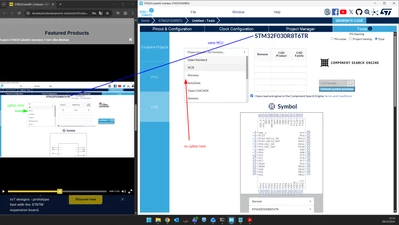
markopesevski_PI_0-1765275639607.png

STM32CubeMX version: 6.16.0

    Best answer by Souhaib MAZHOUD

    Hello @markopesevski_PI 

    Thank you for posting in STCommunity!

    Actually, our team is aware of this issue, and it will be fixed as soon as possible.  (Ticket 222115 This is an internal tracking number and is not accessible or usable by customers).

    KR, Souhaib

    2 replies

    Souhaib MAZHOUDBest answer
    Technical Moderator
    December 9, 2025

    Hello @markopesevski_PI 

    Thank you for posting in STCommunity!

    Actually, our team is aware of this issue, and it will be fixed as soon as possible.  (Ticket 222115 This is an internal tracking number and is not accessible or usable by customers).

    KR, Souhaib

    To give better visibility on the answered topics, please click on Accept as Solution on the reply which solved your issue or answered your question.
    Associate
    December 9, 2025

    Thank you for your prompt answer, looking forward to hear more.

    Associate
    December 18, 2025

    I've found a temporary workaround in case anyone happens to stumble upon this same issue. Maybe this can help point the team in the right direction as well.

    Making the following change in your *.ioc STM32CubeMX project file enables selecting the "Altium Designer" option again in the "Tools > CAD" menu. Take care that when you save the project again from STM32CubeMX, it overwrites it, undoing the workaround.

    -CAD.provider=Component Search Engine

    +CAD.provider=Ultra Librarian