

ADesp.1
Associate II
July 21, 2025
Solved

Nucleo-H755ZI-Q wrong HSE setting ?

  • July 21, 2025
  • 1 reply
  • 246 views

Hello, 

From the UM2408 document, the HSE is connected to ST-Link MCO output which is supposed to be 8MHz.
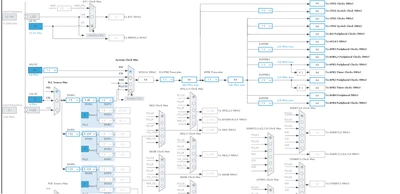
When you select Nucleo-H755ZI-Q board, the HSE input is locked to 25MHz. 
ADesp1_0-1753100480424.png

Is it a CubeMX bug or does the MCO clock really 25MHz ? 
Best answer by TDK

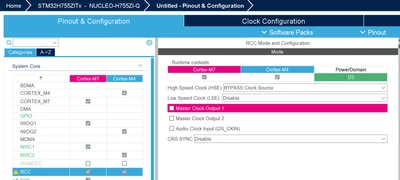
It's grayed out, which means HSE is not enabled.

Enable HSE in the RCC tab and you can set it to 8 MHz or whatever the ST-Link is outputting, which is configurable in the ST-Link firmware upgrade.

By default, it should be set to HSE Bypass at 8 MHz.

TDK_0-1753101946521.png


1 reply

TDK
TDKBest answer
Super User
July 21, 2025

It's grayed out, which means HSE is not enabled.

Enable HSE in the RCC tab and you can set it to 8 MHz or whatever the ST-Link is outputting, which is configurable in the ST-Link firmware upgrade.

By default, it should be set to HSE Bypass at 8 MHz.

TDK_0-1753101946521.png


"If you feel a post has answered your question, please click ""Accept as Solution""."
ADesp.1
ADesp.1Author
Associate II
July 21, 2025

That was an easy find, I should have a deeper look before !
Thanks a lot