
Associate
August 5, 2024
Solved

Nucleo-U545RE-Q in STM32CubeIDE (included CubeMX part) bad IOC file

  • August 5, 2024
  • 1 reply
  • 2344 views

New to STM32. Ordered myself a Nucleo-U545RE-Q Board for software generation used in an embedded project later. Generated a project and started working on it. First it worked just fine. But since mid of last week (start of August), most likely after an update which was installed, it wont crate a working IOC for new projects with the board anymore. New projects for other controllers or other Nucleo-boards work just fine.

More specifically as seen in following screenshot, all pins which should be pre- configured with a function for the Nucleo board produce a conflict. The USART1 function is fully grayed out and not configurable.
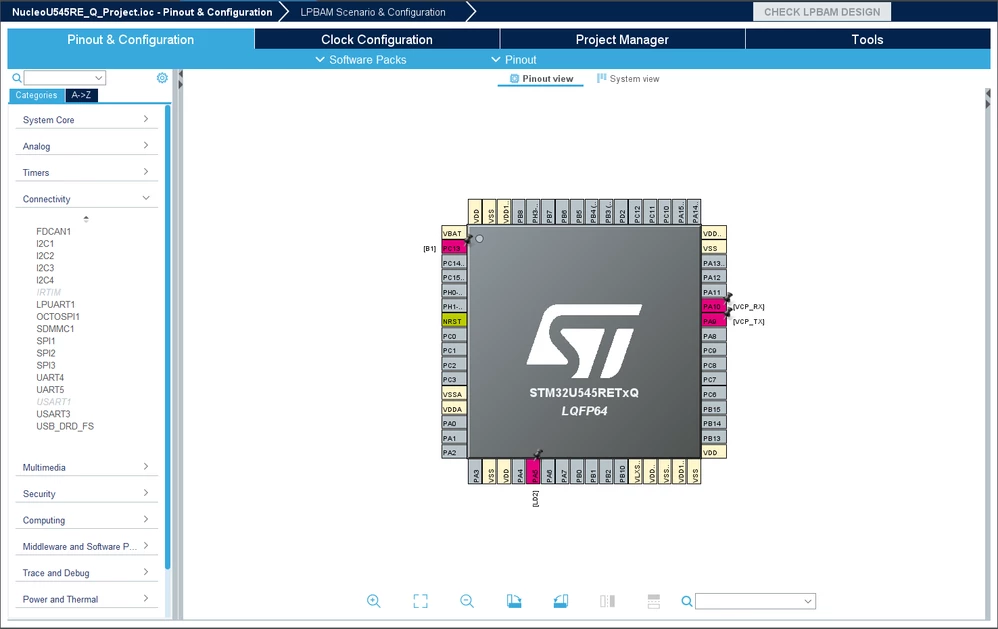
Nucleo-U545RE-Q_Proj_crea4.PNG


During project creation the options for the USER features are ticked as seen in following picture:
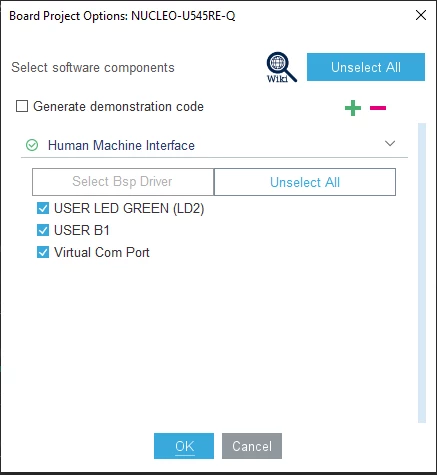
 

Nucleo-U545RE-Q_Proj_crea3.PNG


the right pins seem to get configured in a wrong way.

My current STM32CubeIDE Version: 1.16.0 
                                                 Build: 21983_20240628_1741 (UTC)

current STM32CubeMX version inside the IDE:  6.12.0.202406281431


Am i doing something wrong or is this a bug introduced via the last update?
 

Best answer by TDK

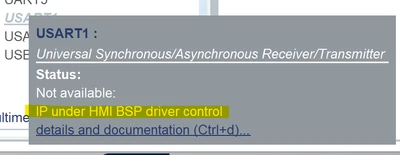
When you use that nucleo board, the peripherals are handled with the BSP, rather than with the typical MX/HAL functions. The "disabled" pins reflect this. Generate the project, you'll see the proper initialization calls are still being made.

TDK_0-1722863516844.png

If you want a "normal" CubeMX project, create a project from the chip instead of the board and configure these peripherals manually.

Presumably a change in how they've decided to do things, but doesn't appear the be a bug.

1 reply

TDK
TDKBest answer
Super User
August 5, 2024

When you use that nucleo board, the peripherals are handled with the BSP, rather than with the typical MX/HAL functions. The "disabled" pins reflect this. Generate the project, you'll see the proper initialization calls are still being made.

TDK_0-1722863516844.png

If you want a "normal" CubeMX project, create a project from the chip instead of the board and configure these peripherals manually.

Presumably a change in how they've decided to do things, but doesn't appear the be a bug.

"If you feel a post has answered your question, please click ""Accept as Solution""."
ELABI.1
Technical Moderator
August 5, 2024

Hello @HannesO 

You can click on "Unselect All" or on the "Pinout"  then Clear Pinouts" button to reset the pin configurations and resolve conflicts, so that you can start configuring the pins from scratch. 

Thank you.

Best regards,

ELABI.1


To give better visibility on the answered topics, please click on Accept as Solution on the reply which solved your issue or answered your question.