
Associate II
July 2, 2024
Solved

PLLP can't be turned on

  • July 2, 2024
  • 3 replies
  • 1623 views

I'm working on page 30 of the STM tutorial for the B-G474E-DPOW discovery kit at this link

https://www.st.com/resource/en/application_note/dm00706304-buck-current-mode-with-the-bg474edpow1-discovery-kit-stmicroelectronics.pdf


I get this warning when I try to follow the directions
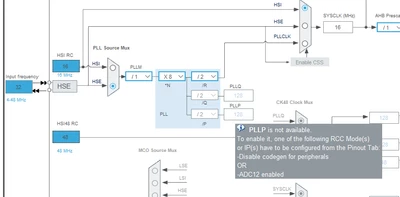
 

decook1110_0-1719895881441.png


Can someone explain how to fix this so I can move to the next step in the tutorial.

I've tried looking up codegen in the reference manual and also how to manipulate ADC12.

Thanks

Dave


Best answer by STTwo-32

Hello @decook1110 

In order to set the [PLLP Clock] or [SYSCLK] as source Clock for the ADC12 or ADC345, just change the clock Prescaler to Asynchronous clock mode in the ADC_Settings.

Best Regards.

STTwo-32

3 replies

Associate II
July 3, 2024
STTwo-32
STTwo-32Best answer
Technical Moderator
July 4, 2024

Hello @decook1110 

In order to set the [PLLP Clock] or [SYSCLK] as source Clock for the ADC12 or ADC345, just change the clock Prescaler to Asynchronous clock mode in the ADC_Settings.

Best Regards.

STTwo-32

Associate II
July 5, 2024

STTwo-32

Thanks for the work around, that fixed the clock so I can move past that,

Dave