
Associate II
February 21, 2024
Solved

Problem with building the STM32H750B-DK example of STM32CubeExpansion_SBSFU_V2.6.2

  • February 21, 2024
  • 2 replies
  • 4910 views

Hello,
I try to build the STM32CubeExpansion_SBSFU_V2.6.2 for STM32H750B-DK. I use STM32CubeIDE Version: 1.14.0  Build: 19471_20231121_1200 (UTC) on Windows 10.


I got several environment issues:
Building SECoreBin failed for multiple reasons.
It needed prepareimage.py at C:\. I copied it there.
The prebuild.sh had issues with the "pwd" command that returns nothing.
I specified basedir and current_directory with the absolute path values.

Everything pass.

Finally I got problems when prepareimage.py tries to encrypt the binaries with the command:

python /prepareimage.py enc -k ../../../2_Images_SECoreBin/STM32CubeIDE/../Binary/OEM_KEY_COMPANY1_key_AES_CBC.bin -i ../../../2_Images_SECoreBin/STM32CubeIDE/../Binary/iv.bin ../UserApp.bin ..//../Binary/UserApp.sfu


I found that the prepareimage.py uses Python module "keys" that is missing on my build machine.
I didn't find a way to install it.
I believe that I missed the step to configure the build environment. Could you help me please to find a document explaining the environment setup?

Thank you in advance.
This topic has been closed for replies.
Best answer by KDJEM.1

Hello @tarbal ,

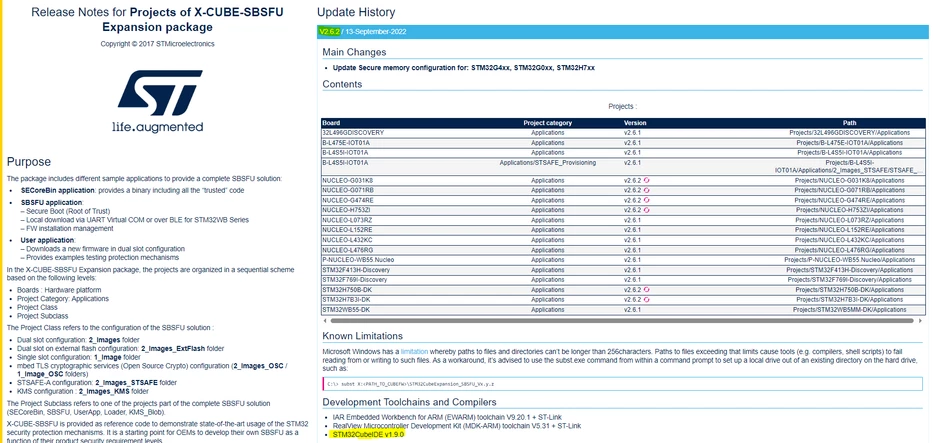
It is mentioned in the release note projects of X-CUBE-SBSFU Expansion package that the development toolchain and compiler used for this package is STM32CubeIDE v1.9.0. For that please try to update the STM32CubeIDE toolchain.

KDJEM1_0-1706614111271.png

Also, possible build issues may be caused by too long path names. I suggest you to unzip the package in a short path like e.g. C:\work.

May this discussion can help you.

Please let me know if the issue is solved or not.

Thank you.

Kaouthar

2 replies

KDJEM.1
KDJEM.1Best answer
Technical Moderator
February 22, 2024

Hello @tarbal ,

It is mentioned in the release note projects of X-CUBE-SBSFU Expansion package that the development toolchain and compiler used for this package is STM32CubeIDE v1.9.0. For that please try to update the STM32CubeIDE toolchain.

KDJEM1_0-1706614111271.png

Also, possible build issues may be caused by too long path names. I suggest you to unzip the package in a short path like e.g. C:\work.

May this discussion can help you.

Please let me know if the issue is solved or not.

Thank you.

Kaouthar

To give better visibility on the answered topics, please click on Accept as Solution on the reply which solved your issue or answered your question.
tarbalAuthor
Associate II
February 22, 2024

Thank you for advise.
I couldn't find  STM32CubeIDE 1.9.0 The latest version on the link you provided is 1.4.1.

KDJEM.1
Technical Moderator
February 22, 2024

Hello @tarbal ,

You can find the STM32CubeIDE 1.9.0 on this link and by choosing the version "1.9.0" in "Select version" as shown in the below figure:

KDJEM1_0-1708609839529.png

I hope this help you.

Kaouthar


To give better visibility on the answered topics, please click on Accept as Solution on the reply which solved your issue or answered your question.
Guillaume K
ST Employee
February 22, 2024

Also upgrade to STM32CubeIDE 1.4.1. This version corrects the problem with "pwd" command missing in STM32CubeIDE 1.14.0.

Guillaume K
ST Employee
February 22, 2024

I mean STM32CubeIDE 1.14.1.

tarbalAuthor
Associate II
February 22, 2024

Hello Guillame,

Thank you.
I installed the version 1.9.0 as recommended in the release notes. It works.