

CTapp.1
Senior III
March 11, 2026
Question

Screen rendering when using CubeMX on a machine through a KVM

  • March 11, 2026
  • 4 replies
  • 243 views

I am running CubeMX in a WIndows on Arm VM on a MacMini, which is connected to a KVM. When I switch the KVM to another machine and come back, all of the windows have changed size (not unexpected). They all revert to their original sizes and positions, but the window for CubeMX does not redraw/scale it's content.

For example, I see this before I switch away:
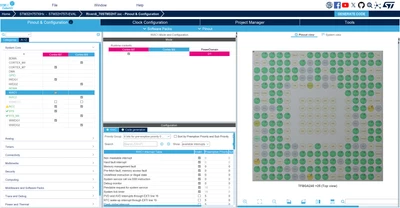
Before.png

And this when I switch back (note the double menu):
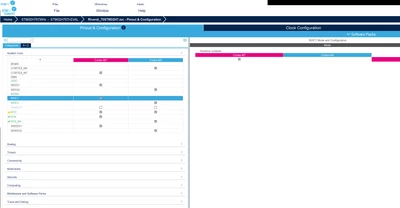
After.png

Dragging the edge of the window to cause a (very small) change in size restores the expected view.

CubeIDE and TouchGFX do not show this behaviour.

4 replies

Andrew Neil
Super User
March 11, 2026

What "KVM" are you using?

IMO, a true KVM should leave the computer thinking that the display is still attached.

But a lot of cheap/consumer "KVM" boxes nowadays effectively just unplug the display.

On Windows, this causes the OS to reconfigure itself from dual-screen to single-screen mode - and not all applications cope well with that.


Do you see the same effect if you do literally just unplug & re-plug the display?

A complex system that works is invariably found to have evolved from a simple system that worked.A complex system designed from scratch never works and cannot be patched up to make it work.
CTapp.1
CTapp.1Author
Senior III
March 12, 2026

@Andrew Neil wrote:

What "KVM" are you using?

IMO, a true KVM should leave the computer thinking that the display is still attached.

But a lot of cheap/consumer "KVM" boxes nowadays effectively just unplug the display.

On Windows, this causes the OS to reconfigure itself from dual-screen to single-screen mode - and not all applications cope well with that.


It's an AV Access 4KSW41-KVM-Pro. About the best I could find with 4K HDMI that wasn't crazy money. I've tried a few, and this one causes fewest problems (but the hotkey switching doesn't work). A lot of them are junk and simply don't work with most setups (screen information not passed through, USB failing to enumerate). I've often considered making my own so that I can get the software working properly!

Only running single screen in this case, but the single/dual screen behaviour is a pain in other cases.


Do you see the same effect if you do literally just unplug & re-plug the display?

No, that seems to be ok. I think the trigger may be something to do with VMware and screen changes/notification when the KVM switches, with MX not processing all of the resolution change notifications. Hard to tell though.

All posts are made in a personal capacityMISRA C++ ChairMISRA C WG MemberDirector The MISRA Consortium Limited (TMCL)
Pavel A.
Super User
March 11, 2026

This is interesting observation. IIRC somebody complained about similar visual error (double menu) on Windows or Linux, but without VMs. Maybe this could help catch the root cause.


CTapp.1
CTapp.1Author
Senior III
March 12, 2026

It's even worse if I switch away when MX is loading and it offers a firmware upgrade:

Firmware update available.png

The popup is modal, so I can't resize to make the content visible. Need to cancel the load and start again to recover.

All posts are made in a personal capacityMISRA C++ ChairMISRA C WG MemberDirector The MISRA Consortium Limited (TMCL)
Pavel A.
Super User
March 12, 2026

What if you simply disconnect and reconnect the display, without the KVM? (is the display DP or thunderbolt/USBC?)

This test is to understand whether the KVM maintains presence of the display when it switches away.