HNefz.1
Associate
February 17, 2023
Question

SDCard Not Working (FR_NOT_READY) on CubeIDE 1.10.1

  • February 17, 2023
  • 6 replies
  • 2251 views

Hello Guys,

Last week I tried to add an SDCard Module on my STM32L476 project and i followed this tutorial: embetronicx.com/tutorials/microcontrollers/stm32/stm32-sd-card-interfacing-with-example/

I can't read the SD in fact I get back FR_NOT_READY when I execute the f_mount method.

Please Note that: The project already contains FREERTOS and it used TIM1 as a timebase source for SYS as it was recommanded so i had to add my timers function in the timer interruption call back like this:

void HAL_TIM_PeriodElapsedCallback(TIM_HandleTypeDef *htim)

{

 /* USER CODE BEGIN Callback 0 */

if (htim->Instance == TIM1) {

 if(Timer1 > 0)

  Timer1--;

 if(Timer2 > 0)

  Timer2--;

 }

 /* USER CODE END Callback 0 */

 if (htim->Instance == TIM1) {

  HAL_IncTick();

 }

 /* USER CODE BEGIN Callback 1 */

 if (htim->Instance == TIM2) {

 DebounceHWTimerHandle(&Joystick);

  }

 /* USER CODE END Callback 1 */

}

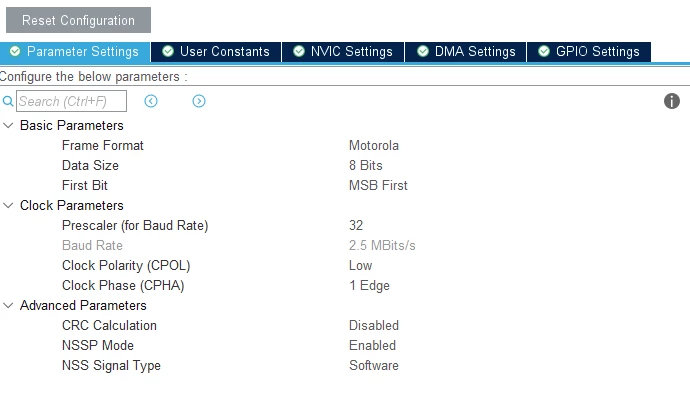
This is the setup i am using on cubeMX:
0693W00000aH53XQAS.png0693W00000aH53XQAS.png0693W00000aH53XQAS.png 

I used similar tutorials with the same steps in previous CubeIDE versions and on SWB4ST32 and it worked fine

This topic has been closed for replies.

6 replies

Technical Moderator
March 15, 2023

Hello @Community member​,

Could you provide more details about CubeIDE version working/not working also, CubeMX and the Cube firmware package?

You may use some external 5V power source. It is possible that the current required for the module is not sufficient.

To give better visibility on the answered topics, please click on Accept as Solution on the reply which solved your issue or answered your question.Best regards,FBL
Technical Moderator
March 29, 2023

@Community member​, Make sure that the baudrate in the SPI config is respected and make sure the chip select is connected. Any feedback would be appreciated.

To give better visibility on the answered topics, please click on Accept as Solution on the reply which solved your issue or answered your question.Best regards,FBL
Technical Moderator
March 29, 2023

Attached the configuration.

To give better visibility on the answered topics, please click on Accept as Solution on the reply which solved your issue or answered your question.Best regards,FBL
HNefz.1
HNefz.1Author
Associate
March 30, 2023

Hello F.Belaid,

Thanks for your reply,

I tried your proposed solution sadly it didn't work.

It would be appreciated if you uend me the project you tested on the SDCard

Please Note that i'am using CubeIDE V1.10.1, CubeMX 6.6.1 and Firmware Package L4 V1.17.2

Thanks in advance

Technical Moderator
March 30, 2023

Hi @Community member​ ​, 

Here is the project and the working environment:

STM32CubeIDE V1.11.2

STM32CubeMX V6.7.0

Firmware Package L4 V1.17.2

To give better visibility on the answered topics, please click on Accept as Solution on the reply which solved your issue or answered your question.Best regards,FBL
HNefz.1
HNefz.1Author
Associate
May 19, 2023

Hello @F.Belaid​ ,

thanks for the reply and i am sorry for the late response

i tried running the project you sent me today and it works

however after regenrating the project using cubeIDE's cubeMX the project now displays a new behavor:

the system harfault directly pass the fmount function .

even trying to enter the function using F5(step into) option leads to hardfault

and the hardfault is said to be caused by a <signal handler called>() at 0xfffffffd

keep in mind that this was tested on cubeIDE 1.12.0 with cubeMX 6.8.0 and FW package 1.17.2 and cubeIDE 1.11.0 with cubeMX 6.7.0 and FW package 1.17.2 with the same results

please note that i tried a version of the code without freertos based on the tutorial mentionned above on cubeide 1.12 and it runned with no hardfault

i included a copy of the project on cube IDE 1.11 below