
IP.2
Associate II
December 6, 2024
Solved

SMPS Configuration

  • December 6, 2024
  • 1 reply
  • 991 views

Using STM32CubeMX Version 6.11.1 for code generation of STM32U545RETxQ LQFP64.

When pressing "Generate Code" there is a message recommending SMPS setting from the PWR menu.

However, no SMPS there and not anywhere in the configuration menu. (Attached)

Any idea?

Best answer by STTwo-32

Hello @IP.2 

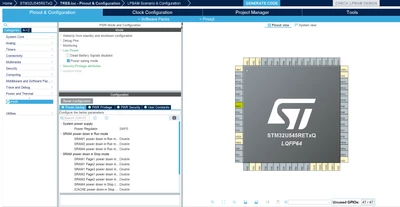
To configure the SMPS you need to go to: Power and Thermal>PWR>Low Power and check the box Power Saving mode. After that, on the configuration tab go to Power Saving>System power supply and you can configure the Power Regulator to LDO or SMPS:
STTwo32_0-1733471515472.png

PS: Make sure to use the last version of the STM32CubeMX (V6.13.0).


Best Regards.

STTwo-32 

1 reply

STTwo-32
STTwo-32Best answer
Technical Moderator
December 6, 2024

Hello @IP.2 

To configure the SMPS you need to go to: Power and Thermal>PWR>Low Power and check the box Power Saving mode. After that, on the configuration tab go to Power Saving>System power supply and you can configure the Power Regulator to LDO or SMPS:

STTwo32_0-1733471515472.png

PS: Make sure to use the last version of the STM32CubeMX (V6.13.0).


Best Regards.

STTwo-32
