
Associate II
February 7, 2024
Solved

STM32CubeMX bug for FDCAN?

  • February 7, 2024
  • 3 replies
  • 1583 views

Hi ST

I am using STM32CubeMX v6.10.0 with selected MCU STM32H563ZITx.
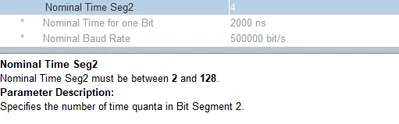
When configuring FDCAN1 I may have found a bug in the tool. The below two Nominal Time Seg1 and Seg2 say that the lowest value is "2" and the tool is limiting setting it to "1" which I think is a valid setting.
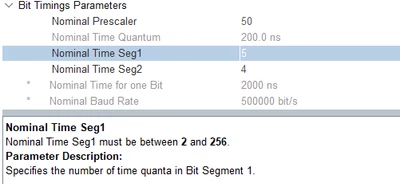
Imre_0-1707302997348.png

Imre_1-1707303014423.png

The RM0481 Rev 1 says that the minimum value that is interpreted by the hardware of that value is "1" (when register segment is set to "0")
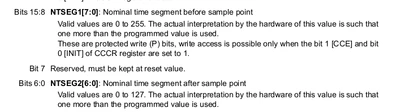
Imre_2-1707303308710.png

Can someone please verify my findings?

Br
Imre

This topic has been closed for replies.
Best answer by mƎALLEm

Hello,

Yes according to the RM:  NTSEG1 is in the range [0:255] and NTSEG2 ins the range [0:127].

In the HAL there is a substraction to meet these ranges:

 hfdcan->Instance->NBTP = ((((uint32_t)hfdcan->Init.NominalSyncJumpWidth - 1U) << FDCAN_NBTP_NSJW_Pos) | \
 (((uint32_t)hfdcan->Init.NominalTimeSeg1 - 1U) << FDCAN_NBTP_NTSEG1_Pos) | \
 (((uint32_t)hfdcan->Init.NominalTimeSeg2 - 1U) << FDCAN_NBTP_NTSEG2_Pos) | \
 (((uint32_t)hfdcan->Init.NominalPrescaler - 1U) << FDCAN_NBTP_NBRP_Pos));

So, to me, in CubeMx the ranges should be:

  • BS1: [1:256] 
  • BS2: [1:128]

I'm raising this behavior internally and get back to you with feedback

3 replies

mƎALLEm
mƎALLEmBest answer
Technical Moderator
February 7, 2024

Hello,

Yes according to the RM:  NTSEG1 is in the range [0:255] and NTSEG2 ins the range [0:127].

In the HAL there is a substraction to meet these ranges:

 hfdcan->Instance->NBTP = ((((uint32_t)hfdcan->Init.NominalSyncJumpWidth - 1U) << FDCAN_NBTP_NSJW_Pos) | \
 (((uint32_t)hfdcan->Init.NominalTimeSeg1 - 1U) << FDCAN_NBTP_NTSEG1_Pos) | \
 (((uint32_t)hfdcan->Init.NominalTimeSeg2 - 1U) << FDCAN_NBTP_NTSEG2_Pos) | \
 (((uint32_t)hfdcan->Init.NominalPrescaler - 1U) << FDCAN_NBTP_NBRP_Pos));

So, to me, in CubeMx the ranges should be:

  • BS1: [1:256] 
  • BS2: [1:128]

I'm raising this behavior internally and get back to you with feedback

"To give better visibility on the answered topics, please click on ""Accept as Solution"" on the reply which solved your issue or answered your question."
mƎALLEm
Technical Moderator
February 8, 2024

Hello,

Internal ticket submitted to treat this issue (172861) and the bug is confirmed. It will be fixed in one of the coming versions of CubeMx.

Thank you for raising the issue.

"To give better visibility on the answered topics, please click on ""Accept as Solution"" on the reply which solved your issue or answered your question."
mƎALLEm
Technical Moderator
March 22, 2024

Issue fixed in the latest version of CubeMx V6.11.0 already available on the web.

"To give better visibility on the answered topics, please click on ""Accept as Solution"" on the reply which solved your issue or answered your question."