

M_Schmidt
Associate II
November 25, 2025
Solved

STM32CubeMX CAD Export Options (e.g. KiCAD) missing

  • November 25, 2025
  • 1 reply
  • 277 views

Hello ST Community,

STM32CubeMX 6.16.0 release summary:
– Migrated to SamacSys as a new CAD provider for STM32CubeMX

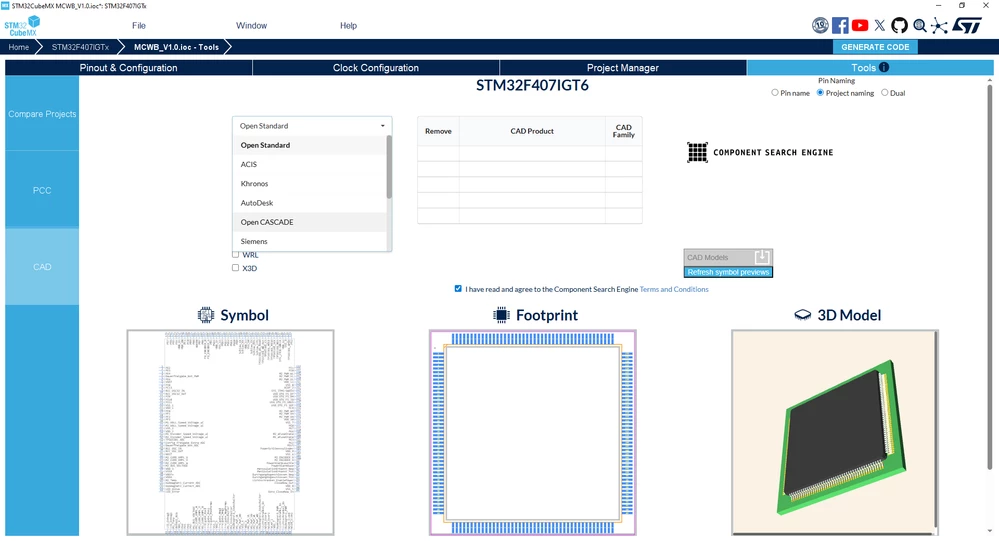
With the new version of the stm32cubemx, the CAD tab in tools (see screenshot) is missing the previously available KiCAD and other options.
M_Schmidt_0-1764079018385.png


Available options are: (Open Standard, ACIS, Khronos, AutoDesk, Open CASCADE, Siemens, Rhino, STL, Pixar, RS, Mentor).

Export to KiCAD used to be available, even the featured video
"A quick STM32CubeMX overview, From Ultra librarian" on the STM32CubeMx Product Overview features Altium, KiCAD and Cadence,... as export options in the dropdown menu.

Componentsearchengine.com supports KiCAD, Altium, ... therefor I am confused why it is not supported in the STM32CubeMX.
Is that intended? Do we have to use an older STM32CubeMX Version if we want the export to KiCAD option?


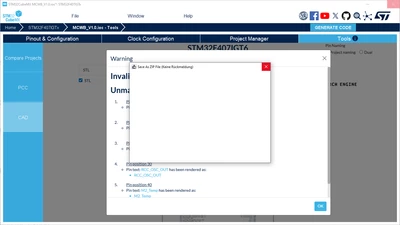
Bug1: Selecting STL and pressing the download button crashes STM32CubeMX after choosing a file location(see screenshot 2)
M_Schmidt_1-1764080134218.png

Bug2: Selecting STL and another File Format and downloading twice in a row crashes STM32CubeMX as well.

I have not tried it on another machine yet.

Best answer by Ghofrane GSOURI

Hello @M_Schmidt 

Regarding Bug 1 and 2 :These limitations have been identified and escalated to the development team under internal ticket IDs 221923 and 222204. They will be addressed and resolved as soon as possible.

Regarding the KiCAD missing option :A ticket has been escalated to dev team 222115 to correct this behavior.

THX
Ghofrane

1 reply

Ghofrane GSOURI
Ghofrane GSOURIBest answer
Technical Moderator
November 25, 2025

Hello @M_Schmidt 

Regarding Bug 1 and 2 :These limitations have been identified and escalated to the development team under internal ticket IDs 221923 and 222204. They will be addressed and resolved as soon as possible.

Regarding the KiCAD missing option :A ticket has been escalated to dev team 222115 to correct this behavior.

THX
Ghofrane

To give better visibility on the answered topics, please click on Accept as Solution on the reply which solved your issue or answered your question.
M_Schmidt
M_SchmidtAuthor
Associate II
November 26, 2025

Hello @Ghofrane,

I have accepted as a solution, as you have created internal tickets for all the mentioned bugs/missing features, therefor the question has been answered.

Could you inform me, once there is a new update, where the issues have been resolved?

Thank you very much!

Ghofrane GSOURI
Technical Moderator
November 26, 2025

Hello @M_Schmidt 

I will keep you informed of any updates.

THX

Ghofrane

To give better visibility on the answered topics, please click on Accept as Solution on the reply which solved your issue or answered your question.