
Solved
stm32cubemx failed to open ACCESS TO MCU SELECTOR
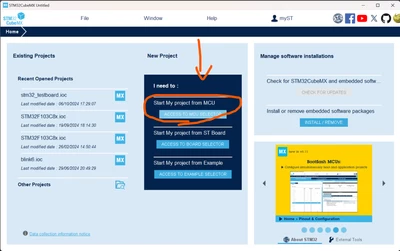
When I click ACCESS TO MCU SELECTOR, the console prints :
(I tried uninstalling and reinstalling, but the problem persists)
command:jre\bin\java -jar STM32CubeMX.exe -i
output:
2024-10-09 19:44:07,992 [INFO] DbMcus:218 - Found 0 MCUs, 0 are supported
2024-10-09 19:44:07,993 [INFO] ApiDb:423 - Load user favorites file C:\Users\PCH/.stm32cubemx/favorites.mcus.txt: 0 item(s)
2024-10-09 19:44:07,993 [INFO] ApiDb:427 - User favorites MCUs=[]
2024-10-09 19:44:07,993 [INFO] DbMcus:224 - Set 0 / 0 favorites MCUs
Exception in thread "AWT-EventQueue-0" java.lang.NullPointerException: Cannot load from int array because "minMax" is null
at com.st.microxplorer.mcufinder.gui.mcuselector.McuFilterPanel.createControls(McuFilterPanel.java:1476)
at com.st.microxplorer.mcufinder.gui.mcuselector.McuFilterPanel.createGUI(McuFilterPanel.java:241)
at com.st.microxplorer.mcufinder.gui.selector.FilterPanel.<init>(FilterPanel.java:124)
at com.st.microxplorer.mcufinder.gui.mcuselector.McuFilterPanel.<init>(McuFilterPanel.java:206)
at com.st.microxplorer.mcufinder.gui.mcuselector.McuMultiScanPanel.<init>(McuMultiScanPanel.java:119)
at com.st.microxplorer.mcufinder.gui.selector.MultiSelectorPanel.createMcuSelectorPanel(MultiSelectorPanel.java:204)
at com.st.microxplorer.mcufinder.gui.selector.MultiSelectorPanel.setSelectedTabIndex(MultiSelectorPanel.java:427)
at com.st.microxplorer.mcufinder.gui.selector.MultiSelectorDialog.setSelectedTabIndex(MultiSelectorDialog.java:185)
at com.st.microxplorer.mcufinder.gui.selector.MultiSelectorDialog.<init>(MultiSelectorDialog.java:61)
at com.st.microxplorer.plugins.filemanager.engine.MainFileManager.userNewConfig(MainFileManager.java:167)
at com.st.microxplorer.plugins.filemanager.FileManagerView.getSpecificTask(FileManagerView.java:223)
at com.st.microxplorer.maingui.HomeNewTaskLinePanel.jButtonNewConfigurationMCUActionPerformed(HomeNewTaskLinePanel.java:126)
at com.st.microxplorer.maingui.HomeNewTaskLinePanel.actionPerformed(HomeNewTaskLinePanel.java:86)
at java.desktop/javax.swing.AbstractButton.fireActionPerformed(AbstractButton.java:1972)
at java.desktop/javax.swing.AbstractButton$Handler.actionPerformed(AbstractButton.java:2313)
at java.desktop/javax.swing.DefaultButtonModel.fireActionPerformed(DefaultButtonModel.java:405)
at java.desktop/javax.swing.DefaultButtonModel.setPressed(DefaultButtonModel.java:262)
at java.desktop/javax.swing.plaf.basic.BasicButtonListener.mouseReleased(BasicButtonListener.java:279)
at java.desktop/java.awt.AWTEventMulticaster.mouseReleased(AWTEventMulticaster.java:297)
at java.desktop/java.awt.Component.processMouseEvent(Component.java:6626)
at java.desktop/javax.swing.JComponent.processMouseEvent(JComponent.java:3389)
at java.desktop/java.awt.Component.processEvent(Component.java:6391)
at java.desktop/java.awt.Container.processEvent(Container.java:2266)
at java.desktop/java.awt.Component.dispatchEventImpl(Component.java:5001)
at java.desktop/java.awt.Container.dispatchEventImpl(Container.java:2324)
at java.desktop/java.awt.Component.dispatchEvent(Component.java:4833)
at java.desktop/java.awt.LightweightDispatcher.retargetMouseEvent(Container.java:4948)
at java.desktop/java.awt.LightweightDispatcher.processMouseEvent(Container.java:4575)
at java.desktop/java.awt.LightweightDispatcher.dispatchEvent(Container.java:4516)
at java.desktop/java.awt.Container.dispatchEventImpl(Container.java:2310)
at java.desktop/java.awt.Window.dispatchEventImpl(Window.java:2780)
at java.desktop/java.awt.Component.dispatchEvent(Component.java:4833)
at java.desktop/java.awt.EventQueue.dispatchEventImpl(EventQueue.java:775)
at java.desktop/java.awt.EventQueue$4.run(EventQueue.java:720)
at java.desktop/java.awt.EventQueue$4.run(EventQueue.java:714)
at java.base/java.security.AccessController.doPrivileged(AccessController.java:399)
at java.base/java.security.ProtectionDomain$JavaSecurityAccessImpl.doIntersectionPrivilege(ProtectionDomain.java:86)
at java.base/java.security.ProtectionDomain$JavaSecurityAccessImpl.doIntersectionPrivilege(ProtectionDomain.java:97)
at java.desktop/java.awt.EventQueue$5.run(EventQueue.java:747)
at java.desktop/java.awt.EventQueue$5.run(EventQueue.java:745)
at java.base/java.security.AccessController.doPrivileged(AccessController.java:399)
at java.base/java.security.ProtectionDomain$JavaSecurityAccessImpl.doIntersectionPrivilege(ProtectionDomain.java:86)
at java.desktop/java.awt.EventQueue.dispatchEvent(EventQueue.java:744)
at java.desktop/java.awt.EventDispatchThread.pumpOneEventForFilters(EventDispatchThread.java:203)
at java.desktop/java.awt.EventDispatchThread.pumpEventsForFilter(EventDispatchThread.java:124)
at java.desktop/java.awt.EventDispatchThread.pumpEventsForHierarchy(EventDispatchThread.java:113)
at java.desktop/java.awt.EventDispatchThread.pumpEvents(EventDispatchThread.java:109)
at java.desktop/java.awt.EventDispatchThread.pumpEvents(EventDispatchThread.java:101)
at java.desktop/java.awt.EventDispatchThread.run(EventDispatchThread.java:90)

stm32cubemx version: 6.12.1