

Question
stm32cubemx failed to open ACCESS TO MCU SELECTOR
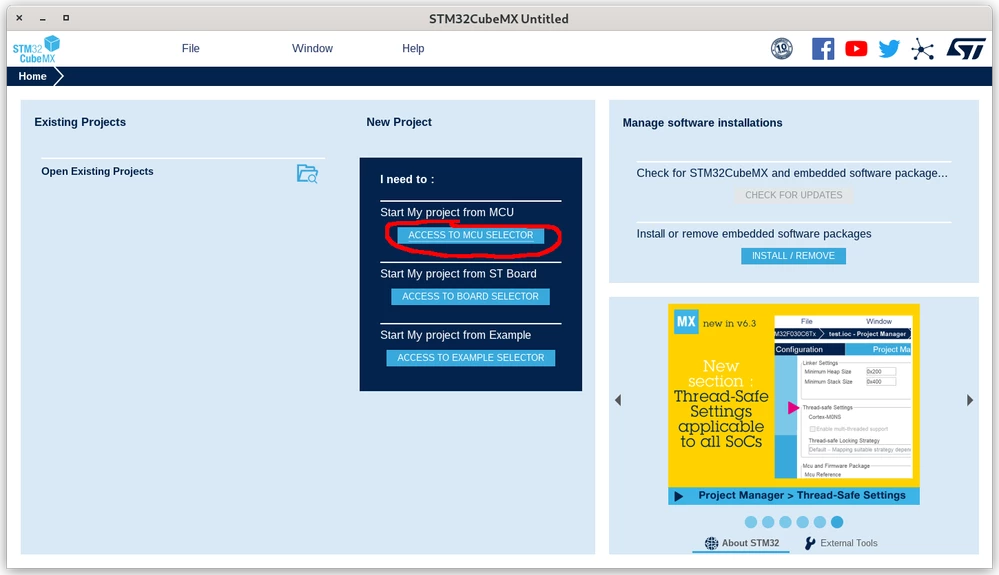 When I click ACCESS TO MCU SELECTOR, the console prints :
2023-01-18 14:35:27,011 [INFO] MultiScanPanel:196 - Auto-refresh data requested => check proxy status ongoing
2023-01-18 14:35:27,014 [INFO] FinderPluginLoader:92 - Searching for filters in installed packs
Failed to load native library:sqlite-3.34.0-2c9e6182-4a79-4303-b6d5-9dd5ff21406c-libsqlitejdbc.so. osinfo: Linux/x86_64
2023-01-18 14:35:27,102 [ERROR] MicroXplorer:720 - Failed to load native library:sqlite-3.34.0-2c9e6182-4a79-4303-b6d5-9dd5ff21406c-libsqlitejdbc.so. osinfo: Linux/x86_64
java.lang.UnsatisfiedLinkError: /tmp/sqlite-3.34.0-2c9e6182-4a79-4303-b6d5-9dd5ff21406c-libsqlitejdbc.so: /tmp/sqlite-3.34.0-2c9e6182-4a79-4303-b6d5-9dd5ff21406c-libsqlitejdbc.so: failed to map segment from shared object
com.st.microxplorer.db.DbException: Can't connect to CubeFinder SQLite database (/home/maegami/.stmcufinder/plugins/mcufinder/mcu/cube-finder-db.db): Error opening connection
	at com.st.microxplorer.mcufinder.db.DbUtils.logErrorAndThrowException(DbUtils.java:241)
	at com.st.microxplorer.mcufinder.db.ApiDb.getConnection(ApiDb.java:578)
	at com.st.microxplorer.mcufinder.db.ApiDb.getVersion(ApiDb.java:613)
	at com.st.microxplorer.mcufinder.db.ApiDb.checkCubeFinderDbVersion(ApiDb.java:664)
	at com.st.microxplorer.mcufinder.db.DbMcusSqlite.<init>(DbMcusSqlite.java:159)
	at com.st.microxplorer.mcufinder.db.DbMcus.getDbManager(DbMcus.java:175)
	at com.st.microxplorer.mcufinder.gui.mcuselector.McuMultiScanPanel.getDB(McuMultiScanPanel.java:58)
	at com.st.microxplorer.mcufinder.gui.mcuselector.McuMultiScanPanel.<init>(McuMultiScanPanel.java:107)
	at com.st.microxplorer.mcufinder.gui.selector.MultiSelectorPanel.createMcuSelectorPanel(MultiSelectorPanel.java:201)
	at com.st.microxplorer.mcufinder.gui.selector.MultiSelectorPanel.setSelectedTabIndex(MultiSelectorPanel.java:424)
	at com.st.microxplorer.mcufinder.gui.selector.MultiSelectorDialog.setSelectedTabIndex(MultiSelectorDialog.java:183)
	at com.st.microxplorer.mcufinder.gui.selector.MultiSelectorDialog.<init>(MultiSelectorDialog.java:58)
	at com.st.microxplorer.plugins.filemanager.engine.MainFileManager.userNewConfig(MainFileManager.java:149)
	at com.st.microxplorer.plugins.filemanager.FileManagerView.getSpecificTask(FileManagerView.java:222)
	at com.st.microxplorer.maingui.HomeNewTaskLinePanel.jButtonNewConfigurationMCUActionPerformed(HomeNewTaskLinePanel.java:126)
	at com.st.microxplorer.maingui.HomeNewTaskLinePanel.actionPerformed(HomeNewTaskLinePanel.java:86)
	at java.desktop/javax.swing.AbstractButton.fireActionPerformed(AbstractButton.java:1967)
	at java.desktop/javax.swing.AbstractButton$Handler.actionPerformed(AbstractButton.java:2308)
	at java.desktop/javax.swing.DefaultButtonModel.fireActionPerformed(DefaultButtonModel.java:405)
	...