

STM32CubeMX with MMT: strange LD file generation
STM32CubeMX v6.17.0
While configuring an STM32CubeMX project for an STM32H753 Ethernet project on a NUCLEO-H753ZI, I observed some strange behavior.
After enabling memory management, including the checkboxes
- Apply Application Regions Settings to Peripherals and
- Apply Application Regions Settings to Linker Files,
I would have expected the memory regions to be included in the linker description file STM32H753XX_FLASH.ld.
Unfortunately, this was not the case.
However, since the STM32H753XX_FLASH.ld file had obviously been regenerated, I did not suspect the file handling itself.
After several hours of searching, I discovered that if the .ld file is deleted before regeneration, different content is generated.
Steps to reproduce this:
- Open STM32CubeMX
- File / New Project… / Board Selector
- Select NUCLEO-H753ZI
- In „Board Project Options“ dialog, click button „Unselect All“
- Set Project Manager / Project / Toolchain / IDE to CMake
and Default Compiler/Linker to ST Arm Clang - File / Save Project
- Generate Code
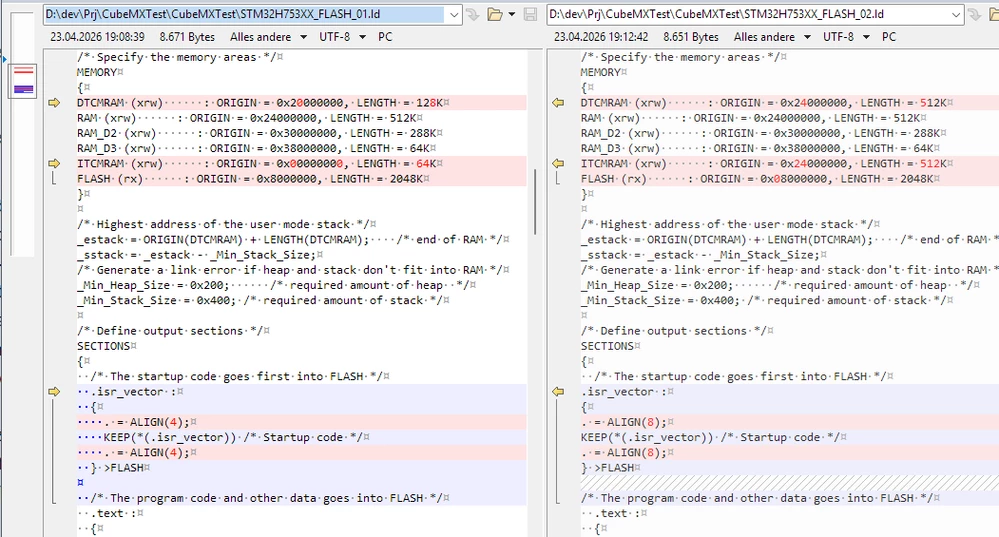
- Check the file size of STM32H753XX_FLASH.ld file (in my case: 8671 Bytes)
- Make a *copy* of the STM32H753XX_FLASH.ld file to STM32H753XX_FLASH_01.ld for later compare, but don't delete the file.
- In STM32CubeMX Go to Tools / Memory Management
- Switch Apply Application Regions Settings to Peripherals On
- Switch Apply Application Regions Settings to Linker Files On - File / Save Project
- Generate Code
- Check the file size of STM32H753XX_FLASH.ld file (in my case: 8651 Bytes)
- Make a *copy* of the STM32H753XX_FLASH.ld file to STM32H753XX_FLASH_02.ld
- Compare the file _01.ld file from step 9 with this _02.ld file:
- *Delete* the STM32H753XX_FLASH.ld
- Generate Code again and open STM32H753XX_FLASH.ld file again
- Check the file size of STM32H753XX_FLASH.ld file (in my case: 9119 Bytes)
- Make a *copy* of the STM32H753XX_FLASH.ld file to STM32H753XX_FLASH_03.ld
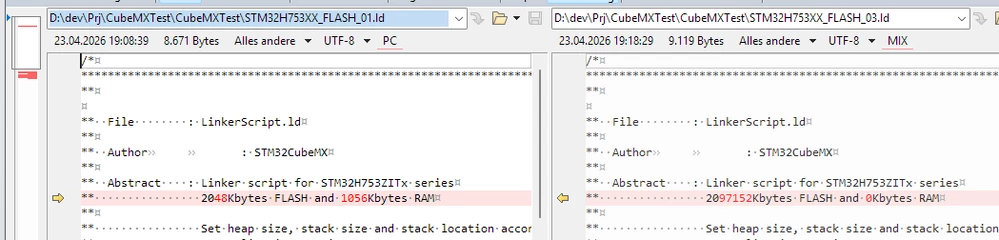
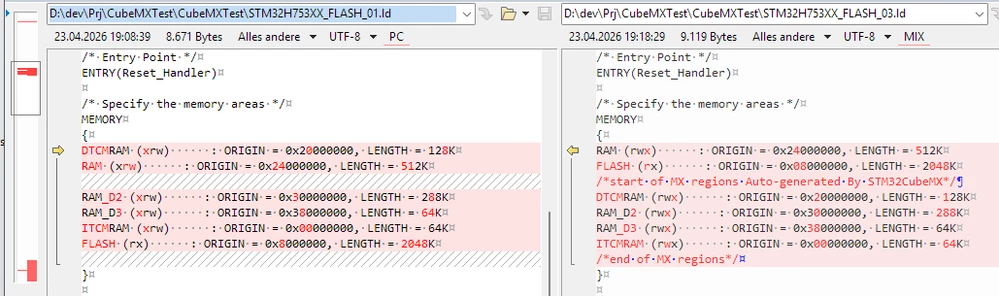
- Compare the file _01.ld file from step 9 with this _03.ld file:
[...]
[...]
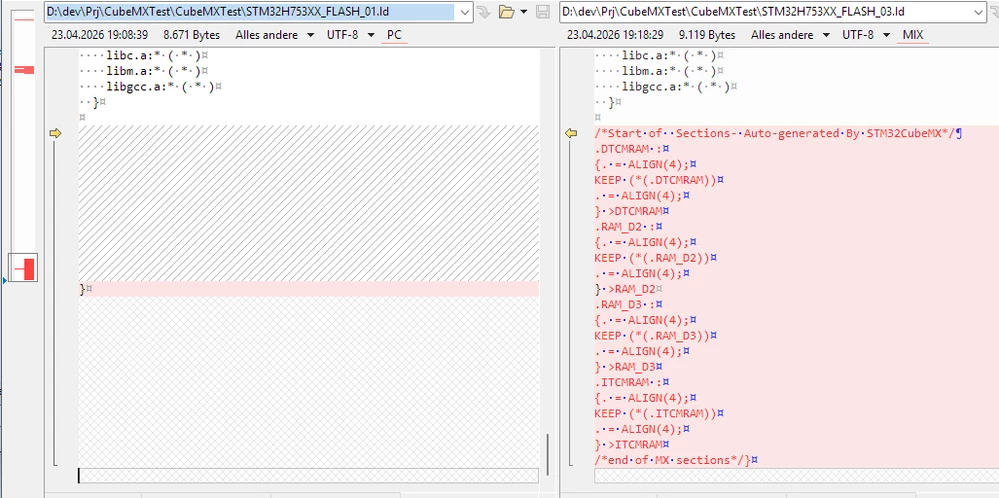
The regions are now available.
However, according to the comment header, the controller has now much more flash memory, but zero RAM :)
In addition, when the STM32CubeMX GUI is started with command line logging, two warnings occur during code generation after the MMT tab is opened once:
2026-04-23 19:59:33,111 [INFO] CodeEngine:319 - Generated code: D:\dev\Prj\CubeMXTest\CubeMXTest\MXTmpFiles\gpio.tmp
2026-04-23 19:59:33,121 [WARN] IPConfigManager:107 - WARNING: Missing Config File for MEMORYMAP ip!!
2026-04-23 19:59:33,122 [WARN] IP:2258 - DefaultDataRegion not found: check if there is a RefParameter without a condition.
2026-04-23 19:59:33,153 [INFO] CodeEngine:295 - oldGeneratedFile, D:\dev\Prj\CubeMXTest\CubeMXTest\MXTmpFiles\cortex.tmp_save
If you click on the RAM_D2 (or other) table cell now and regenerate it without changing the content, the error "IP:2258 - DefaultDataRegion not found" will disappear:
2026-04-23 20:00:00,152 [INFO] CodeEngine:319 - Generated code: D:\dev\Prj\CubeMXTest\CubeMXTest\MXTmpFiles\gpio.tmp
2026-04-23 20:00:00,161 [WARN] IPConfigManager:107 - WARNING: Missing Config File for MEMORYMAP ip!!
2026-04-23 20:00:00,191 [INFO] CodeEngine:295 - oldGeneratedFile, D:\dev\Prj\CubeMXTest\CubeMXTest\MXTmpFiles\cortex.tmp_save
The next behavior occurs if the ETH module is switched on (to RMII) after the MMT is still activated.
The error appears in the MMT output log:

However, if you switch to Tools / Memory Management, the output view is disabled.
When you turn it back on, the content is empty:

until you switch the ETH off and on again, you will see both the new and old errors:

I have a feeling that this feature is in a very beta state (or perhaps it's very KI-generated?)
ST: Thank you for fixing and testing the tool - I'm already excited for the new version!
Best wishes, Timo