
Associate
December 17, 2025
Solved

STM32H5 USB PHY not working (no interrupts) using PLL2Q as clock source

  • December 17, 2025
  • 5 replies
  • 2262 views

I'm working on a project with the STM32H503CBU7 which requires USB. I have a 32MHz external crystal on my board that appears to be stable. The chip works and can be programmed and such. I also troubleshot out other physical issues like cold joints and shorts because that has burned me before when the USB device fails to enumerate.

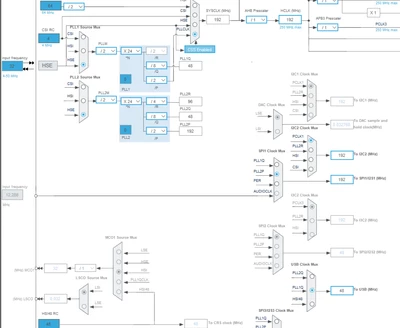
My intent was to use the PLL2Q source with the USB peripheral so I could also specify a 200MHz sys clock for everything else via PLL1. When I use the PLL2Q source however,  I get no interrupts from the `USB_DRD_FS_IRQHandler` handler and so my USB stack does not operate.

To make things more confusing, it also does not work even when both PLL's have the same values set for all parameters, as shown in the image below.
GCRev_0-1765965554207.png

It is important to note that this works with the PLL1Q source, as it is shown in the image, and I'm currently compromising a little on the sys clock speed. It will work for my purposes, but I'm more interested to know whether there's some "magic bullet" setting I'm missing, or if this could be a known configuration limitation.

The generated code in my `main.c` file that configures the peripheral clocks seemed to be okay, so I don't think it is a code auto-gen issue, but I could also be wrong about that.

I have already tried this on two chips because I thought there could be something wrong with the first, but they both exhibit this behavior.

Best answer by GCRev

Thanks to both @gbm and @TDK for the recommendations to check the registers while debugging!

I found that the PLL2QEN bit was not getting set in the RCC->RCC_PLL2CFGR register due to a code auto-gen bug in CubeMX (6.16.1).

This is the default line of code generated when PLL2Q is selected in the clock config UI:

 PeriphClkInitStruct.PLL2.PLL2ClockOut = RCC_PLL2_DIVP|RCC_PLL2_DIVR;

It should actually be

 PeriphClkInitStruct.PLL2.PLL2ClockOut = RCC_PLL2_DIVP|RCC_PLL2_DIVR|RCC_PLL2_DIVQ

Because all three outputs are in use.

Manually adding this register-set between the peripheral clock init and the rest of the init functions works for me and won't get clobbered when the auto-gen re-runs. I should probably know better than to rely so heavily on CubeMX code generation, but I'm not to the point with where I can remove the convenience of it for handling other things.

 /* USER CODE BEGIN SysInit */
 // auto-gen code does not enable the PLL2Q output which is required for USB clock
 RCC->PLL2CFGR |= RCC_PLL2CFGR_PLL2QEN;
 /* USER CODE END SysInit */

I also tried moving all my other clock sources back to PLL1 but keeping just USB on PLL2, and it's as if CubeMX doesn't "think" that PLL2Q exists because it removes the entire auto-gen function for the peripheral clock initialization at that point. I'll have to make use of @gbm's suggestion in the meantime to properly configure PLL2.

I ended up just copying the auto-generated code using the init struct because it's easier for me to read and comprehend:

void PeriphClk_Config(void)
{
 RCC_PeriphCLKInitTypeDef PeriphClkInitStruct = {0};

 /** Initializes the peripherals clock
 */
 PeriphClkInitStruct.PeriphClockSelection = RCC_PERIPHCLK_USB;
 PeriphClkInitStruct.PLL2.PLL2Source = RCC_PLL2_SOURCE_HSE;
 PeriphClkInitStruct.PLL2.PLL2M = 2;
 PeriphClkInitStruct.PLL2.PLL2N = 12;
 PeriphClkInitStruct.PLL2.PLL2P = 2;
 PeriphClkInitStruct.PLL2.PLL2Q = 4;
 PeriphClkInitStruct.PLL2.PLL2R = 1;
 PeriphClkInitStruct.PLL2.PLL2RGE = RCC_PLL2_VCIRANGE_3;
 PeriphClkInitStruct.PLL2.PLL2VCOSEL = RCC_PLL2_VCORANGE_WIDE;
 PeriphClkInitStruct.PLL2.PLL2FRACN = 0;
 PeriphClkInitStruct.PLL2.PLL2ClockOut = RCC_PLL2CFGR_PLL2QEN;
 PeriphClkInitStruct.UsbClockSelection = RCC_USBCLKSOURCE_PLL2Q;
 if (HAL_RCCEx_PeriphCLKConfig(&PeriphClkInitStruct) != HAL_OK)
 {
 Error_Handler();
 }
}

I call this function after the sys clock init and before the other peripheral inits.

5 replies

TDK
Super User
December 17, 2025

For clarity, you said the configuration in the screenshot works, yes?

But if you change the radio button from PLL1Q to PLL2Q without changing anything else, it no longer works?


Shouldn't be a magic setting anywhere. Does it fail to enumerate? If you debug your code, does it make it past initialization and through MX_USB_Init okay?

"If you feel a post has answered your question, please click ""Accept as Solution""."
GCRevAuthor
Associate
December 17, 2025

Yes, that's the confusing part: both PLLs based off the HSE with the same MHz configured, but with PLL2Q no interrupts are triggered whereas PLL1Q they are.

By "fails to enumerate" are you referring to the USB device on the host machine, or -- pardon my lack of knowledge, I'm pretty green in embedded dev -- some other type of internal enumeration like a register that contains information about whether that PLL is operating correctly?

To answer the first case if so: the host can enumerate it with PLL1Q selected, and not with PLL2Q selected. To also answer part of @gbm's question, it also enumerates on the host with the HSI48 source.


I've ordered some different caps to try tuning my oscillator, which is a 9pf. I've assumed a 4 pf stray capacitance so I've used 10pf load caps. But I'll check with 9pf load caps and 8pf load caps as well.


TDK
Super User
December 17, 2025

By "fails to enumerate" I mean does the host system register an unknown device in the Device Manager when you connect it? This is what happens when the USB pullup is enabled but the device doesn't respond correctly.

If not, it may not even be getting to the USB initialization code. You should debug your code and find out where execution stops.

"If you feel a post has answered your question, please click ""Accept as Solution""."
gbm
Principal
December 17, 2025

Check what happens if you set the USB clock to HSI48 synchronized to USB SOF - this configuration must work regardless of main oscillator failure/malfunction. Once this works, verify the HSE. It may oscillate at some sub-harmonic of its nominal frequency.

My STM32 stuff on github - compact USB device stack and more: https://github.com/gbm-ii/gbmUSBdevice
gbm
Principal
December 17, 2025

I did some experiments to check the case described on Nucleo-H503. USB is operating correctly with HSI48 and HSE/PLL2Q. I attach the minimal code for HSE/PLL2 setup. It mighty be useful for checking the RCC register content in a debug session. In my code, both PLLs are configured in the same way. USB clock source is selected by setting RCC->CCIPR4;

#define HCLK_FREQ 240000000u
static inline void ClockSetup2(void)
{
	RCC->PLL2DIVR = (2 - 1) << RCC_PLL2DIVR_PLL2P_Pos | (HCLK_FREQ * 2 / 48000000 - 1) << RCC_PLL2DIVR_PLL2Q_Pos | (2 - 1) << RCC_PLL2DIVR_PLL2R_Pos
		| (HCLK_FREQ / 1000000u - 1) << RCC_PLL2DIVR_PLL2N_Pos;

	RCC->CR |= RCC_CR_HSEON | RCC_CR_HSI48ON;
	while ((RCC->CR & (RCC_CR_HSERDY | RCC_CR_HSI48RDY)) != (RCC_CR_HSERDY | RCC_CR_HSI48RDY)) ;
	// 2 MHz from 24 MHz HSE -> div by 12
	RCC->PLL2CFGR = RCC_PLLxCFGR_PLLxSRC_HSE | (HSE_VALUE / 2000000u) << RCC_PLL2CFGR_PLL2M_Pos | RCC_PLL2CFGR_PLL2PEN | RCC_PLL2CFGR_PLL2QEN;

	RCC->CR |= RCC_CR_PLL2ON;
	// wait for PLL ready
	while (~RCC->CR & RCC_CR_PLL2RDY) ;

	// select USB clock
	RCC->CCIPR4 = 2u << RCC_CCIPR4_USBSEL_Pos;	// PLL2Q as USB clock
}


My STM32 stuff on github - compact USB device stack and more: https://github.com/gbm-ii/gbmUSBdevice
GCRevAuthorBest answer
Associate
December 18, 2025

Thanks to both @gbm and @TDK for the recommendations to check the registers while debugging!

I found that the PLL2QEN bit was not getting set in the RCC->RCC_PLL2CFGR register due to a code auto-gen bug in CubeMX (6.16.1).

This is the default line of code generated when PLL2Q is selected in the clock config UI:

 PeriphClkInitStruct.PLL2.PLL2ClockOut = RCC_PLL2_DIVP|RCC_PLL2_DIVR;

It should actually be

 PeriphClkInitStruct.PLL2.PLL2ClockOut = RCC_PLL2_DIVP|RCC_PLL2_DIVR|RCC_PLL2_DIVQ

Because all three outputs are in use.

Manually adding this register-set between the peripheral clock init and the rest of the init functions works for me and won't get clobbered when the auto-gen re-runs. I should probably know better than to rely so heavily on CubeMX code generation, but I'm not to the point with where I can remove the convenience of it for handling other things.

 /* USER CODE BEGIN SysInit */
 // auto-gen code does not enable the PLL2Q output which is required for USB clock
 RCC->PLL2CFGR |= RCC_PLL2CFGR_PLL2QEN;
 /* USER CODE END SysInit */

I also tried moving all my other clock sources back to PLL1 but keeping just USB on PLL2, and it's as if CubeMX doesn't "think" that PLL2Q exists because it removes the entire auto-gen function for the peripheral clock initialization at that point. I'll have to make use of @gbm's suggestion in the meantime to properly configure PLL2.

I ended up just copying the auto-generated code using the init struct because it's easier for me to read and comprehend:

void PeriphClk_Config(void)
{
 RCC_PeriphCLKInitTypeDef PeriphClkInitStruct = {0};

 /** Initializes the peripherals clock
 */
 PeriphClkInitStruct.PeriphClockSelection = RCC_PERIPHCLK_USB;
 PeriphClkInitStruct.PLL2.PLL2Source = RCC_PLL2_SOURCE_HSE;
 PeriphClkInitStruct.PLL2.PLL2M = 2;
 PeriphClkInitStruct.PLL2.PLL2N = 12;
 PeriphClkInitStruct.PLL2.PLL2P = 2;
 PeriphClkInitStruct.PLL2.PLL2Q = 4;
 PeriphClkInitStruct.PLL2.PLL2R = 1;
 PeriphClkInitStruct.PLL2.PLL2RGE = RCC_PLL2_VCIRANGE_3;
 PeriphClkInitStruct.PLL2.PLL2VCOSEL = RCC_PLL2_VCORANGE_WIDE;
 PeriphClkInitStruct.PLL2.PLL2FRACN = 0;
 PeriphClkInitStruct.PLL2.PLL2ClockOut = RCC_PLL2CFGR_PLL2QEN;
 PeriphClkInitStruct.UsbClockSelection = RCC_USBCLKSOURCE_PLL2Q;
 if (HAL_RCCEx_PeriphCLKConfig(&PeriphClkInitStruct) != HAL_OK)
 {
 Error_Handler();
 }
}

I call this function after the sys clock init and before the other peripheral inits.

Ghofrane GSOURI
Technical Moderator
December 19, 2025

Hello @GCRev @TDK @gbm 

Thank you all for your valuable contributions.

Ticket 224151 has been escalated to the development team for resolution.

I will keep you posted with updates.

THX

Ghofrane

To give better visibility on the answered topics, please click on Accept as Solution on the reply which solved your issue or answered your question.
TDK
Super User
December 18, 2025

@Mahmoud Ben Romdhane Please take a look if you can.

"If you feel a post has answered your question, please click ""Accept as Solution""."