

Ayoub Cheggari
Senior
February 17, 2025
Solved

[STM32H7B0RBT6][LTDC] Not possible to use RGB888 on CubeMx

  • February 17, 2025
  • 2 replies
  • 1137 views

Hello,

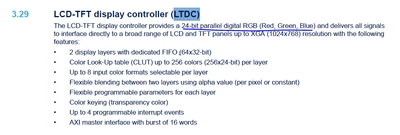
I am working on an HMI product with STM32H7B0RBTx LQFP64 and want to use the RGB888. As per Datasheet, it seems possible:
AyoubCheggari_1-1739659176493.png

But when I start a project on CubeIDE, it only provides only RGB565/666. 

My question is:

- Is this a limitation in the CubeMX and I can use RGB888 if I do it manually?

- If it's not the case, please to let me know and correct it on the datasheet.

Thanks,

Ayoub

Best answer by mƎALLEm

By checking again the datasheet, LCD_R0 and LCD_B0 lines are not available on LQFP64. So that's why RGB888 is not available on that package.

2 replies

mƎALLEm
Technical Moderator
February 17, 2025

Hello,

I think it's not a limitation but linked to the package you are using LQFP64. So some LTDC signals are not available on that package.

You need to refer to the product datasheet.

With UFBGA176 (bigger package) I can see RGB888:

SofLit_0-1739799975125.png

Hope that answered your question.


"To give better visibility on the answered topics, please click on ""Accept as Solution"" on the reply which solved your issue or answered your question."
Ayoub Cheggari
Senior
February 17, 2025

Thanks for the quick reply @mƎALLEm ! 

I saw that are supported on different packages, but data sheet still says it's possible! Below, it shows that LDC_R1 is mapped to pin 16, while in CubeMx, it's allowed to use it! 

AyoubCheggari_0-1739800436931.png

AyoubCheggari_1-1739800500215.png


mƎALLEm
Technical Moderator
February 17, 2025

Ok I will escalate the issue and get back to you as soon as it's confirmed.

"To give better visibility on the answered topics, please click on ""Accept as Solution"" on the reply which solved your issue or answered your question."
mƎALLEm
Technical Moderator
July 15, 2025

FYI, issue fixed in the latest version of CubeMx 6.15.0

"To give better visibility on the answered topics, please click on ""Accept as Solution"" on the reply which solved your issue or answered your question."
Ayoub Cheggari
Senior
July 15, 2025

Thanks for informing @mƎALLEm !