
Associate II
October 20, 2023
Solved

stmelectronics.xcube-azrtos-h5 not found in STMCubemx

  • October 20, 2023
  • 1 reply
  • 1832 views

Hello ,

We are devloping application using NUCLEO-H503 , try to install USBX as CDC-ACM port and transfer data to host device ,

1. Try to install Driver for USBX , but not found stmelectronics.xcube-azrtos-h5  
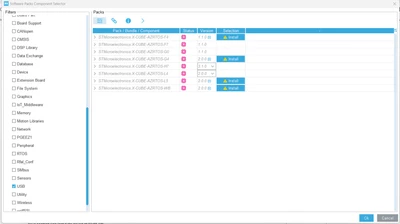
USBX_ISSUE.png

How to use NUCLE-H503 USB in Device mode only as CDC-ACM port 
This topic has been closed for replies.
Best answer by Foued_KH

Hello @pooja , 

The xcube-azrtos-h5 is not available.

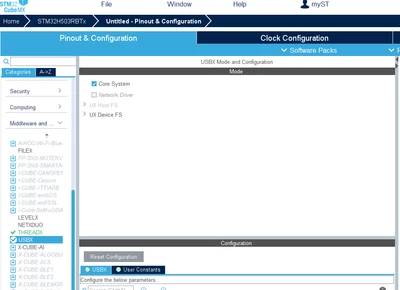
For USBX : Please before enable the THREADX , then you can use the USBX : 

Foued_KH_0-1697797802912.png


Foued


1 reply

Foued_KH
Foued_KHBest answer
ST Employee
October 20, 2023

Hello @pooja , 

The xcube-azrtos-h5 is not available.

For USBX : Please before enable the THREADX , then you can use the USBX : 

Foued_KH_0-1697797802912.png


Foued


To give better visibility on the answered topics, please click on Accept as Solution on the reply which solved your issue or answered your question.
poojaAuthor
Associate II
October 26, 2023

Hello  Foued 

Thanks for your support 

NUCLEO-H503 : USB Driver 

Import example code from package en.stm32cubeh5-v1-1-0 STM32Cube_FW_H5_V1.1.0-Projects-NUCLEO-H503RB-Applications-USBX-Ux_Device_CDC_ACM

and Run the example using STMcubemx IDE 

But gives error for 

status = MX_USBX_Device_Init(memory_ptr);

if (status != UX_SUCCESS)

{

/* USER CODE BEGIN MX_USBX_Device_Init_Error */

while(1)

{

}

/* USER CODE END MX_USBX_Device_Init_Error */

}

Wait in while


Check error status : UX_MEMORY_INSUFFICIENT


Visitor II
April 27, 2024
 add size

#define UX_DEVICE_APP_MEM_POOL_SIZE 30000
#define USBX_DEVICE_MEMORY_STACK_SIZE 25000