Associate II
July 11, 2024
Solved

STPackCreator Global/Project define.

  • July 11, 2024
  • 2 replies
  • 1112 views

Hi all.

Working with the Pack Creator I know I can create a header file that contains defines that are editable in the CubeMX view.

I'd like to know if it's possible to have a pack that places defines in the project settings instead of a header file?

 

Best answer by pywtk

Update, the solution I used:

When using the Pack Creator, in the STM32CubeMX tab

pywtk_0-1721901577174.png

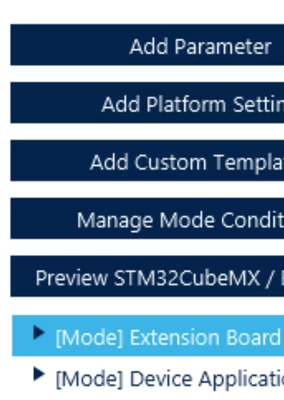
Select the relevant "mode" on the left hand side

pywtk_1-1721901654669.png

Select the "Preprocessor Defines" tab

pywtk_2-1721901722329.png

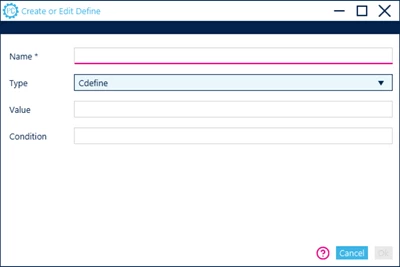
Click on Add Define & select "Cdefine" along with the Preprocessor name & value if necessary.

pywtk_3-1721901829022.png


2 replies

Semer CHERNI
ST Employee
July 15, 2024

Hello @pywtk 

First let me thank you for posting.

This could be done with STM32CubeMX via the .extSettings file.

Check the "6.4 Additional settings for C project generation" section of the STM32CubeMX User Manual

BR,
Semer.

pywtkAuthor
Associate II
July 15, 2024

thanks for the tip!

Say then that I include a .extSettings file with my pack.

Say also that there's a pre-existing .extSettings file within the project before I import/enable my pack.

Will the extSettings file in my pack overwrite the pre-existing one?


pywtkAuthorBest answer
Associate II
July 25, 2024

Update, the solution I used:

When using the Pack Creator, in the STM32CubeMX tab

pywtk_0-1721901577174.png

Select the relevant "mode" on the left hand side

pywtk_1-1721901654669.png

Select the "Preprocessor Defines" tab

pywtk_2-1721901722329.png

Click on Add Define & select "Cdefine" along with the Preprocessor name & value if necessary.

pywtk_3-1721901829022.png