

DYann.1
Senior II
April 22, 2025
Solved

Udapte STM32CubeMX

  • April 22, 2025
  • 1 reply
  • 691 views

Hello,

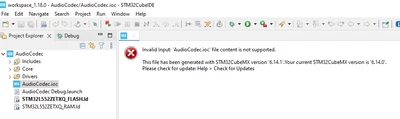
I have Version STM32CubeIDE : 1.18.0, and I get a program that was communicated to me, but I have this message below : 
DYann1_0-1745311554144.png

And I downloaded and installed STM32CubeMX 6.14.1 version, but it seems that it is not taken into account in the environment of STM32CubeIDE version 1.18.0. 

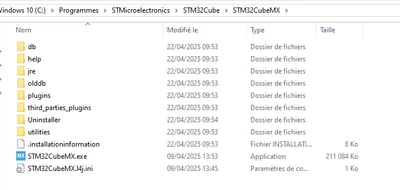
Here is the path I installed the STM32CubeMX 6.14.1 version
DYann1_1-1745311766549.png

How to link STM32Cube IDE with STM32CubeMX so I can open the program. Thank you for your helps.

Best answer by STTwo-32

Hello @DYann.1 

The version of the STM32CubeMX integrated on the STM32CubeIDE is an independent plug-in and does not depend on the version you have installed as standalone. So, to have an  STM32CubeIDe with the STM32CubeMX V6.14.1 integrated, you have to download and update to the STM32CubeIDE V1.18.1.

Best Regards.

STTwo-32

1 reply

STTwo-32
STTwo-32Best answer
Technical Moderator
April 22, 2025

Hello @DYann.1 

The version of the STM32CubeMX integrated on the STM32CubeIDE is an independent plug-in and does not depend on the version you have installed as standalone. So, to have an  STM32CubeIDe with the STM32CubeMX V6.14.1 integrated, you have to download and update to the STM32CubeIDE V1.18.1.

Best Regards.

STTwo-32

DYann.1
DYann.1Author
Senior II
April 22, 2025

Hello STTwo-32,

Thank you I'll install the new version of STM32CubeIDE.  

STTwo-32
Technical Moderator
April 22, 2025

If this solves your issue. Please mark the comment of the answer as best answer to close the thread.

Best Regards.

STTwo-32