Associate II
July 8, 2024
Solved

USART2 is not working in NUCLEO-G491RE

  • July 8, 2024
  • 2 replies
  • 1354 views

Hi STM Community,

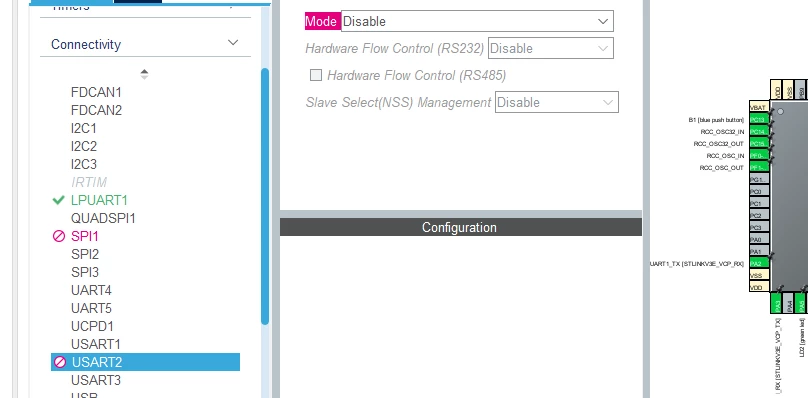
I was trying to use USART2 on NUCLEO-G491RE board, but it is disabled from the start.

It is highlighted in Pink and I am not able to edit it.  Can you please tell me how to make it work ?

Thank you. Appreciate it.

Regards,

STMUSER
 

img1.PNG

Best answer by mƎALLEm

Hello,

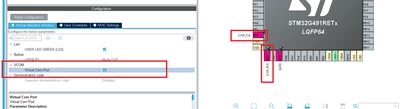
Check if USART2 is already selected in the Bsp menu:  

SofLit_0-1720430008334.png

If it's the case you no more need to configure it in Connectivity menu.
Unless you need to customise the configuration. in that case disable it from the Bsp menu and USART2 will be available in the Connectivity menu.

2 replies

mƎALLEm
mƎALLEmBest answer
Technical Moderator
July 8, 2024

Hello,

Check if USART2 is already selected in the Bsp menu:  

SofLit_0-1720430008334.png

If it's the case you no more need to configure it in Connectivity menu.
Unless you need to customise the configuration. in that case disable it from the Bsp menu and USART2 will be available in the Connectivity menu.

"To give better visibility on the answered topics, please click on ""Accept as Solution"" on the reply which solved your issue or answered your question."
Associate II
July 9, 2024

Thank you. Appreciate your reply.

Karl Yamashita
Principal
July 8, 2024

LPUART1 and UART2 uses the same RX/TX pins. You currently have LPUART1 enabled so that is why you can't use UART2. If you don't need the LPUART1 then disable it. Then you will be able to select UART2.

If a reply has proven helpful, click on Accept as Solution so that it'll show at top of the post.CAN Jammer an open source CAN bus hacking toolCANableV3 Open Source