Virtual COM Port Not Working on NUCLEO-H755?
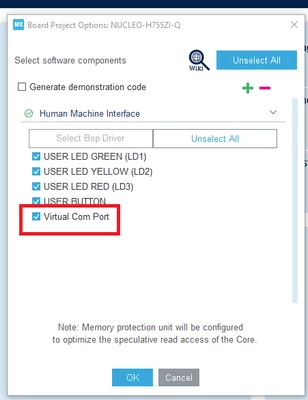
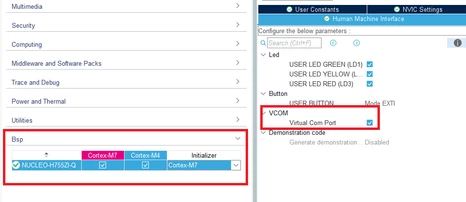
I installed the latest CubeIDE hosted on a Mac to demo a NUCLEO-H755 board over USB. Starting from a clean CubeMX code generation, I've managed to successfully create a basic application to blink the user LEDs and use the pushbutton (along with basic use of the debugger), but I would like to be able to configure the Virtual COM Port (VCP) to use as a debugging tool before proceeding to the next step of getting the Ethernet working. Unfortunately, I have not been able to figure out how to get the VCP to work. In CubeMX, I have USART3 selected as the VCP with the correct pins per the schematic, but for some reason the only available selection is "disabled". I suspect this might be because the NUCLEO board support package (bsp) is somehow controlling configuration of the VCP and not allowing changes from CubeMX. Here are my questions:
1) Does the NUCLEO bsp automatically configure the VCP, or is there some other way to configure?
2) Do the VCP (over USB) printf's go to the main CubeIDE console in the Eclipse environment, or do I need to use some other terminal window? I've tried using a generic printf as in the example code as well as trying to use the HAL_UART_Transmit function to COM1 (which seems to be configured to use USART3) but nothing shows up on the debug console.
I am new to STM32 development and the CubeIDE, so any help would be greatly appreciated.