ChahinezC
Technical Moderator
April 1, 2021

Configuring DSP libraries on STM32CubeIDE

  • April 1, 2021
  • 16 replies
  • 96177 views
This FAQ concerns the DSP Libraries, how to integrate them in an STM32CubeIDE project and to execute an example based on the Digital Signal Processing

Note: If you are using CMSIS V 5.8.0, refer to the article below. 
How to integrate CMSIS-DSP libraries on a STM32 project.
After finishing this tutorial, you will know more about the DSP libraries of STM32 products, adding, configuring, and manipulating them using the STM32CubeIDE tool chain.
 

1. Installing the required tools and generating the project:

First, install the tools required, STM32CubeIDE, STM32CubeMX, STM32CubeProgrammer. Please follow the steps presented in the STM32StepByStepTutorial: Step1 Tools installation.
 

The next step is to start the project, if you have a ready project, please go directly to the 2nd section,  Including the DSP libraries and header files.

Otherwise, to create an STM32CubeIDE project, you can refer to 2.2 section of the UM2609.
 

       Note:

  •  The versions used in this tutorial are, 1.5.1 for STM32CubeIDE, and 6.1.1 for STM32CubeMX. Please make sure to always upgrade the tools' versions you are using.
  • The board used in this tutorial is STM32F429 Discovery.


  • After launching the project, you will find it, as well as the generated .ioc file, in the workspace.
  • You can select the different pinouts and/or the clock to configure within STM32CubeIDE without launching the STM32CubeMX.
  • After finishing the settings, just save the file.
  • A popup appears asking to generate the project, at this point just click on "Yes" and the updates will be made directly on the code project.

2. Including the DSP libraries and header files

Here are the steps to follow to copy the DSP drivers into the project:

  1. Support DSP in the project workspace

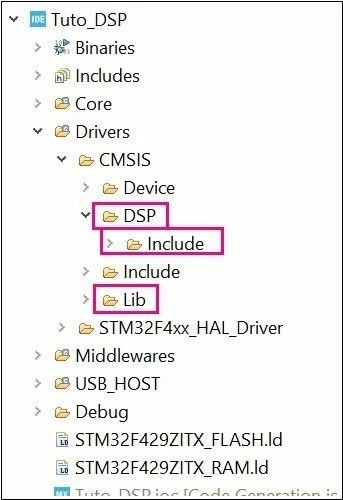
  • In the generated project, create a folder under ..\Drivers\CMSIS named DSP.

  • Copy <STM32Cube_Repository>\STM32Cube_FW_F4_V.X.XX.X\Drivers\CMSIS\DSP\Include and paste in in the created folder

  •  Copy <STM32Cube_Repository>\STM32Cube_FW_F4_V.X.XX.X\Drivers\CMSIS\Lib and paste it under ..\Drivers\CMSIS.

After being copied and refreshing the project, the added folders appear automatically in the STM32CubeIDE workspace:
1300.jpg

           ii. Include paths

The purpose of this part is to describe the steps to follow in order to support new header files:

  • Select the project from the Project Explorer section

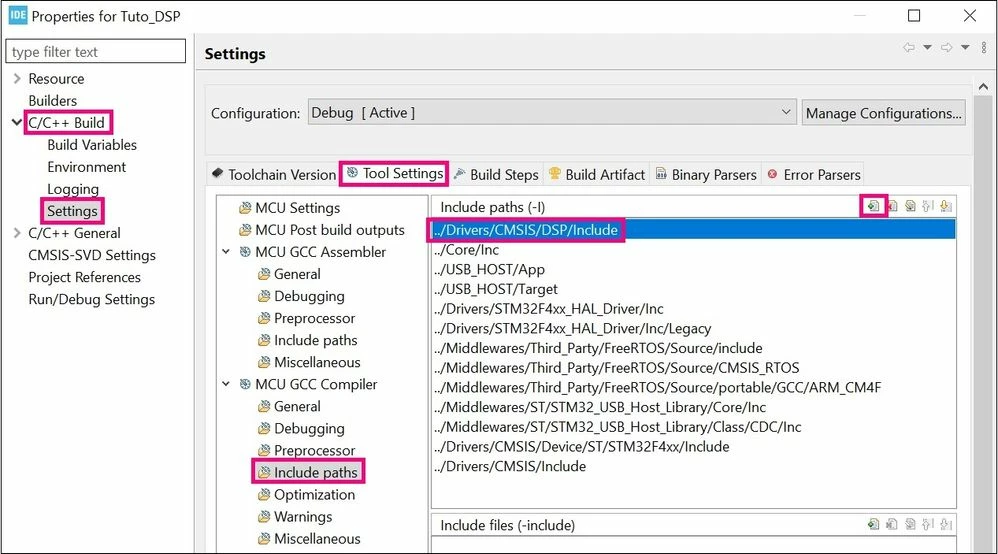
  • From Project menu or File menu, go to Project properties > C/C++ Build >

Settings > Tool Settings > MCU GCC Compiler > Include paths.

  • Click on “Add” to include the new paths.

  • Add ../Drivers/CMSIS/DSP/Include path

    1301.jpg

          iii. Update libraries

The purpose of this part is to describe how to update the libraries in the project.
The first step is to add the libraries' path in the project settings:
 

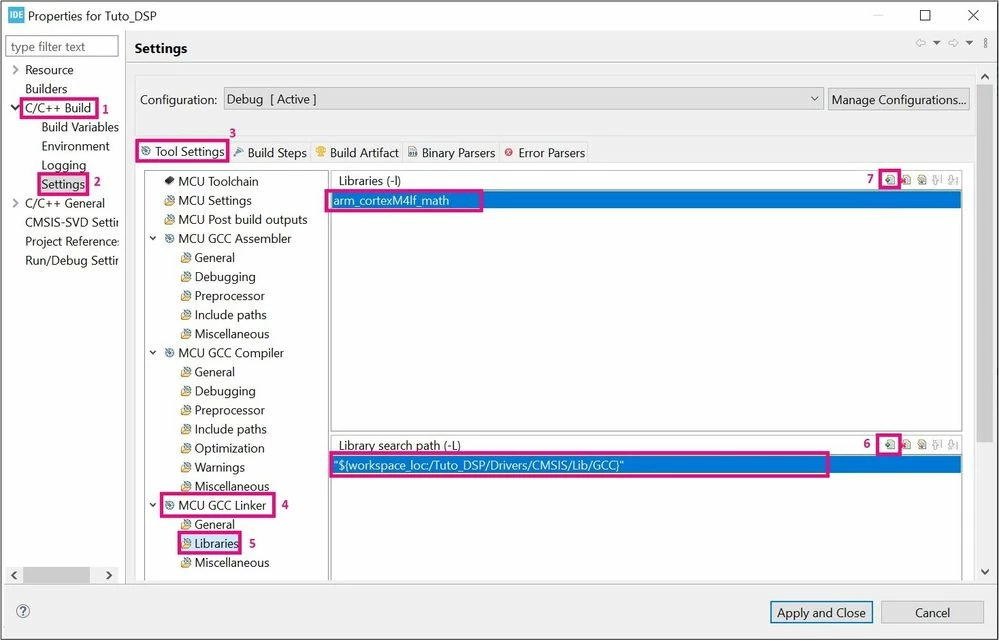
  • Select the project from the Project Explorer section, then from Project menu or File menu, go to Properties > C/C++ Build > Settings > Tool Settings > MCU CGC Linker > Libraries > Library search Path > Add.

  • Select the GCC library present in the workspace path: ../Drivers/CMSIS/Lib/GCC.

  • Now, to add the specific library to work with, select the project from the Project Explorer section.

  • From Project menu or File menu, go to Properties > C/C++ Build > Settings > Tool Settings > MCU CGC Linker > Libraries > Libraries (-l) > Add and insert the following library: "arm_cortexM4lf_math".
    1303.jpg

Warning:

  • Make sure that you are using the “/” and not the “\” in the paths.

  • Do not use “:libarmcortexM4lf_math.a”. This usage is not recommended as it can lead to side-effects in some use cases.

  • Use "arm_cortexM4l_math" with STM32WL series.

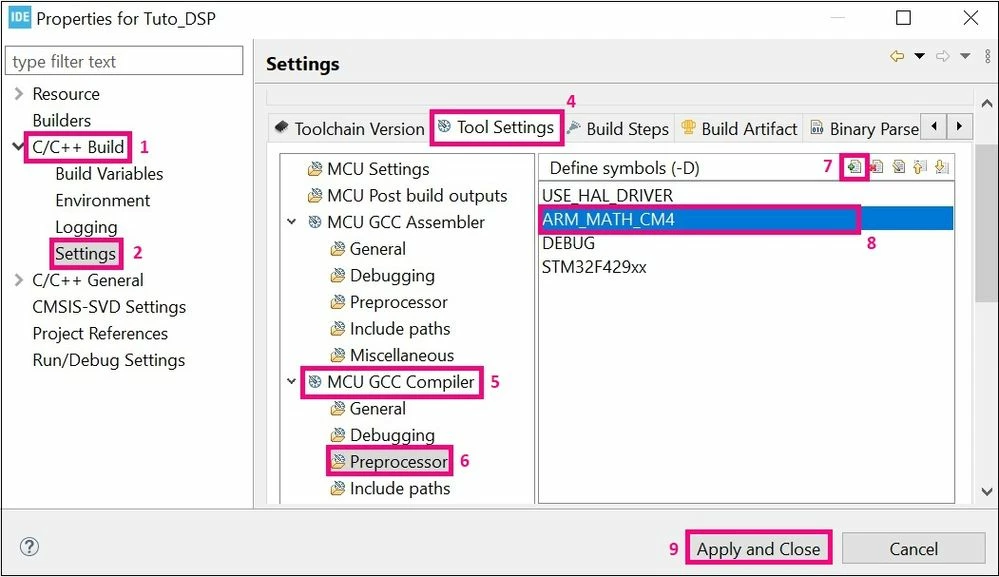
The final step, is to add the “ARM_MATH_CM4” symbol to the project, as presented in the photo below:
1304.jpg

 Note: 
  Please do not forget that this step depends on the core you are using.


Now you can use the DSP libraries in your project, after including the required header file, for the following example here is "arm_math.h" and declaring the used variables:
 

/* USER CODE BEGIN PV */
float32_t FFT_Input_Q15_f[50];
float32_t aFFT_Input_Q15[50];
/* USER CODE END PV */
/* USER CODE BEGIN PD */
#define FFT_Length 1024
/* USER CODE END PD */

Let’s take the example of using the “arm_float_to_q15” function:


/* USER CODE BEGIN 1 */
	arm_float_to_q15((float32_t *)&FFT_Input_Q15_f[0], (q15_t *)&aFFT_Input_Q15[0], FFT_Length*2);
/* USER CODE END 1 */


Warning:

  • Please note that the use of the previous function is a form of guidelines only.

Finally, you can also download the example based on the STM32Cube HAL drivers Digital Signal Processing with STM32, software expansion for STM32Cube . You can refer to this example as a complete use-case of DSP. 
 

16 replies

Robmar
Senior II
September 6, 2023

We've just started a new H7 project in CubeIDE and after selecting CMSIS Core and DSP in Software Components, it's listing 17 errors:

../Middlewares/Third_Party/ARM_CMSIS/CMSIS/DSP/Source/SVMFunctions/SVMFunctions.c:29:10: fatal error: arm_svm_linear_init_f32.c: No such file or directory

29 | #include "arm_svm_linear_init_f32.c"

Why doesn't STM test the CMSIS integration?

I had to add the following paths to get it to compile, but there must be a single include for this?

If we all start hacking the code it risks issues with any updates, STM really need to fix this as the single source authority IMO.

ad to add all of these to the include, there must be a single include to fix this issue?

C:/Users/YourUser/STM32Cube/Repository/Packs/ARM/CMSIS/5.8.0/CMSIS/DSP/Source/FastMathsFunctions/
C:/Users/YourUser/STM32Cube/Repository/Packs/ARM/CMSIS/5.8.0/CMSIS/DSP/Source/SVMFunctions/
C:/Users/YourUser/STM32Cube/Repository/Packs/ARM/CMSIS/5.8.0/CMSIS/DSP/Source/SupportFunctions/
C:/Users/YourUser/STM32Cube/Repository/Packs/ARM/CMSIS/5.8.0/CMSIS/DSP/Source/TransformFunctions/
C:/Users/YourUser/STM32Cube/Repository/Packs/ARM/CMSIS/5.8.0/CMSIS/DSP/Source/StatisticsFunctions/
C:/Users/YourUser/STM32Cube/Repository/Packs/ARM/CMSIS/5.8.0/CMSIS/DSP/Source/QuaternionMathFunctions/
C:/Users/YourUser/STM32Cube/Repository/Packs/ARM/CMSIS/5.8.0/CMSIS/DSP/Source/MatrixFunctions/
C:/Users/YourUser/STM32Cube/Repository/Packs/ARM/CMSIS/5.8.0/CMSIS/DSP/Source/InterpolationFunctions/
C:/Users/YourUser/STM32Cube/Repository/Packs/ARM/CMSIS/5.8.0/CMSIS/DSP/Source/FilteringFunctions/
C:/Users/YourUser/STM32Cube/Repository/Packs/ARM/CMSIS/5.8.0/CMSIS/DSP/Source/DistanceFunctions/
C:/Users/YourUser/STM32Cube/Repository/Packs/ARM/CMSIS/5.8.0/CMSIS/DSP/Source/ComplexMathFunctions/
C:/Users/YourUser/STM32Cube/Repository/Packs/ARM/CMSIS/5.8.0/CMSIS/DSP/Source/ControllerFunctions/
C:/Users/YourUser/STM32Cube/Repository/Packs/ARM/CMSIS/5.8.0/CMSIS/DSP/Source/CommonTables/
C:/Users/YourUser/STM32Cube/Repository/Packs/ARM/CMSIS/5.8.0/CMSIS/DSP/Source/BayesFunctions/
C:/Users/YourUser/STM32Cube/Repository/Packs/ARM/CMSIS/5.8.0/CMSIS/DSP/Source/BasicMathFunctions/

LeonTerl
Associate
April 26, 2024

Very helpful!

Explorer
May 23, 2024

at: ChahinezC 

One of the very best and most usefull post I have ever seen on a forum! I'm not sure why those that pretend to be experts cannot do posts like this. 

  1. Extremely well documented
  2. Concise and clear
  3. Well organised
  4. To the point!
  5. Wow, I'm truly amazed about you post. Bravo!

SPA1

Associate III
June 6, 2024

Is it possible to download the latest sources of CMSIS-DSP from github, add the "include", "privateinclude" and "source" folders to the cube ide project, fix the include paths and compile the sources without errors?

Can I use the library sources and avoid the .a file?

If yes, can you please update the article to reflect this?

KDJEM.1
Technical Moderator
June 6, 2024

Hello @Manuel Ferrero ,


It is possible to download the latest CMSIS-DSP library from the github and to integrate it in your project. 

For that, I recommend you to follow the steps shared in this FAQ: How to integrate CMSIS-DSP libraries on a STM32 pr... - STMicroelectronics Community 

Note:


Thank you.

Kaouthar

To give better visibility on the answered topics, please click on Accept as Solution on the reply which solved your issue or answered your question.
HDaji.1
Senior
October 18, 2024

I wonder what the differences are between STM32-provided library and those in Github.