

B.Montanari
ST Employee
May 22, 2023

How to jump to system bootloader from application code on STM32 microcontrollers

  • May 22, 2023
  • 84 replies
  • 132226 views

Introduction

There are many possible ways to access the System Bootloader in STM32 devices and, in this tutorial, we will cover how to easily perform this jump directly from application code for all our families and product series, except for the STM32F0 and some STM32L0 that have an empty check mechanism in place.
To achieve this goal, we highly recommend following two main sources of documentation to ensure an easy and successful jump. Both the microcontroller’s Reference Manual and the Application Note AN2606 contain bootloader details, such as important addresses, supported peripherals and specific requirements to keep in mind when using the STM32 devices Custom or System Bootloader. In the app note it is possible to see the note explaining the effect of the empty check for the mentioned series:

496.png
This article will not cover the workaround of erasing the first page, but the code will have all STM32s addresses in it to facilitate the implementation, in case the reader wants to use it. We do suggest reading this article that explains how to execute code from SRAM.

I'd also like to appreciate the fantastic contribution from @Ahmet Yasin CİVAN in the post STM32H745XI: Software Jump to System Bootloader Without BOOT0/Option Bytes – Has Anyone Succeeded? , as this address a particular problem related to the STM32H745 series. 
Assuming you are using a series that allow you to make the jump from the application into system memory, we need to be aware of some important and necessary steps to be performed and some notes to keep in mind.

1. How to find System Memory / Bootloader Start Address value:

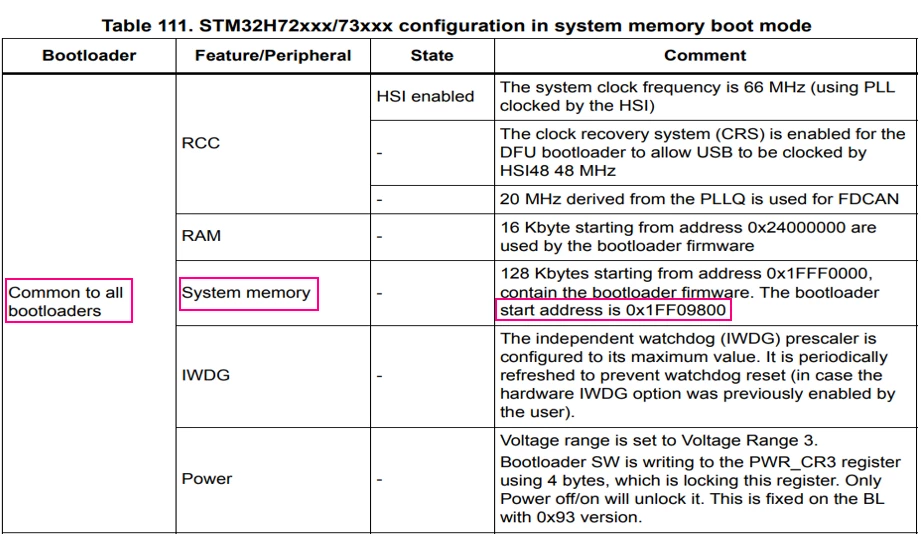
Refer to AN2606 “Configuration in System Memory Boot Mode” tables. Each device will have a specific System Memory/Bootloader address, and this value must be known to jump to bootloader correctly.
For example, for the STM32H723ZG microcontroller (a quick article showing the code for this series is available here), the Bootloader doesn’t start from the same address as the System Memory, but this is clearly defined in Table 111.
497.png

1.2. Disable, deinit and clear all peripherals your application has configured:

Including Clock Structure, Systick timer, ISR, Peripheral initializations and GPIO, every peripheral settings must be set to their default states to avoid interruptions when system is in boot mode. That’s why it is of the most importance to deinit all these functions and prevent an interruption to happen without a proper handler.

1.3. Re-enable Interrupts:

With the registers cleared, the interrupts can be re-enabled without compromising the application while in Bootloader.
 

1.4. Set the Bootloader Reset Handler address:

Bootloader Reset Handler address = Bootloader address + 4 bytes offset.

1.5. Set the Main Stack Pointer (MSP) to the values stored at the Bootloader stack.

1.6. Call a function pointing to the system bootloader to start execution.


Obs.: If your project uses watchdogs (IWDG and or WWDG), set the time base to the higher value possible to avoid a reset from it while in Boot Mode.

2. Development


Considering all the topics mentioned above, there is defined below a general code where you can simply set the MCU used in your application according to the list in the “enum” structure and the function is ready to be used in your project.
This code works by lighting one of the available User LEDs in the NUCLEO-H723ZG board, and then entering in system bootloader mode by calling the JumpToBootloader function.
Please be aware that all the different parts of code are specifically written between /*USER CODE BEGIN*/ regions so the code will not be erased when regenerating the project *.ioc file.
 

/* Private define ------------------------------------------------------------*/
/* USER CODE BEGIN PD */
/* Set the enumeration of the STM32 Microcontrollers Series*/
enum{C0, F030x8, F030xC, F03xx, F05, F07, F09, F10xx, F105, F107, F10XL, F2, F3, F4, F7, G0, G4, H503, H563, H573, H7x, H7A, H7B, L0, L1, L4, L5, WBA, WBX, WL, U5};

#define MCU			H7x		//Define here the MCU being used
/* USER CODE END PD */
/* USER CODE BEGIN PFP */
void JumpToBootloader(void);
/* USER CODE END PFP */
/* Infinite loop */
	/* USER CODE BEGIN WHILE */
	while (1)
	{
		HAL_GPIO_TogglePin(LED_GREEN_GPIO_Port, LED_GREEN_Pin);
		HAL_Delay(1000);

		JumpToBootloader();

		/* USER CODE END WHILE */
		/* USER CODE BEGIN 3 */
	}
	/* USER CODE END 3 */
/* USER CODE BEGIN 4 */

void JumpToBootloader (void)
{
uint32_t i=0;
void (*SysMemBootJump)(void);


/* Set a vector addressed with STM32 Microcontrollers names */
/* Each vector position contains an address to the boot loader entry point */

	volatile uint32_t BootAddr[33];

	BootAddr[C0] = 0x1FFF0000;
	BootAddr[F030x8] = 0x1FFFEC00;
	BootAddr[F030xC] = 0x1FFFD800;
	BootAddr[F03xx] = 0x1FFFEC00;
	BootAddr[F05] = 0x1FFFEC00;
	BootAddr[F07] = 0x1FFFC800;
	BootAddr[F09] = 0x1FFFD800;
	BootAddr[F10xx] = 0x1FFFF000;
	BootAddr[F105] = 0x1FFFB000;
	BootAddr[F107] = 0x1FFFB000;
	BootAddr[F10XL] = 0x1FFFE000;
	BootAddr[F2] = 0x1FFF0000;
	BootAddr[F3] = 0x1FFFD800;
	BootAddr[F4] = 0x1FFF0000;
	BootAddr[F7] = 0x1FF00000;
	BootAddr[G0] = 0x1FFF0000;
	BootAddr[G4] = 0x1FFF0000;
	BootAddr[H503] = 0x0BF87000;
	BootAddr[H563] = 0x0BF97000;
	BootAddr[H573] = 0x0BF97000;
	BootAddr[H7x] = 0x1FF09800;
	BootAddr[H7A] = 0x1FF0A800;
	BootAddr[H7B] = 0x1FF0A000;
	BootAddr[L0] = 0x1FF00000;
	BootAddr[L1] = 0x1FF00000;
	BootAddr[L4] = 0x1FFF0000;
	BootAddr[L5] = 0x0BF90000;
	BootAddr[WBA] = 0x0BF88000;
	BootAddr[WBX] = 0x1FFF0000;
	BootAddr[WL] = 0x1FFF0000;
	BootAddr[U5] = 0x0BF90000;

	/* Disable all interrupts */
	__disable_irq();

	/* Disable Systick timer */
	SysTick->CTRL = 0;

	/* Set the clock to the default state */
	HAL_RCC_DeInit();

	/* Clear Interrupt Enable Register & Interrupt Pending Register */
	for (i=0;i<5;i++)
	{
		NVIC->ICER[i]=0xFFFFFFFF;
		NVIC->ICPR[i]=0xFFFFFFFF;
	}

	/* Re-enable all interrupts */
	__enable_irq();

	/* Set up the jump to boot loader address + 4 */
	SysMemBootJump = (void (*)(void)) (*((uint32_t *) ((BootAddr[MCU] + 4))));

	/* Set the main stack pointer to the boot loader stack */
	__set_MSP(*(uint32_t *)BootAddr[MCU]);

	/* Call the function to jump to boot loader location */
	SysMemBootJump();

	/* Jump is done successfully */
	while (1)
	{
		/* Code should never reach this loop */
	}
}

/* USER CODE END 4 */


There are different useful ways to test if the code worked successfully, two of them are explained below.
 

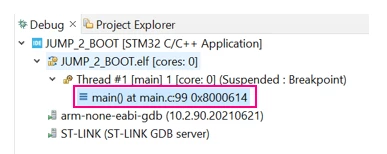
2.1. STM32CubeIDE debugging tab.

You can check whether the PC is set to the Flash or Boot address in the debug tab on the top left corner of the debug perspective. At first, the PC starts in Flash address: 0x08000614 (for this particular demo).
498.png
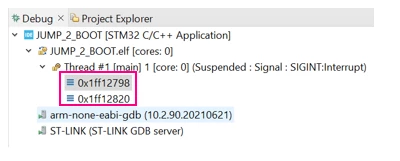
After entering the Bootloader, the PC is now set to an address inside the Boot region: 0x1FF127BC. You can see the tab below after hitting “pause” button.
499.png
 

2.2. STM32CubeProgrammer Tool


Once within the Bootloader region, we can use the STM32CubeProg to guarantee that the system is working in system boot mode.
For this tutorial, we will use the USB entry point to perform this, but other interfaces available for the given series could be used as well. Just keep in mind that the USB has higher priority than the others, so if the cable is connected it will be the one selected. The AN2606 covers all of this peripherals and needed settings for all series.
Obs.: Please pay attention to the pins specified in the AN2606, because even if the STM32CubeIDE allows the pin reallocation, to enter in bootloader the pins must be the same as in the Application Note.
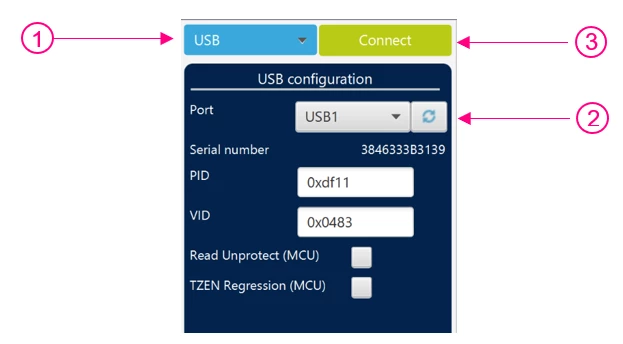
To execute this over USB, connect the USB cable on the User USB connector. After that:


- In the right corner, select USB instead of ST-LINK
- Refresh the Port to recognize the USB
- Hit “Connect”

501.png
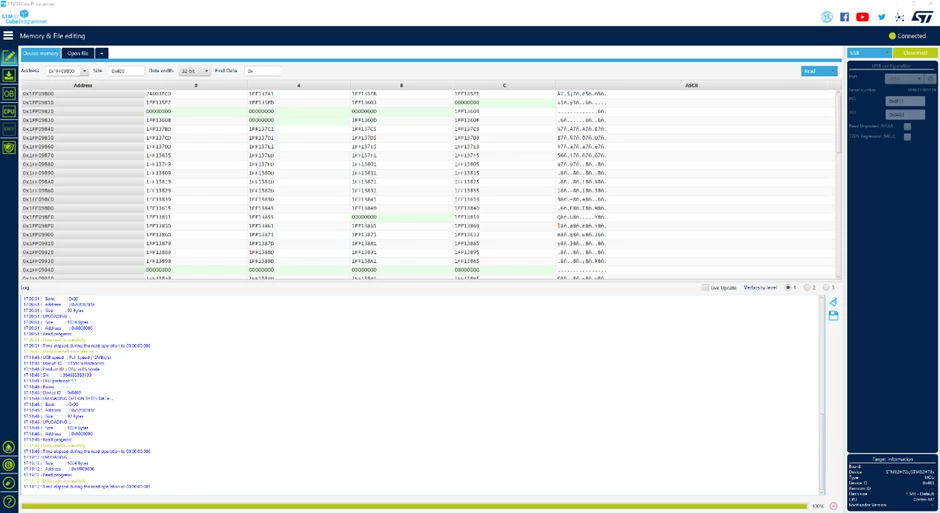
After connecting,  search for the Bootloader start address and you will see something similar to the following image.
505.png
You have now successfully jumped to bootloader from the application. Well done!
Hope this article was helpful.
 

84 replies

SBaro.11
Associate III
October 2, 2023

Nice thanks a lot @EThom.3 for explanation, I'll try this :beaming_face_with_smiling_eyes:, before I'll develop my first simple bootloader tjust to flash a LED after that i'll flash it to 0x1FFF0000 address.

Associate
October 6, 2023

Thank you for the post, code works fine for my application. 


Associate
October 6, 2023

@EThom.3 

where in the code did you exactly reset the USB ? 

EThom.3
Senior II
October 6, 2023

@Mkotb 

Just after disabling interrupts, before I de-initialize peripherals.

This my take on it: A mix of the original post, suggestions from others, and the tiny bit I figured out myself.

void JumpToBootloader(void)
{
 #define conBootloadAddress 0x1FFF0000

 void (*SysMemBootJump)(void);
 uint8_t i;

 __disable_irq();
 // Reset USB
 USB->CNTR = 0x0003;

 //De-init all peripherals
 HAL_ADC_DeInit(&hadc1);
 HAL_DMA_DeInit(&hdma_i2c2_rx);
 HAL_DMA_DeInit(&hdma_i2c2_tx);
 HAL_I2C_DeInit(&hi2c2);
 HAL_LPTIM_DeInit(&hlptim1);
 HAL_LPTIM_DeInit(&hlptim2);
 HAL_SPI_DeInit(&hspi1);
 HAL_SPI_DeInit(&hspi2);
 HAL_SPI_DeInit(&hspi3);
 HAL_TIM_PWM_DeInit(&htim1);
 HAL_TIM_Base_DeInit(&htim1);
 HAL_TIM_Base_DeInit(&htim6);
 HAL_TIM_PWM_DeInit(&htim15);
 HAL_TIM_Base_DeInit(&htim15);
 HAL_TIM_PWM_DeInit(&htim16);
 HAL_TIM_Base_DeInit(&htim16);
 HAL_UART_DeInit(&huart1);
 HAL_DMA_DeInit(&hdma_usart2_tx);
 HAL_UART_DeInit(&huart2);

 // Disable Systick
 SysTick->CTRL = 0;
 SysTick->LOAD = 0;
 SysTick->VAL = 0;

 // Reset clock to default
 HAL_RCC_DeInit();

 // Clear all interrupt bits
 for (i = 0; i < sizeof(NVIC->ICER) / sizeof(NVIC->ICER[0]); i++)
 {
 NVIC->ICER[i] = 0xFFFFFFFF;
 NVIC->ICPR[i] = 0xFFFFFFFF;
 }

 __enable_irq();

 SysMemBootJump = (void (*)(void)) (*((uint32_t *) (conBootloadAddress + 4)));
 __set_MSP(*(uint32_t *)conBootloadAddress);
 SysMemBootJump();

 while (1); // Just in case...
}

:information:  Unrelated tip: If you are running the RTC on battery power, and wish to keep it running during firmware upload, then do not run HAL_RTC_DeInit(). Yeah, it is kinda obvious, but that didn't keep me from making that mistake the first time.

Associate
October 9, 2023

@EThom.3 Unfortunately, it's still doing the same behavior.
I'm sure that it's Jumping well to the system memory address, but the USB is not recognized.
My controller is : STM32L412 

Associate
October 10, 2023

@EThom.3 it does work now, it was only a wrong calling from my side.

Associate
November 6, 2023

Could anyone please suggest to me how to do a user bootloader? I'm trying to erase and program the bank1 while being at bank2. First, I swapped from bank1 to bank2 successfully, verified through the cube programmer too. After erasing the bank1, the status of FLASH_CR.MER1=1, EOPIE=1,ERRIE=1,OPTLOCK=1. FLASH_SR.EOP=1. It's entering into HAL_FLASH_Program_IT(uint32_t TypeProgram, uint32_t Address, uint64_t Data) but exits after HAL_Lock(&pFlash) function. FYI: Custom board using STM32L4P5 controller. 

B.Montanari
ST Employee
November 7, 2023

Hi @Lavanya1 , there are several ways to implement a user bootloader (the interface to communicate can really vary) and a few fundamentals that are interesting to revisit (you can skip if they are already known to you).

I'd recommend checking this video series for the fundamentals>  How to Create a Super Simple Bootloader - YouTube  and if you want to use an equivalent approach as the native one, I'd suggest getting to know the open bootloader, which is basically a user code implementation of the native system bootloader this article talks briefly about> STMicroelectronics/stm32-mw-openbl: Provides the Open Bootloader library, part of the STM32Cube MCU Component "middleware", for all STM32xx series. (github.com). We provide a video series detailing the OpenBL as well> https://www.youtube.com/watch?v=_gejWsAn5kg

We also have 2 expansion packages covering different approaches, in case you want to look at them as well:

https://www.st.com/en/embedded-software/x-cube-iap-usart.html

https://www.st.com/en/embedded-software/x-cube-iap-sd.html

There is a package related to secure boot and secure firmware update as well, in case your application goes to that route, take a look at this package: https://www.st.com/en/embedded-software/x-cube-sbsfu.html 

I've tried to be generic in the comments, mostly because I believe you should issue an online support ticket (Online Support (st.com) ), so one of our FAEs can help you addressing the particular implementation and specific questions.

Hope this helps

Best Regards

B.Montanari
Konami
Senior
November 8, 2023

Can you expand on when we need to "remap by hand before making the jump, so SYSCFG->MEMRMP = 0x01" and why this is needed?

APrim.2
Visitor II
November 19, 2023

Hello all,

I'm using the STM32F446RE  nucleo board with STM32CubeIde and I would like to use the system bootloader by calling it from within the software.

I implemented the code here suggested by some of you but it doesn't work.

When the code reach the function to jump to the bootloader (BOOTVTAB->Reset_Handler();), the jump doesn't happen but only a reset and the same code that called the bootloader (not the bootloader code) is executed.

Moreover, the DFU device is not enumerated by the PC and the related DFU driver isn't loaded by the PC (when I force the board by the BOOT pin to VCC and reset it all works perfect).

I tried several things also with or without initializing the USB, but nothing worked for me.

Here my code:


int main(void)
{
  /* USER CODE BEGIN 1 */
 
  /* USER CODE END 1 */
 
  /* MCU Configuration--------------------------------------------------------*/
 
  /* Reset of all peripherals, Initializes the Flash interface and the Systick. */
  HAL_Init();
 
  /* USER CODE BEGIN Init */
 
  /* USER CODE END Init */
 
  /* Configure the system clock */
  SystemClock_Config();
 
  /* USER CODE BEGIN SysInit */
 
  /* USER CODE END SysInit */
 
  /* Initialize all configured peripherals */
  MX_GPIO_Init();
  MX_USB_DEVICE_Init();
  /* USER CODE BEGIN 2 */
 
  /* USER CODE END 2 */
 
  /* Infinite loop */
  /* USER CODE BEGIN WHILE */
  while (1)
  {
     for (int i=0; i<5; i++)
     {
        HAL_GPIO_TogglePin(LD2_GPIO_Port, LD2_Pin);
        HAL_Delay(1000);
     }
 
  JumpToBootloader();
    /* USER CODE END WHILE */
 
    /* USER CODE BEGIN 3 */
  }
  /* USER CODE END 3 */
}
 
/* USER CODE BEGIN 4 */
#define BOOT_ADDR 0x1FFF0000 // my MCU boot code base address
 
struct boot_vectable_ {
    uint32_t Initial_SP;
    void (*Reset_Handler)(void);
};
 
#define BOOTVTAB ((struct boot_vectable_ *)BOOT_ADDR)
 
int16_t i;
 
void JumpToBootloader(void)
{
// Disable all interrupts
__disable_irq();
 
// Disable Systick timer
SysTick->CTRL = 0;
 
// Set the clock to the default state
HAL_RCC_DeInit();
 
    for (i = 0; i < sizeof(NVIC->ICER) / sizeof(NVIC->ICER[0]); i++)
    {
      NVIC->ICER[i] = 0xFFFFFFFF;
      NVIC->ICPR[i] = 0xFFFFFFFF;
    }
 
    // REMAP
    SYSCFG->MEMRMP = 0x01;
 
// Re-enable all interrupts
__enable_irq();
 
// Set the MSP
__set_MSP(BOOTVTAB->Initial_SP);
 
// Jump to app firmware
BOOTVTAB->Reset_Handler();
}
 
/* USER CODE END 4 */
 
PS: Here in this code it is present the USB but not used, in the final application it will be present to check for a command to jump to the bootloader.

Please help me.

Thanks to you all.