
ST Employee
October 13, 2025

NEW STM32CubeIDE for Visual Studio Code: from prerelease to official release

  • October 13, 2025
  • 18 replies
  • 29288 views

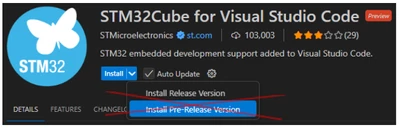
Since May, we have been offering a prerelease version (3.x) of the STM32CubeIDE for Visual Studio Code extensions. This version gave early adopters access to the latest features and improvements. 

These enhancements have now been merged into the official release version (2.x), marking a key milestone in the deployment of STM32CubeIDE for Visual Studio Code.
Screenshot 2025-10-13 115219.png


What is changing for developers? 

  • Release tracks are merged: the prerelease, which is version 3.x of our extensions, is merged back into the 2.x release track. Moving forward, all developers will enjoy one single 3.x version, integrating all extensions and main packages. 
  • Automatic user migration: all VS Code users previously working with the 2.x release track will migrate to the 3.x version of our extensions. We have replaced the complete tool architecture, but we expect minimal end-user disruption. 
  • Transition to VS Code extension pack: developers previously relying on the 2x version, and who used to have a single STM32 for Visual Studio Code extension, will now find around fifteen STM32 extensions. This extension split paves the way to greater installation flexibility and improved maintainability. 
  • Transition from CubeCLT to cube bundle manager + CMSIS-PACKs: the new VS Code extension version removes the CubeCLT dependency. Instead, we introduce the cube bundle manager that automatically downloads, installs, and updates CLI tools and STM32 device support. Developers no longer need to install a full new CubeCLT package to access the latest compiler or benefit from the latest STM32 device support. CubeCLT will later be deprecated. 
  • Debugging improvements: version 3.x uses the ST custom DAP instead of Cortex® debug DAP. Developers will need to create new launch configurations to access new debug features like improved RTOS debug. 

Why this transition? 

  • Moving from prerelease to release reflects the natural evolution from beta to stable software. 
  • Version 3.x offers enhanced installation workflows, better update management, broader STM32 MCU support, and improved maturity. These improvements are now available in the official release (2.x). 
  • Although some initial bugs remain and several advanced STM32CubeIDE debug features are yet to come in Visual Studio Code, version 3.x provides a strong foundation for future development. 


The prerelease track may return to a smaller scope to enable early access to new features. 

For help with the migration, download the user guide available directly in STM32CubeIDE for Visual Studio Code. 

Your feedback is essential in shaping the future of STM32Cube for Visual Studio Code as it allows us to tailor it precisely to your requirements. We look forward to reading your ideas and questions on our community forum! 

Additional resources

First published on Oct 13, 2025

18 replies

Visitor II
October 23, 2025

Great work ladies and gents!!! 
One question, while I understand CubeCLT will be deprecated in favor of the more granular approach of a package manager (great move in my opnion), will users still be able to get to the installed cli tools like STLInk GDB Server and STM32CubeProgrammer which are essential cli tool for CI pipelines and HIL testing setups. I guess the question is how hard we will have to dig to find where they are installed, as you recall the awful installation paths of CubeIDE internal tools. I know a pack manager is meant to abstract a lot but at the same time larger companies with real CI and HIL setups rely heavily on CLI tools. 

Explorer
October 23, 2025

I second that.  Sound like great progress, AND It would be good to have the CLI tools clear and well documented. It’s essential, and not in not just large companies, to be able to automate the testing within a team.

Rookie38
Associate III
October 23, 2025

Is it possible to start the serial wire viewer via the extension?

MAdle.1
Associate II
October 23, 2025

Nice to see the progress on the VS Code support – well done!

However, I need to mention one issue: we are using VS Code on Linux. With version 2 of the extension, debugging worked without any problems, but with version 3 I can’t connect to any board. I’ve also installed the udev rules from cubeclt, but that didn’t help either.

Additionally, there doesn’t seem to be any user manual for installing the ST-Link driver on Linux or for using the extension under Linux. It would be great if someone could provide some guidance on what steps are needed to enable debugging on Linux.

PHryn
Associate III
October 23, 2025

I'm not very enthusiastic.

I woke up one day, started VSC, and had to spend an entire day setting everything up again. From a usability perspective, the progress feels minimal to none. It would make more sense to release this as separate version 3 (or whatever) and let users migrate at their own pace — especially since it was pushed without any announcement, and only now we’re celebrating it.

mattias norlander
ST Employee
October 23, 2025

Hi @Stm32GuyNamedEddie and @SJB,

Thanks for these feedbacks... "Future is bright", but we have to move there step-by-step. Clearly we are missing documentation on how to use CLI tools. Something we will have to work on...

Today STM32CubeIDE for VS Code is the first till bringing the new cube CLI toolbox to your machine. In the future we will need to deliver this toolbox as a stan-alone tool to support CI/CD scenarios. But we are not there yet. There is a work-around on how to obtain the cube CLI toolbox from outside VS Code context and work with this in CI/CD context. I will try to write up a small guide on this asap. I will ping you once available.


@Rookie38 :

Unfortunately not yet. My recommendation for now would be to rely on Eclipse-based CubeIDE as a "stand-alone debugger" when you want to do SWV tracing. Please have a look here:

SWV tracing is on the roadmap, but we have more important features to address first.


@MAdle.1 :

Alright... Could I ask you to create a bug report with a bit more details on our VS Code forum to help us narrow down what went wrong? In theory your old debug should still work unless you removed CubeCLT and the Cortex-debug extensions... But our recommendation is to re-create your launch configurations using our new DAP (not relying on CubeCLT nor Cortex-debug extension)... Choice is yours, both should work. Let's try to figure out what went wrong...


@PHryn :
Our apologies. We considered multiple options deployment options. Each had a lot of pros/cons. We should probably at least have given a heads-up warning before.

The 3.x release is not a very exciting major update from a feature point of view. It is instead a full re-work of the underlying tool architecture. You will not see much benefit benefit until you want to start a new project on a future STM32 silicon product which is not supported by the CubeCLT version that you currently have installed... The 3.x version of the extensions allow you to keep your existing projects frozen while starting new projects on new stm32 MCUs with new CLI tool versions, without having to fiddle with PATH variable at all.

While we cannot brag about new features in 3.x, we are quite happy about the tool update and collaboration/deployment workflows.

tejo
Associate II
October 23, 2025

Sounds interesting. I'm currently using CubeIDE but moving to VSCode seems like the next step in terms of gaining transferable skills. Thanks! Guess I have homework for the weekend :)

MAdle.1
Associate II
October 23, 2025

@mattias norlander 

I figured what went wrong. Two libraries was missing: libusb1 and libglib2. Installing the two libs and the udev rules fixed the problem for me. Installing the complete cubeclt was not necessary.


Explorer II
October 24, 2025

I use stm32cube ide 1.16 for developing in stm32h7.

is there anything different I need to do to integrate my existing working code base onto the vscode extension?

AMend.7
Associate III
October 24, 2025

Hi Maxime,

I followed the "get started video" but the following error occurred in cmake:

[cmake] -- The CXX compiler identification is unknown
[cmake] -- Configuring incomplete, errors occurred!
[cmake] CMake Error at CMakeLists.txt:31 (project):
[cmake]   The CMAKE_C_COMPILER:
[cmake]
[cmake]     arm-none-eabi-gcc
[cmake]
[cmake]   is not a full path and was not found in the PATH.  Perhaps the extension is
[cmake]   missing?
[cmake]
[cmake]   Tell CMake where to find the compiler by setting either the environment
[cmake]   variable "CC" or the CMake cache entry CMAKE_C_COMPILER to the full path to
[cmake]   the compiler, or to the compiler name if it is in the PATH.
[cmake]
[cmake]
[cmake] CMake Error at CMakeLists.txt:31 (project):
[cmake]   The CMAKE_CXX_COMPILER:
[cmake]
[cmake]     arm-none-eabi-g++
[cmake]
[cmake]   is not a full path and was not found in the PATH.  Perhaps the extension is
[cmake]   missing?
[cmake]
[cmake]   Tell CMake where to find the compiler by setting either the environment
[cmake]   variable "CXX" or the CMake cache entry CMAKE_CXX_COMPILER to the full path
[cmake]   to the compiler, or to the compiler name if it is in the PATH.
[cmake]
[cmake]