

KMill
Senior
September 19, 2024
Solved

BUG: STM32CubeIDE Won't connect to ST-LINK v2 debugger on macOS 15.0

  • September 19, 2024
  • 4 replies
  • 5594 views

My setup is macOS 15.0 Sequoia

STM32CubeIDE 1.16.1

STLink-Server v2.1.1

When trying to program or debug a device the following error is shown:
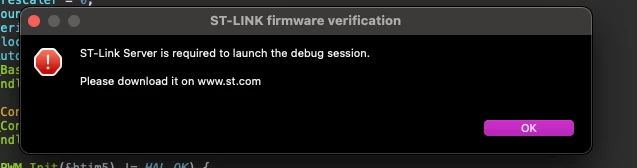
Screenshot 2024-09-19 at 13.00.10.png

Even after re-installing ST-Link server

I have rebooted and re-installed ST-Link Server, but the issue persists.

It's not a show stopper as I can use STM32CubeProgrammer to program the device, on the same machine.
Best answer by mƎALLEm

Hello,

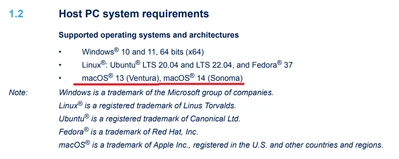
Got the answer from the team and macOS15 is not supported yet. The only supported macOS versions supported till now in STM32CubeIDE V1.16.1 are macOS® 13 (Ventura), macOS® 14 (Sonoma)

You can refer to the readme file from here.

SofLit_0-1726753107695.png

Hope it helps.


4 replies

mƎALLEm
Technical Moderator
September 19, 2024

Hello,

Reported internally to the team.

Internal ticket for follow up 191542.

"To give better visibility on the answered topics, please click on ""Accept as Solution"" on the reply which solved your issue or answered your question."
mƎALLEm
mƎALLEmBest answer
Technical Moderator
September 19, 2024

Hello,

Got the answer from the team and macOS15 is not supported yet. The only supported macOS versions supported till now in STM32CubeIDE V1.16.1 are macOS® 13 (Ventura), macOS® 14 (Sonoma)

You can refer to the readme file from here.

SofLit_0-1726753107695.png

Hope it helps.


"To give better visibility on the answered topics, please click on ""Accept as Solution"" on the reply which solved your issue or answered your question."
KMill
KMillAuthor
Senior
September 19, 2024

Yip, I know that!

Just reportig what happens if you do update to macOS 15.0.

Although to be honest it's a bit disappointing that it's not supprted yet.

mƎALLEm
Technical Moderator
September 19, 2024

I think it will be supported but I don't have a visibility on where it will be.. So sorry for any inconvenience ..

"To give better visibility on the answered topics, please click on ""Accept as Solution"" on the reply which solved your issue or answered your question."
Explorer
September 24, 2024

I already tried using sudo /Applications/STM32CubeIDE.app/Contents/MacOS/STM32CubeIDE

And it didn't work


hikari_o_shinjite
Visitor II
November 5, 2024

I started ide with the sudo command and it works fine with st-link, macOS 15.1 Intel CPU.


This post has been translated from Chinese to comply with the ST Community guidelines.

Andrew Neil
Super User
September 28, 2024
A complex system that works is invariably found to have evolved from a simple system that worked.A complex system designed from scratch never works and cannot be patched up to make it work.